
MagIQtouch Wireless RF Controller – Installation & Key Information
⚠️ Safety Notice – MagIQtouch Controllers and Components / Accessories
MagIQtouch controllers and accessories control devices used to operate and monitor compatible evaporative coolers, ducted gas heaters and add-on cooling systems.
Installation, commissioning, servicing, fault finding and repairs must only be carried out by suitably qualified and licensed personnel where applicable. Before commencing work, complete a task-specific risk assessment and ensure electrical safety procedures, safe access and appropriate PPE have been considered. All work must comply with applicable regulations, standards and manufacturer requirements.
Particular care must be taken when working on or around electrical systems, communication wiring, control circuits, roof spaces, ceiling spaces and associated heating or cooling equipment connected to the controller.
Do not proceed if safe access, electrical isolation requirements, required clearances or appropriate safety controls cannot be achieved and maintained. This controller forms part of a complete heating and/or cooling system, and incorrect installation, testing or servicing may result in equipment damage or unsafe operation.
Safety takes priority over diagnosis, repairs, installation schedules and customer expectations. If the task cannot be completed safely, it must not proceed until the risks have been adequately controlled.
Overview
Key Features
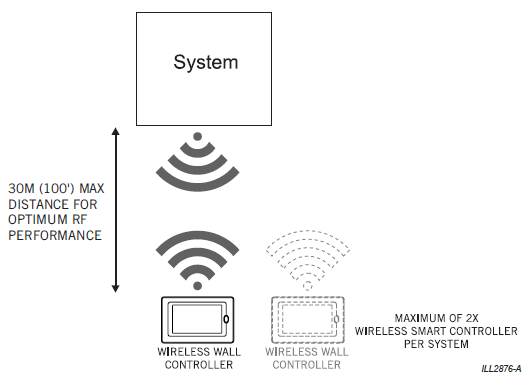
- Communicates with up to 2 Wireless Smart Controllers per system.
- Last used controller becomes the active controller.
- Operates the same as the current MagIQtouch wall controller.
- Uses the same wall bracket as the wired version.
- Wireless range: Up to 100m line of sight from RF receiver.
- Powered by 4x AA batteries.
- Designed for replacement installations where wiring is problematic.
- Utilizes RF channel hopping technology for optimum performance.
- Lower installation costs – no need for wiring in wall cavities.
Factors Affecting Battery Life
Battery longevity in the RF controller varies depending on:
1. RF Signal Strength
Weak signal = increased RF transmit power = faster battery drain.
2. Battery Type
- Lithium AA → Longest life
- Alkaline AA → Standard performance
- Cheap carbon batteries → Very short life, not recommended
3. Usage Patterns
- Frequent screen activation
- High‑traffic environments
- Constant backlighting or frequent wake cycles
4. Environmental Conditions
- High heat can reduce battery efficiency
- Extremely cold areas can reduce output voltage
When to Replace Batteries
The controller will show a Low Battery message when the voltage drops below the safe operating threshold.
This is the primary indicator that replacement is required.
Recommended best practice:
- Replace batteries annually during scheduled maintenance
- Use lithium AA batteries for the longest life
- Inspect battery terminals for corrosion when replacing
Troubleshooting Short Battery Life
If batteries are lasting less than 3 months, check the following:
1. Poor RF Signal Quality
- Long distance to receiver
- Installed through thick walls
- Interference from routers, TVs, or metal cabinetry
2. Battery Corrosion or Loose Contacts
- Clean terminals and ensure batteries sit firmly
3. Excessive wake cycles
- Controller installed near high‑traffic doorway
- Frequent touching or waking
4. Incorrect mounting location
Controller should not be installed:
- In direct sunlight
- Near heat sources
- On external walls
Installation Guidelines
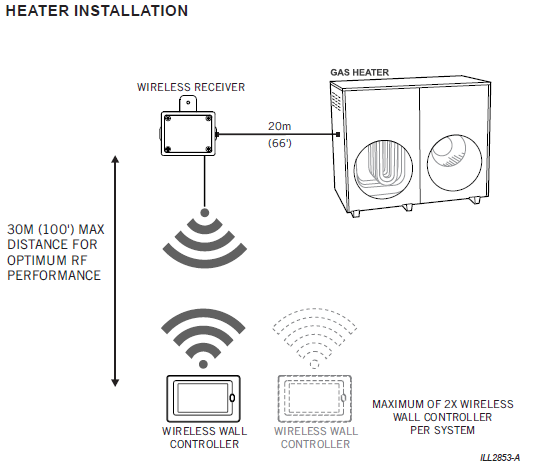
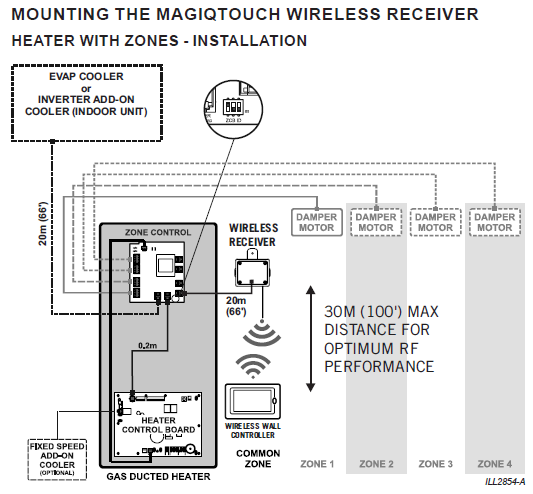
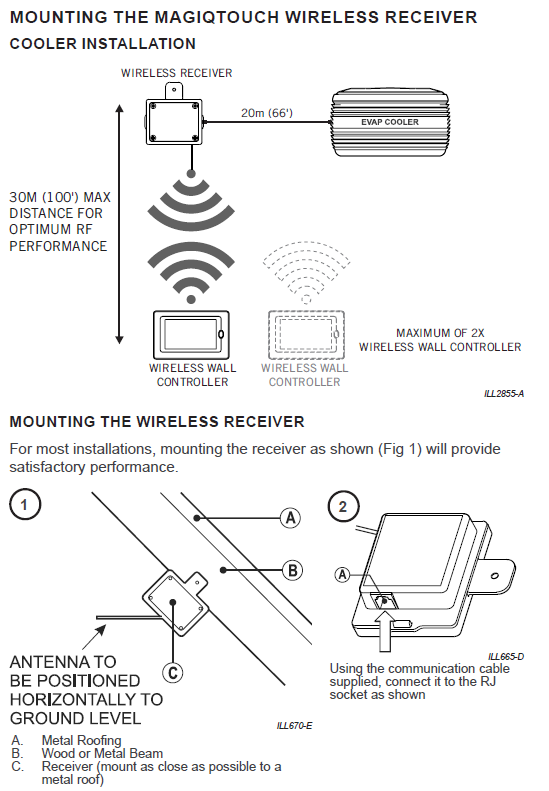
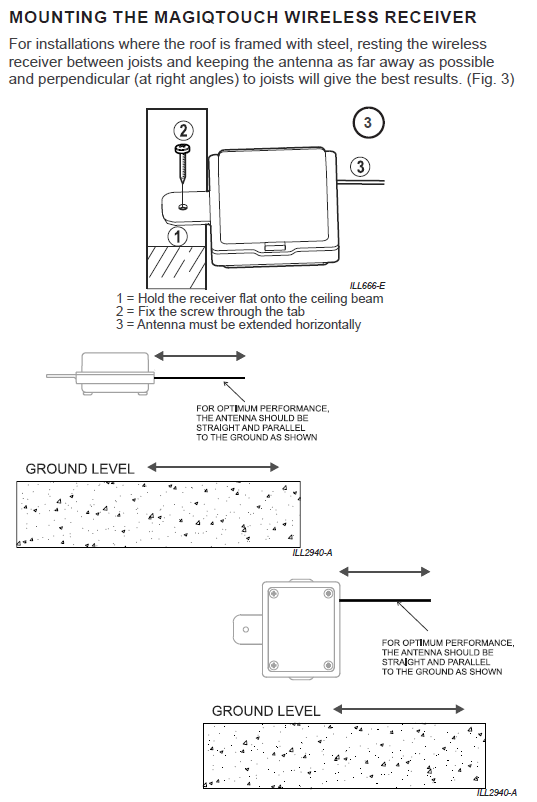
Important Warnings
- Do NOT install the RF receiver outdoors.
- Do NOT wrap excess cable around the receiver.
- Do NOT extend the receiver cable.
- CRITICAL:
- Do NOT mount the RF receiver under the lid inside the heater. The metal cabinet will act as a shield and block the signal, causing communication failure.
- Do NOT mount the RF receiver inside the cooler. Electric motors and electronics inside the cooler will cause RF interference, leading to communication failures. This is also another reason why installation inside the heater is prohibited.
Pairing Process
Pairing First RF Controller
- Install batteries in the Wireless Smart Controller.
- Cycle power to the appliance to activate discovery mode.
- Press Home button on the controller within 8 minutes.
- Follow on-screen instructions to complete pairing.
Pairing Second RF Controller
- Install batteries in the second Wireless Smart Controller.
- Cycle power again to reactivate discovery mode.
- On the second controller, select “Additional Controller” from pairing options.
- Complete the installation wizard. The second controller will show as inactive until activated
Important Considerations for RF with TQ Heaters
- You cannot control temperature in individual zones using MagIQtouch RF (wireless) controllers.
- Maximum of 2 RF controllers per system – last controller touched becomes active. Two RF controllers are only recommended in non-zoned systems.
- In a zoned ducted heater system, 2 RF controllers are not practical as both must be in the common zone to monitor and regulate temperature.
- We recommend only 1 RF controller for zoned heating systems.
- RF zoned systems should be treated the same as a single wired controller zoned system (temperature controlled in the common zone where the controller is located).
- If you need to monitor temperature in multiple zones, use multiple wired MagIQtouch controllers or a wired MagIQtouch with slave air sensors
Battery Information
- Use only good quality Alkaline or Lithium AA batteries.
- Do NOT use rechargeable batteries.
- Expected battery life: 1–1.5 years under normal use.
Wireless Range
Troubleshooting
- If the controller displays “Lost Communication”, check:
- RF signal strength.
- Battery condition.
- Receiver placement.
- If pairing fails:
- Cycle power to initiate 8-minute discovery mode.
- Ensure no more than 2 controllers are paired.