
MagIQtouch Wi-Fi App showing Zero 0 degrees and unable to change temperature via the App
⚠️ Customer Safety Notice
This article contains general information intended for homeowners and occupants. Installation, servicing, repairs, electrical work, gas work and refrigerant-related work must only be carried out by appropriately qualified and licensed personnel.
Before performing any checks or maintenance, ensure the equipment is switched off and safe to access. Do not remove covers, enter roof or ceiling spaces, work at heights or attempt repairs unless you are qualified to do so.
If in doubt, contact an authorised service agent or licensed tradesperson. Safety must always take priority.
Symptom:
App shows Zero 0 degrees (see pic) and unable to change temperature via the App.
However, temperature control still operates correctly from wall controller.
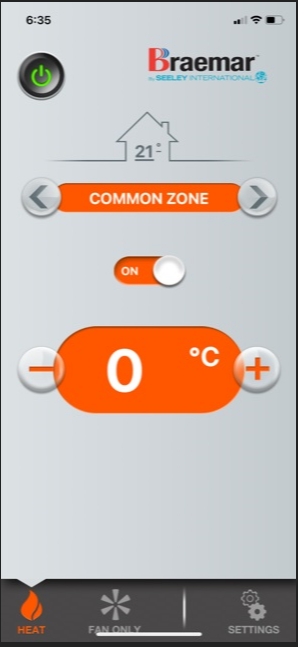
Suggested remedy:
- Completely delete MagIQtouch smart App on all mobile devices (to ensure app is deleted completely exit and delete App and then re-boot phone/mobile device) Re-download App and log into your account.
- If problem still persists next try exiting the MagIQtouch smart App re-setting your Wi-Fi router and open App to check again
- If unsuccessful, next ensure you have a minimum of 3 solid bars of Wi-Fi signal strength

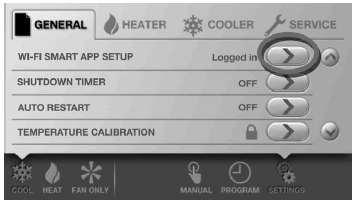
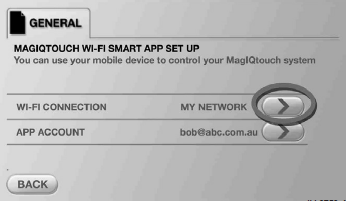
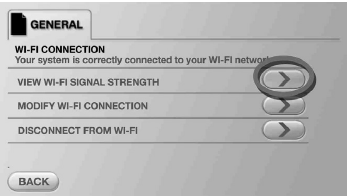
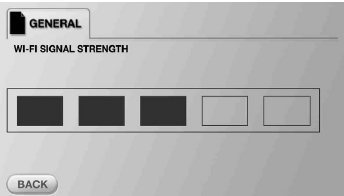

If ALL the above steps are unsuccessful you will need to do the below
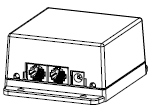
- Power OFF and then back ON the IOT device (which is the square black box Wi-Fi interface supplied with the Wi-Fi kit). This may be in the roof space or underfloor and not be easily accessed. If not accessible turn heater OFF at MagIQtouch wall controller, then only if you are competent and it is safe to do so turn OFF the circuit breaker for the heater in your switchboard for at least 30 seconds, then turn it back ON again. Once MagIQtouch is ready to use turn heater ON and see if MagIQtouch smart App display issue is resolved.
Below is an image of the Wi-Fi IOT device used to connect compatible MagIQtouch wall controllers with Wi-Fi internet
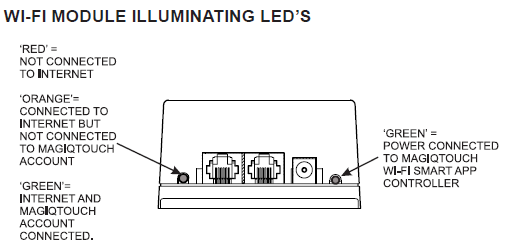
If the above does not resolve the issue please supply the following additional information:
- Screenshot of the issue
- Screen shot from your smart App by going to SETTINGS :YOUR SYSTEM :WI-FI Smart Controller,
- The email address used to create your MagIQtouch smart App account
- How long the App has been working before this issue occurred
- Does it only occur on one device (try installing the MagIQtouch Smart App on another device as the issue may be device related)
- When did you first see this issue, was it after an operating system update, after changing password etc
- Make and model of phone
- Device operating system ( Android or IOS)
- Operating system software revision level