
C4 / C5 / LP Jumper Faults – Missing or Wrong Jumper Cap After PCB Replacement SCHV & KCHV Ducted & Braemar Inverter Split Systems
⚠️ Safety Notice – Reverse Cycle Air Conditioners
This equipment must only be installed, commissioned, serviced and repaired by suitably qualified and licensed personnel.
Before commencing work, complete a task-specific risk assessment and ensure electrical isolation procedures, safe access, adequate service clearances and appropriate PPE have been considered. All work must comply with applicable regulations, standards and manufacturer requirements.
Particular care must be taken when working around electrical systems, refrigerant circuits, moving parts, roof spaces, ceiling spaces, confined spaces and working-at-heights hazards where applicable.
Do not proceed if safe access, required clearances, confined space risks or appropriate safety controls cannot be achieved and maintained.
Safety takes priority over diagnosis, repairs, installation schedules and customer expectations. If the task cannot be completed safely, it must not proceed until the risks have been adequately controlled.
C4, C5 & LP — Jumper‑Cap Errors
Applies to all Braemar/Seeley inverter split systems (Wall Split, Multi, Cassette, Bulkhead, Ducted, Add‑On Cooling).
Purpose
Provide field‑ready diagnosis and rectification when systems display C4, C5, or LP after PCB replacement or configuration work (jumper plug missing/loose/wrong; or equivalent configuration mismatch).
1) Fault code meanings
| Code | Text Shown | Where Detected | What It Means |
|---|---|---|---|
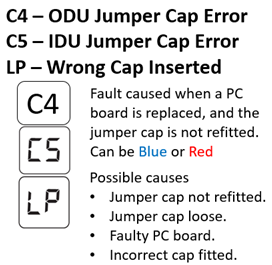
| C4 | ODU Jumper Cap Error | Outdoor PCB | Outdoor configuration jumper missing, loose, unreadable, or wrong position/value. Frequently appears after PCB replacement when the original jumper is not transferred. |
| C5 | IDU Jumper Cap Error | Indoor PCB | Indoor configuration jumper missing/loose or IDU configuration invalid for that board/model. |
| LP | Wrong Jumper / Mismatch | System (IDU↔ODU) | The fitted jumper value/type is wrong for the model, or indoor/outdoor configuration doesn’t match. |
2) Affected models (scope)
The Service Guide’s error‑code charts cover all of the following families; therefore, all can raise C4/C5/LP:
Wall Split: LSHV, KSHV, WSHV‑S, WSHV‑T • Ducted: SDHV (1‑ & 3‑phase), KDHV • Cassette: SBHV, KBHV • Bulkhead: MDHV, NDHV • Multi: MCHV (R410A), NCHV (R32) + their compatible indoor heads • Add‑On Cooling: SACV (SCHV ODU), KACV (KCHV ODU).
Note on hardware: Some families expose a removable model jumper (notably SCHV/KCHV ODUs). Other families may rely on an equivalent configuration (factory link/DIP/board option). The same C4/C5/LP codes still apply if that configuration is missing or mismatched.
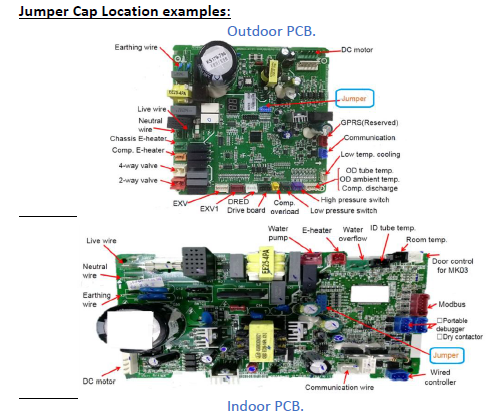
3) What the jumper looks like (for platforms that use it)
- Small blue (sometimes red) two‑pin cap seated on a labeled header; the cap carries a printed number (e.g., 05 / 07 / 13 / 17 / 22). That number is the configuration value the PCB reads to identify model class/capacity.
“Jumper number” callout + “C4/C5/LP Explanation”
4) Model → Jumper value (when the original cap is missing)
If the old PCB has been discarded without transferring the jumper, use these lookup tables to fit the correct value and restore operation.
4.1 SCHV Outdoor Units (Ducted ODU; also used by SACV Add‑On Cooling)
Standard SCHV jumper set: 05 / 07 / 13 / 17 / 22 (blue).
| SCHV Outdoor Model | Correct Jumper Value |
|---|---|
| SCHV 07 D1S | 05 |
| SCHV 10 D1S | 07 |
| SCHV 12 D1S | 13 |
| SCHV 14 D1S | 17 |
| SCHV 16 D1S | 22 |
| SCHV 25 D1S | 05 |
| SCHV 35 D1S | 07 |
| SCHV 53 D1S | 13 |
| SCHV 71 D1S | 17 |
| SCHV 80 D1S | 22 |
SCHV jumper spare parts (blue):
05 → 4202021905, 07 → 4202021907, 13 → 4202021913, 17 → 4202021917, 22 → 4202021922.
4.2 KCHV Outdoor Units (Ducted ODU; also used by KACV Add‑On Cooling)
Standard KCHV jumper set: 01 / 03 / 05 / 16 / 17 (blue).
| KCHV Outdoor Model | Correct Jumper Value |
|---|---|
| KCHV 070 D1B | 01 |
| KCHV 100 D1B | 03 |
| KCHV 125 D1B | 05 |
| KCHV 140 D1B | 16 |
| KCHV 160 D1B | 17 |
KCHV jumper spare parts (blue):
01 → 4202021901, 03 → 4202021903, 05 → 4202021905, 16 → 4202021916, 17 → 4202021917.
Tip: If a distributor supplies a different part number due to supersession, confirm the printed number on the cap matches the required value above before fitting. The value must match even if the PN changes.
5) Universal diagnostic flow (C4 / C5 / LP)
(Insert your flowchart image here; below is the text equivalent.)
Was the PCB replaced recently?
→ If yes, confirm the jumper was transferred. If not, fit the correct jumper from the tables above.Is a jumper/config link physically present?
→ No: Install the correct jumper (SCHV/KCHV) or set the required IDU/ODU configuration on ranges that use DIP/factory links. Retest.Is the jumper seated correctly?
→ No: Reseat firmly; avoid skewed or high‑sitting caps that intermittently open.Is the jumper value correct for the model?
→ No: Replace with the right value per model table; mismatches throw LP.Are header pins bent/broken or pads damaged?
→ Yes: Carefully straighten pins; if broken pad/track → replace PCB.Still faulting (C4/C5/LP)?
- Power‑cycle and verify IDU↔ODU pairing is correct for the series.
- If configuration is correct and stable, treat as PCB hardware fault.
6) Corrective‑action quick table
| Finding | Action |
|---|---|
| Jumper missing (C4/C5) | Install correct jumper: use SCHV/KCHV tables above. |
| Jumper wrong value (LP) | Change to the required value for the model. |
| Jumper loose / not seated | Reseat firmly; verify both pins fully covered. |
| Bent/broken pins on PCB | Straighten if possible; broken pad/track → replace PCB. |
| Non‑jumper families still show C4/C5/LP | Set required configuration method (DIP/factory link/option) per model; codes are shared across families. |
7) Notes for technicians
- Systems will not operate with missing/incorrect jumper/configuration; always transfer the jumper during PCB replacements.
- SACV (R410A Add‑On Cooling) uses SCHV ODUs; KACV (R32 Add‑On) uses KCHV ODUs → apply the same jumper maps.
- Keep one set of spare jumpers (values listed above) in van stock for post‑board‑change recoveries.