XE71 XK60 XK117 XE70-13/E LE60 Fault code access - KDHV and SCHV
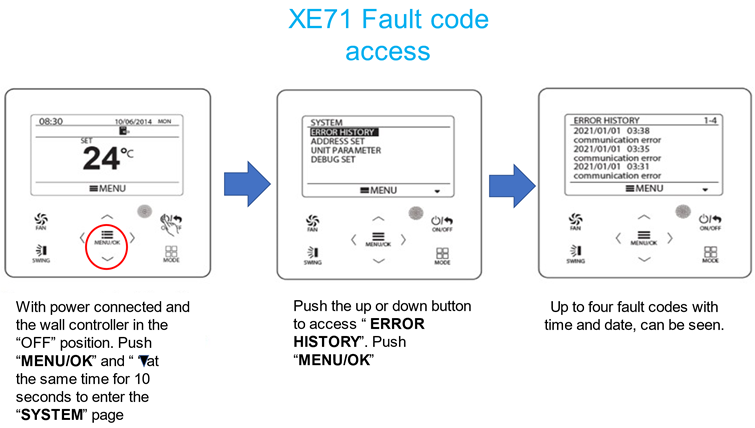
CLICK LINK TO VIEW YOUTUBE VIDEO: Accessing Fault Log XE71
XK60 and XK117 Fault code access
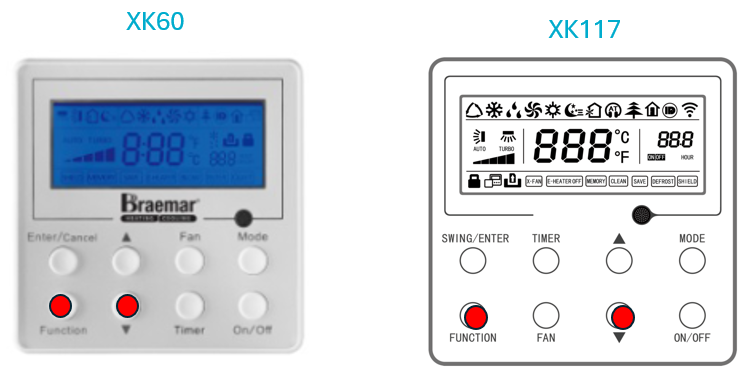
Accessing Fault log on XK60 and XK117
Press "FUNCTION" and " ▼ " at the same time for 5 seconds
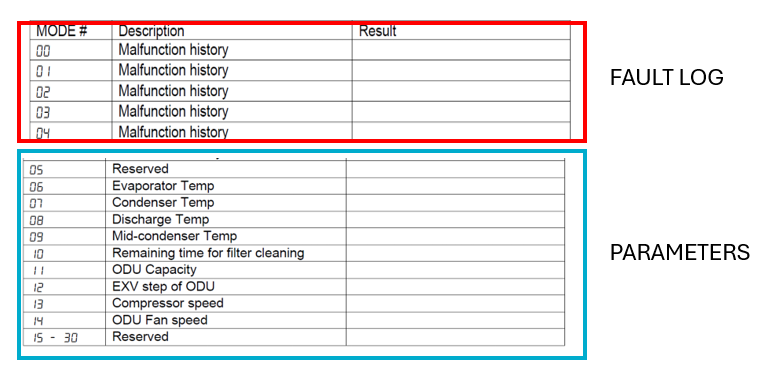
Press " ▲ " to change from "00" to "04" ( last 5 fault codes)
"00" is the most recent fault code
Press "ENTER/CANCEL" to exit fault Log
(Process for both XK60 and XK117 is the same but button layout is different)
Other parameters (05-14) can also be viewed from this menu, such as
: Thermistor Temperatures
:Expansion valve steps
:Compressor and Fan Speeds etc
Once you have accessed fault log as detailed above press the "MODE" button to view other parameters as shown in table below
Use " ▲" to page through parameters
Press "ENTER/CANCEL" to exit parameters
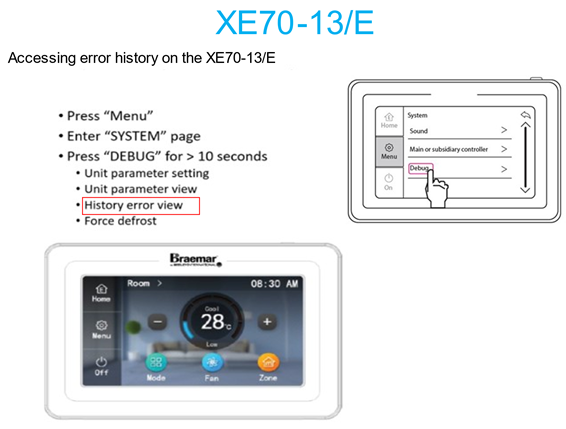
LE60 XE70/13 ACCESSING FAULT HISTORY