
⚠️ Customer Safety Notice
This article contains general information intended for homeowners and occupants. Installation, servicing, repairs, electrical work, gas work and refrigerant-related work must only be carried out by appropriately qualified and licensed personnel.
Before performing any checks or maintenance, ensure the equipment is switched off and safe to access. Do not remove covers, enter roof or ceiling spaces, work at heights or attempt repairs unless you are qualified to do so.
If in doubt, contact an authorised service agent or licensed tradesperson. Safety must always take priority.
The owner's manual explain the controller has three basic operating modes: Cool, Auto Cool, and Vent (fan only).
MagIQcool Controller Operating Modes
To help you get the best performance from your evaporative cooler, it is important to understand what each operating mode does.
Watch the Video
▶️ Watch MagIQcool Operating Modes Video
Mode 1: Cooler OFF
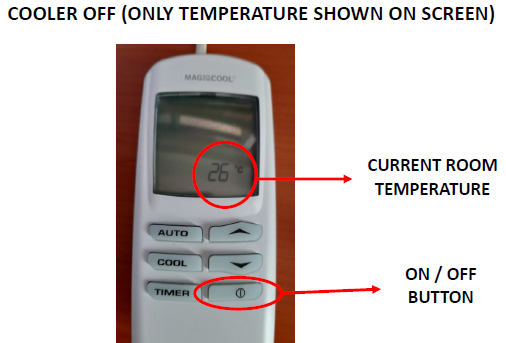
When the cooler is switched off, the controller only displays the current room temperature.
What you will see
- Room temperature displayed on screen.
- No fan operating.
- No cooling occurring.
To turn the cooler ON
Press the ON/OFF button once.
Mode 2: VENT Mode (Fan Only)
Best for:
- Fresh air circulation.
- Mild weather.
- When you want airflow without cooling.
What does it do?
The cooler works like a large fan, drawing fresh outside air into the home.
✅ Air movement
✅ Fresh air circulation
❌ No cooling water used
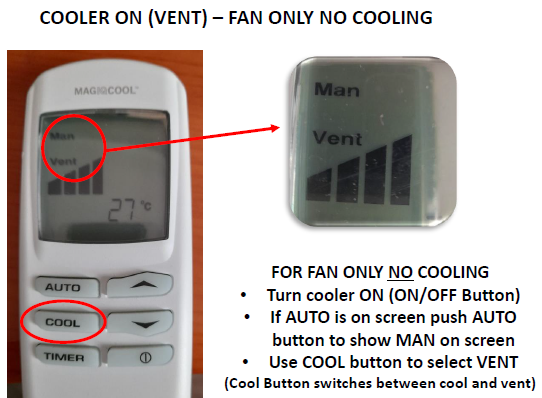
How to select VENT mode
- Press the ON/OFF button.
- If AUTO is displayed, press AUTO until MAN appears.
- Press the COOL button until VENT is displayed.
What you will see
- MAN
- VENT
- Fan speed bars
Adjusting airflow
Use the ▲ and ▼ buttons to increase or decrease fan speed.
Mode 3: Manual Cool Mode
Best for:
- Hot days when you want full control.
- Increasing or decreasing airflow yourself.
What does it do?
The cooler operates continuously at the fan speed you select.
✅ Cooling enabled
✅ Fan speed can be adjusted manually
❌ Temperature cannot be set
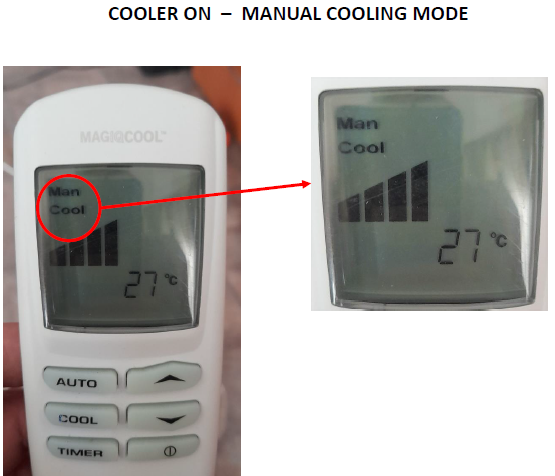
How to select Manual Cool Mode
- Press the ON/OFF button.
- Press AUTO until MAN appears.
- Press COOL until COOL is displayed.
What you will see
- MAN
- COOL
- Fan speed bars
Adjusting cooling airflow
Use the ▲ and ▼ buttons to increase or decrease fan speed.
Example
If the house feels too warm:
- Press ▲ for more airflow.
If the house feels too cool:
- Press ▼ for less airflow.
Mode 4: Auto Cool Mode
Best for:
- Everyday use.
- Maintaining a comfortable temperature automatically.
- Most homeowners.
What does it do?
You choose the temperature, and the cooler automatically adjusts the fan speed to try to maintain comfort.
✅ Cooling enabled
✅ Temperature can be set
✅ Cooler automatically adjusts fan speed
✅ Easiest mode to use
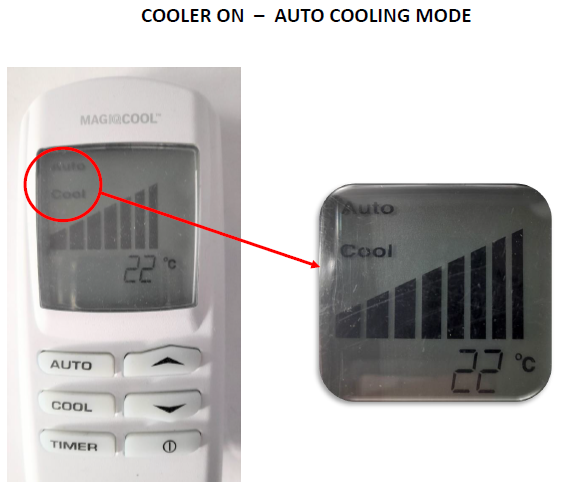
How to select Auto Cool Mode
- Press the ON/OFF button.
- Press AUTO until AUTO appears.
- Ensure COOL is displayed.
- Use ▲ or ▼ to adjust the desired temperature.
What you will see
- AUTO
- COOL
- Set temperature
Example
Set the controller to 22°C.
The cooler will automatically increase or decrease airflow to try to keep the home comfortable. Fan speed is controlled automatically by the cooler.
Which Mode Should I Use?
| Mode | Use When | Cooling? |
|---|---|---|
| OFF | Cooler not required | ❌ |
| VENT | Fresh outside air circulation only | ❌ |
| MAN COOL | You want to control fan speed yourself | ✅ |
| AUTO COOL | You want the cooler to maintain comfort automatically | ✅ |
For most households, AUTO COOL is the easiest and most effective mode because the cooler automatically adjusts fan speed to maintain comfort.
Helpful Tip
When starting COOL mode, the cooler may take a few minutes before cool air is delivered. During this time it fills with water and wets the cooling pads. This is normal operation.
Related Resources
- MagIQcool Controller Operating Modes Video
- BMQ / CPQ / LCQ / LCS / LPQI / LCQV / LPQV Owner's Manuals Manual Braemar & Coolair Evaporative Coolers
Frequently Asked Questions
Cooler OFF Mode
Why does the controller only show a temperature?
This is normal. The cooler is switched OFF and is simply displaying the current room temperature.
I've pressed the ON/OFF button but nothing happens.
Check:
- The cooler has power.
- The circuit breaker has not tripped.
- The controller batteries (if fitted) are not flat.
- Wait a few seconds after pressing the button.
The screen is blank.
Check:
- Power supply to the cooler.
- Circuit breaker or isolator switch.
- Contact a service agent if power is available but the screen remains blank.
VENT Mode (Fan Only)
Why isn't the air cool?
This is normal.
VENT mode only circulates outside air through the home. No water is being used, so no cooling occurs. The screen should show VENT.
When should I use VENT mode?
VENT mode is useful:
- During mild weather.
- In the morning or evening.
- When you simply want fresh air circulation.
The airflow is too weak.
Press the ▲ button to increase fan speed.
Also check:
- Windows or doors are open to allow air to flow through the home.
- Supply vents are open.
I selected VENT but it still feels warm.
VENT mode does not cool the air. If cooling is required:
- Press the COOL button.
- Ensure COOL is displayed instead of VENT.
Manual COOL Mode
Why can't I change the temperature?
This is normal.
In Manual COOL mode you control the fan speed, not the temperature. The cooler will continue running at the speed you select.
How do I make the house cooler?
Press the ▲ button to increase fan speed.
Higher fan speeds move more cooled air through the home.
The cooler is running but the air doesn't feel cold immediately.
This is normal.
When COOL mode is selected, the cooler may take several minutes to fill with water and wet the cooling pads before cool air is delivered. During this time the controller may display "Preparing to Start".
Why does the cooler seem to run continuously?
Manual COOL mode is designed to maintain the fan speed you have selected until you change it or switch the cooler off.
The cooling isn't as effective as usual.
Check:
- Water supply to the cooler is turned on.
- Windows or doors are open to allow airflow.
- Cooling pads are receiving water.
- Weather conditions are not unusually humid. High humidity reduces evaporative cooling performance.
Auto COOL Mode
Why is the fan speed changing by itself?
This is normal.
In AUTO COOL mode, the controller automatically adjusts the fan speed to help maintain the temperature you have selected.
Why can't I adjust the fan speed?
This is normal.
AUTO COOL mode controls the fan speed automatically. To manually select fan speeds, switch to MAN COOL mode.
Why has the cooler changed from COOL to VENT mode by itself?
This is normal operation.
When the room temperature gets close to your selected temperature, the controller may automatically switch from COOL mode to VENT mode. This helps maintain a comfortable temperature without overcooling the home.
If the room temperature increases again, the controller will automatically switch back to COOL mode and resume cooling.
Why am I no longer getting cool air?
If the controller has automatically switched to VENT mode, the fan will continue to circulate fresh air, but the water pump will stop running. This means the air will no longer be cooled until additional cooling is required.
This is a normal part of AUTO COOL mode operation.
The cooler keeps switching between COOL and VENT. Is this normal?
Yes.
In AUTO COOL mode, the controller may switch between COOL and VENT as needed to maintain the selected temperature. This helps provide consistent comfort while reducing unnecessary cooling.
What temperature should I set?
Most users find a setting between 22°C and 26°C comfortable, depending on outdoor conditions and personal preference.
The cooler seems to be blowing harder than I expected.
This is normal.
The cooler automatically increases fan speed when:
- The room temperature is higher than the selected temperature.
- Additional cooling is required.
As the room approaches the selected temperature, the controller may reduce fan speed or switch to VENT mode to maintain comfort.
AUTO COOL Mode Summary
- You set the temperature.
- The controller automatically adjusts the fan speed.
- The controller may switch between COOL and VENT as required.
- Fan speed cannot be manually adjusted in AUTO COOL mode.
General Questions
Why do I need windows or doors open?
Evaporative coolers continually bring fresh air into the home. The air needs a way to escape, so windows or doors should be left partially open. The owner’s manual recommends providing adequate exhaust openings to allow proper airflow through the home.
Why is the cooler taking a long time to start?
When COOL mode is selected, the cooler may first:
- Fill the water tank.
- Wet the cooling pads.
- Begin cooling operation.
This startup delay is normal.
The controller is showing "Service". What should I do?
The cooler has detected a fault.
Turn the controller OFF and note the flashing fault number. This number helps identify the issue when contacting a service agent. Common examples include:
- Fault 02: Check water supply is turned on.
- Fault 04: Check the drain is not blocked.
The cooler doesn't seem to cool as well as it used to.
Check:
- Water supply is on.
- Doors and windows are open appropriately.
- Cooling pads are wet.
- Weather conditions are not unusually humid.
If the issue persists, arrange service or maintenance