⚠️ Safety Notice: Evaporative Coolers
This information is intended only for suitably trained, qualified, licensed and authorised service technicians.
Installation, electrical work, servicing and repairs must be completed by personnel with the licences, competencies and authorisations required by applicable legislation, regulations and industry requirements.
Before Commencing Work
- Complete a site-specific and task-specific risk assessment.
- Isolate the electrical supply before disconnecting wiring, testing resistance or replacing components.
- Confirm electrical isolation using an appropriate test instrument.
- Isolate the water supply before removing water components.
- Use appropriate working-at-height controls and safe roof-access equipment.
- Do not work on wet, unstable or unsafe roof surfaces.
- Do not operate the pump with pad frames removed while the fan is running.
- Keep hands, clothing, tools and test leads clear of moving fan components.
- Remember that some fan motors have automatic reset protection and may restart without warning.
- Do not allow the cooler electronics, electrical plugs, cables or motor connections to become wet.
- Do not open or attempt to repair a sealed, non-serviceable cooler electronics module.
- Do not bypass, modify or permanently disable protection circuits.
- Refit splash covers, electrical covers, pad frames and safety components before returning the cooler to service.
- Refer to the installation and service information applicable to the exact cooler model.
When pad frames are removed, test the cooler with the pump disconnected or in ventilation mode to prevent water creating a roof-surface hazard. Care must also be taken when working near moving components.
Safety takes priority over diagnosis, repair schedules and customer expectations. If the work cannot be completed safely, it must not proceed until appropriate controls are in place.
Applies To
- Braemar evaporative coolers
- Breezair evaporative coolers
- Coolair evaporative coolers
- MagIQcool wall controls
- Earlier Braemar/Breezair/Coolair wall controls that share the same style and operation as the MagIQcool controller
Symptom
The wall control displays:
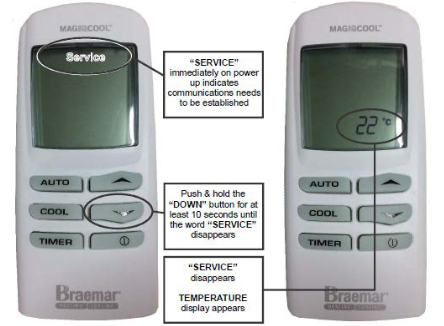
SERVICE
and the cooler will not operate.
Common reports include:
- Wall control displays SERVICE
- ON/OFF button does nothing
- Cooler will not start after a power outage
- Cooler will not start after a brown-out or power interruption
- SERVICE displayed after replacing the wall control
- SERVICE displayed after replacing electronic components
- Backlight operates but the cooler will not respond
Important
The display of SERVICE does not always indicate a fault.
There are two possible scenarios:
Communication Has Not Been Established
This commonly occurs:
- During initial commissioning
- After replacing a wall control
- After replacing an electronics module
- Following a power outage
- Following a brown-out
- After a power interruption
In this situation, communication between the wall control and the cooler electronics has not been established.
A Fault Condition Exists
The word SERVICE can also indicate that the cooler has detected a fault.
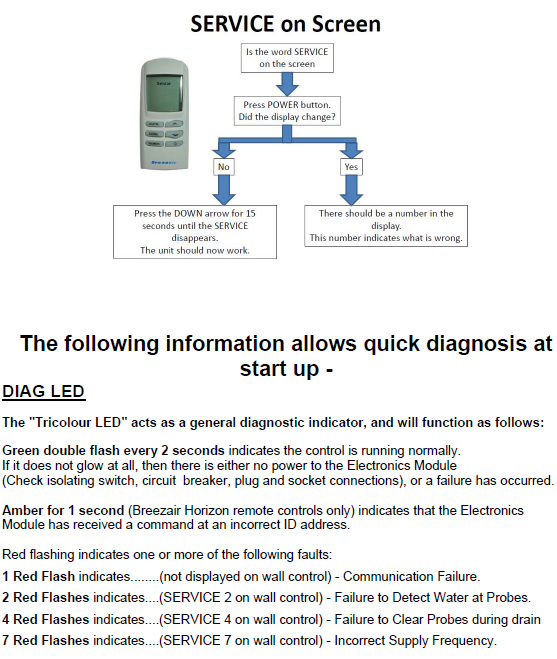
Pressing the ON/OFF (Power) button may reveal a fault code number.
The displayed number identifies the fault present and should be investigated using the relevant fault code troubleshooting guide.
Quick Diagnosis
Step 1 - Press the ON/OFF (Power) Button
Observe the display.
Does a Number Appear?
Yes
A fault code is present.
Examples:
- SERVICE 2
- SERVICE 4
- SERVICE 7
The displayed number identifies the fault requiring investigation.
Refer to the applicable service manual or fault code article.
No
The display continues to show only:
SERVICE
Proceed to Step 2.
Step 2 - Re-establish Communication
Press and hold the DOWN ▼ button for up to 15 to 20 seconds.
Continue holding until:
- SERVICE disappears from the display
- The room temperature appears on the screen
Once the temperature is displayed, communication has been established and normal operation can resume.
IMPORTANT!!! Only MagIQcool controllers display temperature.
Why Does This Occur?
The wall control communicates with the electronic controller located inside the cooler.
After:
- Initial installation
- Wall control replacement
- Electronics module replacement
- Power outages
- Brown-outs
- Power interruptions
the wall control may lose or not establish communication with the cooler controller.
Holding the DOWN ▼ button forces communication to be established between the wall control and the cooler electronics.
Typical Fault Codes
If pressing the ON/OFF button changes the display from SERVICE to a number, a fault is present.
| Display | Description |
|---|---|
| SERVICE 2 | Water not detected at probe fault |
| SERVICE 4 | Probes not clearing the water during drain cycle |
| SERVICE 7 | Incorrect supply frequency detected |
Note: Additional fault codes may be applicable depending on model and controller type.
Helpful links to more solutions:
YouTube video MagIQcool viewing and resetting fault log
Technician Diagnostic LED Reference
The electronics module contains a tri-colour diagnostic LED that can assist with troubleshooting.
Green Double Flash Every 2 Seconds
- Normal operation
- Electronics module functioning correctly
No LED Activity
Possible causes:
- No power to electronics module
- Isolator switched OFF
- Circuit breaker tripped
- Plug disconnected
- Electronics module failure
Green LED Changes and Flashes Red Fault Codes
| Red Flashes | Fault |
|---|---|
| 1 Flash | Communication failure |
| 2 Flashes | Water probe detection fault (SERVICE 2) |
| 4 Flashes | Unable to clear probes during drain cycle (SERVICE 4) |
| 7 Flashes | Incorrect supply frequency (SERVICE 7) |
Frequently Asked Questions
SERVICE is displayed and the ON/OFF button does nothing. What should I do?
Press and hold the DOWN ▼ button for up to 15 seconds. If communication is the issue, SERVICE will disappear and the temperature will be displayed.
SERVICE appeared after a power outage. Is the cooler faulty?
Not necessarily. Power interruptions can cause communication between the wall control and electronics module to be lost. First perform the communication reset procedure by holding the DOWN ▼ button.
SERVICE appeared immediately after a wall control replacement.
This is normal if communication has not yet been established. Hold the DOWN ▼ button until SERVICE disappears and the temperature is displayed.
Pressing ON/OFF changes SERVICE to a number.
A fault is present. Record the number displayed and refer to the relevant fault code troubleshooting procedure.