
⚠️ Safety Notice – Commercial Evaporative Cooling Products
This equipment must only be installed, commissioned, serviced and repaired by suitably qualified and licensed personnel.
Before commencing work, complete a task-specific risk assessment and ensure safe roof access, fall protection requirements, electrical isolation procedures, service clearances and appropriate PPE have been considered. All work must comply with applicable regulations, standards and manufacturer requirements.
Particular care must be taken when working at heights, in roof spaces, ceiling spaces and other restricted access areas. Additional consideration must be given to confined working conditions, electrical hazards, moving parts, water systems, wet surfaces, manual handling risks and weather conditions.
Do not proceed if safe access, weather conditions, required clearances, confined space risks or appropriate safety controls cannot be achieved and maintained.
Safety takes priority over diagnosis, repairs, installation schedules and customer expectations. If the task cannot be completed safely, it must not proceed until the risks have been adequately controlled.
PLC ↔ PCBA Communication Failure (Post‑2020 Models)
(Technical Explanation & Installation and Operation Manual 859749‑L References)
Post-2020 manufactured CW-H - FC1 PLC - PCBA Communication Failure Climate Wizard
Climate Wizard post-2020 manufactured control system using PLC interface
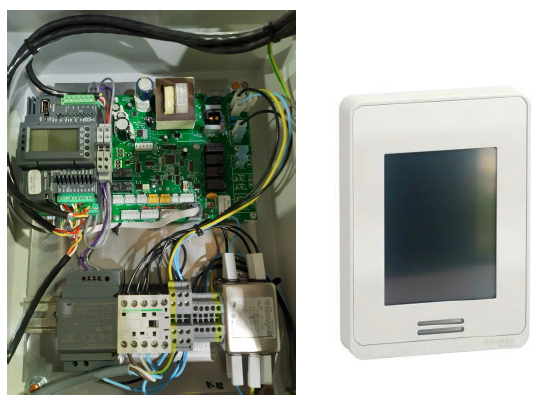
Fault Code 1 (FC1) indicates a communication failure between the PLC (Programmable Logic Controller) and the internal PCBA (Water Manager Board) inside the Climate Wizard CW‑H control enclosure.
If the PLC does not receive valid data from the PCBA for more than 1 minute, the cooler will shutdown and display Fault Code 1.
This is an internal control fault and is not related to:
- Wall Controller
- Modbus
- BACnet
- BMS
- RS‑485 field wiring
Manual Reference: Fault Code 1 description — p.29
What the Cooler Is Detecting
The PLC constantly exchanges critical operational data with the PCBA, including:
- Water level (low and high probes)
- Pump status (IEC and DEC)
- Inlet solenoid valve state
- Drain valve position
- Chlorinator operation
- Water salinity readings
If this information stops updating, the PLC can no longer guarantee safe water management and forces a shutdown to protect the unit.
Expanded Technical Explanation
1. Internal Control Architecture (Post‑2020 CW‑H)
Post‑2020 CW‑H models use a distributed internal control system made up of:
PLC
- Master controller
- Manages operating logic
- Handles fault detection and shutdown
- Selects control mode and fan speed
PCBA (Water Manager Board)
- Controls all water‑related functions
- Manages pumps, solenoid, drain valve, chlorinator
- Monitors water probes and salinity
- Reports status back to the PLC
These two boards must remain in constant communication.
If communication is lost, the PLC cannot verify water safety states, so the cooler is immediately stopped.
2. How Fault Code 1 Is Triggered
Fault Code 1 is generated when any of the following occur:
- PCBA loses power
- Internal PLC ↔ PCBA communication is interrupted
- PCBA stops responding
- PCBA is damaged or failed
If the condition persists for more than 60 seconds, FC1 becomes active and the cooler shuts down.
Troubleshooting Procedure – Fault Code 1
Follow these steps in order. Skipping steps commonly leads to repeat faults.
⚠️ CRITICAL FIRST CHECK – PCBA POWER STATUS
Step 1: Check PCBA LED (D11)
Open the electrical control enclosure and locate the Water Manager PCBA.
Check LED D11 on the PCBA:
✅ LED flashing
→ PCBA has power and is running
❌ LED OFF
→ PCBA is not powered
→ Fault Code 1 is guaranteed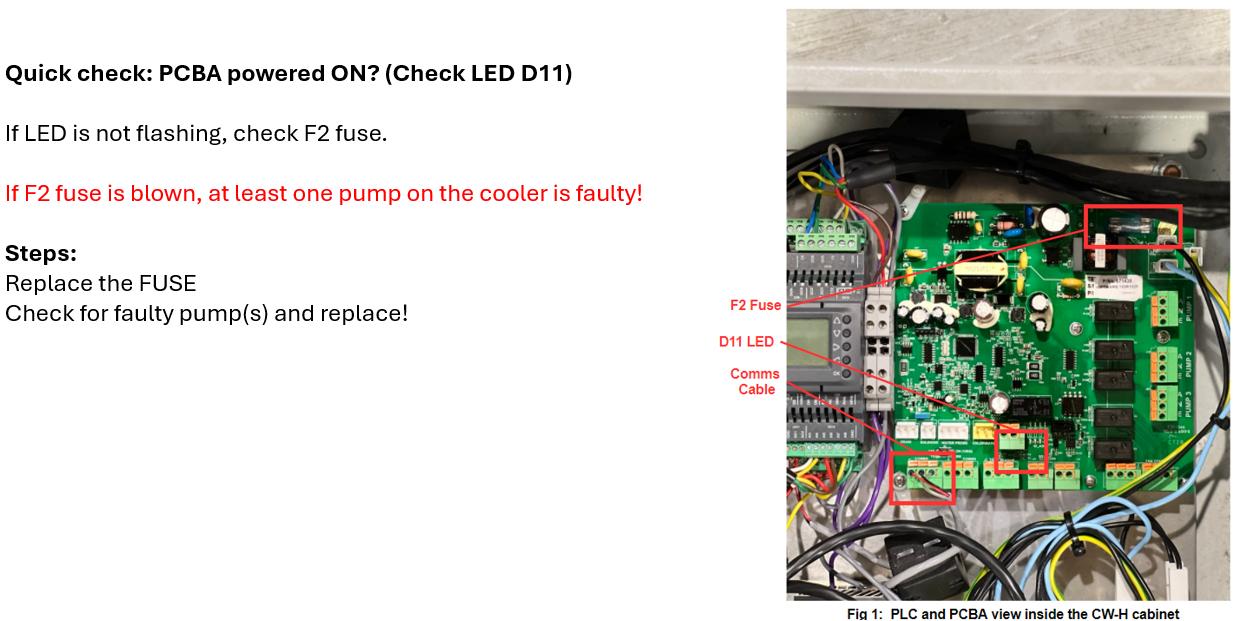
Manual Reference: Water Manager LED states — p.28
Step 2: Check F2 Fuse (Most Common Root Cause)
If the PCBA LED is OFF, immediately check the F2 fuse.
⚠️ Important Field Insight:
A blown F2 fuse is almost never the actual fault — it is a protection response.
Common Reasons F2 Blows
- Shorted indirect pump
- Shorted direct pump (Supercool units)
- Moisture ingress into a pump motor
- Damaged pump wiring after servicing
✅ Correct Action
- Replace F2 fuse with correct rating
- Identify and test pumps
- Replace faulty pump if required
- Confirm PCBA LED starts flashing
❌ Incorrect Action
- Replacing PCBA without checking pumps
- Repeatedly replacing fuse only
This will result in repeat FC1 faults or PCBA damage.
Manual Reference: Electrical enclosure & fuses — pp.14, 42
Step 3: Check PLC ↔ PCBA Internal Communication Wiring
If the PCBA LED is flashing and fuse is OK:
Inspect the internal communication wiring only (this is not RS‑485).
Check:
- PCBA comms plug fully seated
- No bent pins or loose connectors
- No pinched cables
- Wiring correctly reinstated after service work
⚠️ FC1 frequently occurs after:
- Pump replacement
- Chlorinator replacement
- Drain valve replacement
- Control box service
Manual Reference: Control components — p.16
Step 4: Inspect for Moisture or Contamination
Check inside the electrical enclosure for:
- Water ingress
- Condensation
- Corrosion on connectors
- Insects or debris
Even minor moisture contamination can cause intermittent PLC ↔ PCBA communication loss.
Manual Reference: Electrical enclosure — p.42
Step 5: Determine if the PCBA Is Faulty
Only replace the PCBA if all of the following are true:
✅ F2 fuse intact
✅ Correct 24 VDC supply present
✅ Pumps electrically healthy
✅ No wiring issues
✅ Enclosure dry
❌ PCBA LED D11 not flashing or abnormal
➡️ At this point, the PCBA has failed and replacement is justified.
Resetting Fault Code 1
Once the root cause has been resolved:
- Navigate to ACTIVE FAULTS
- Press RESET
- Cycle power if fuse or PCBA was replaced
- Confirm:
- PCBA LED flashing
- Fault cleared
- Cooler resumes normal operation
Manual Reference: Fault reset — p.28
What Fault Code 1 Is NOT
To avoid misdiagnosis, FC1 is not caused by:
❌ Wall Controller faults
❌ Modbus / BACnet issues
❌ RS‑485 wiring
❌ BMS polling problems
❌ External communication loss (that is Fault Code 16)
Technician Quick Reference – FC1
✅ PCBA LED D11 flashing?
If no → check F2 fuse
✅ F2 fuse intact?
If blown → suspect pump short
✅ Pumps tested and healthy?
✅ Internal comms wiring secure?
✅ Control enclosure dry and clean?
✅ Reset fault only after fixing root cause
⚠️ Field Note
Replacing the PCBA without checking pumps is one of the most common causes of repeat Fault Code 1 failures on CW‑H units. Always identify why the fuse blew first.
Manual Cross‑Reference Summary
| Topic | Manual Page |
|---|---|
| Fault Code 1 description | p.29 |
| PLC & PCBA overview | pp.16–17 |
| Water Manager LED states | p.28 |
| Electrical supply & fuses | p.14 |
| Electrical enclosure | p.42 |
| Fault reset | p.28 |