⚠️ Safety Notice – Reverse Cycle Air Conditioners
This equipment must only be installed, commissioned, serviced and repaired by suitably qualified and licensed personnel.
Before commencing work, complete a task-specific risk assessment and ensure electrical isolation procedures, safe access, adequate service clearances and appropriate PPE have been considered. All work must comply with applicable regulations, standards and manufacturer requirements.
Particular care must be taken when working around electrical systems, refrigerant circuits, moving parts, roof spaces, ceiling spaces, confined spaces and working-at-heights hazards where applicable.
Do not proceed if safe access, required clearances, confined space risks or appropriate safety controls cannot be achieved and maintained.
Safety takes priority over diagnosis, repairs, installation schedules and customer expectations. If the task cannot be completed safely, it must not proceed until the risks have been adequately controlled.
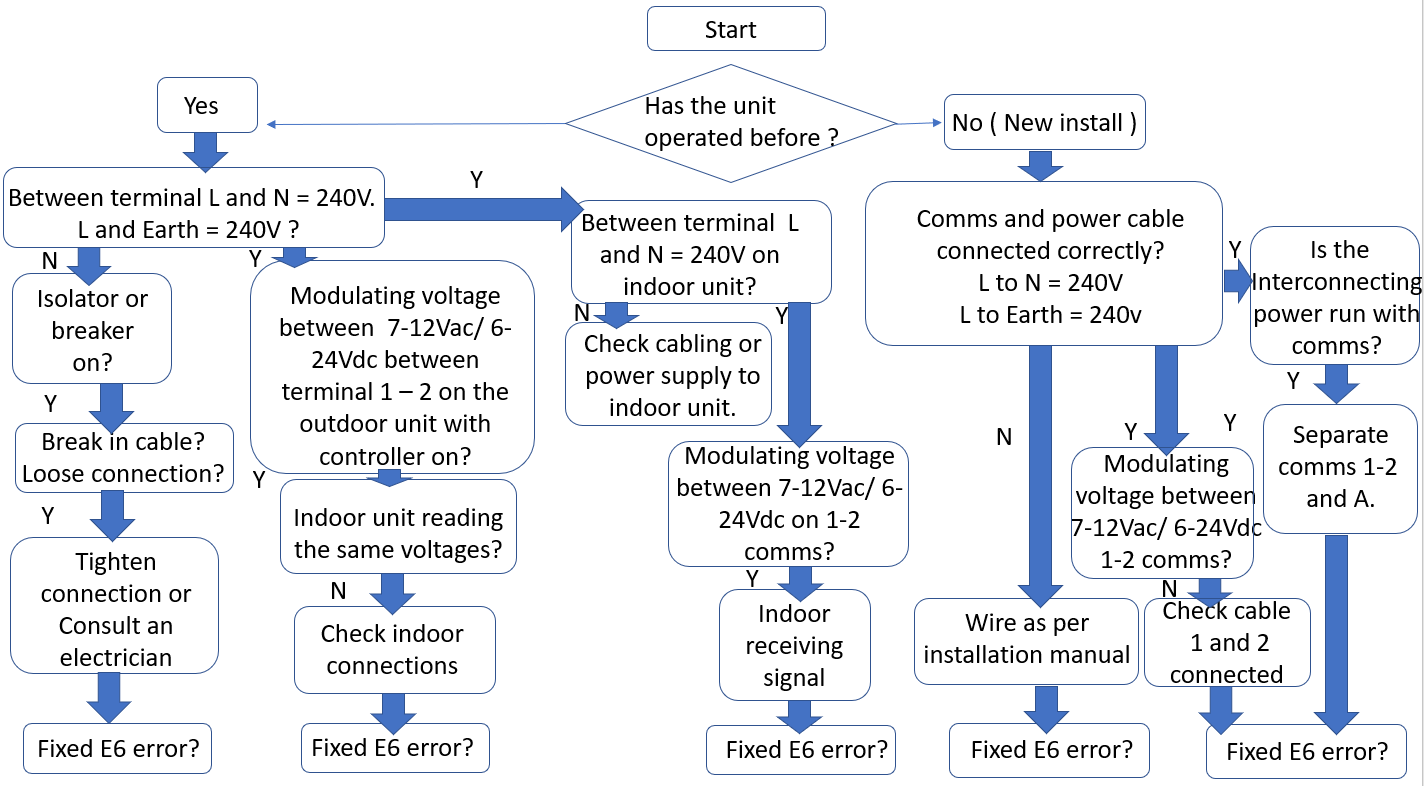
E6 – Communication Error
Communication fault between Indoor PCB and Outdoor PCB
Applies to:
- SDHV / KDHV ducted systems
- SACV / KACV “Invertair” add-on coolers
Key Point
- The indoor PCB supplies communication voltage to the outdoor PCB via terminals 1 and 2
- The outdoor PCB may show LED lights even without 240V power — this is normal
Main Check Points
Communication Cable
Must be:
- Twin cable approx. 0.75mm
- Maximum length 100m
Ensure cable is:
- Continuous (no breaks)
- Correctly terminated at both ends
IMPORTANT – Cable Routing (Critical)
Communication cable (terminals 1 & 2) must NOT be run with 240V mains cables
- Do NOT run in the same conduit, tray, or loom as mains wiring
- Do NOT cable-tie comms cable to 240V cables
This can cause:
- E6 communication faults
- Signal interference
- Intermittent or hard-to-diagnose issues
If suspected:
- Physically separate comms cable from mains wiring
- Re-test communication voltage at both indoor and outdoor
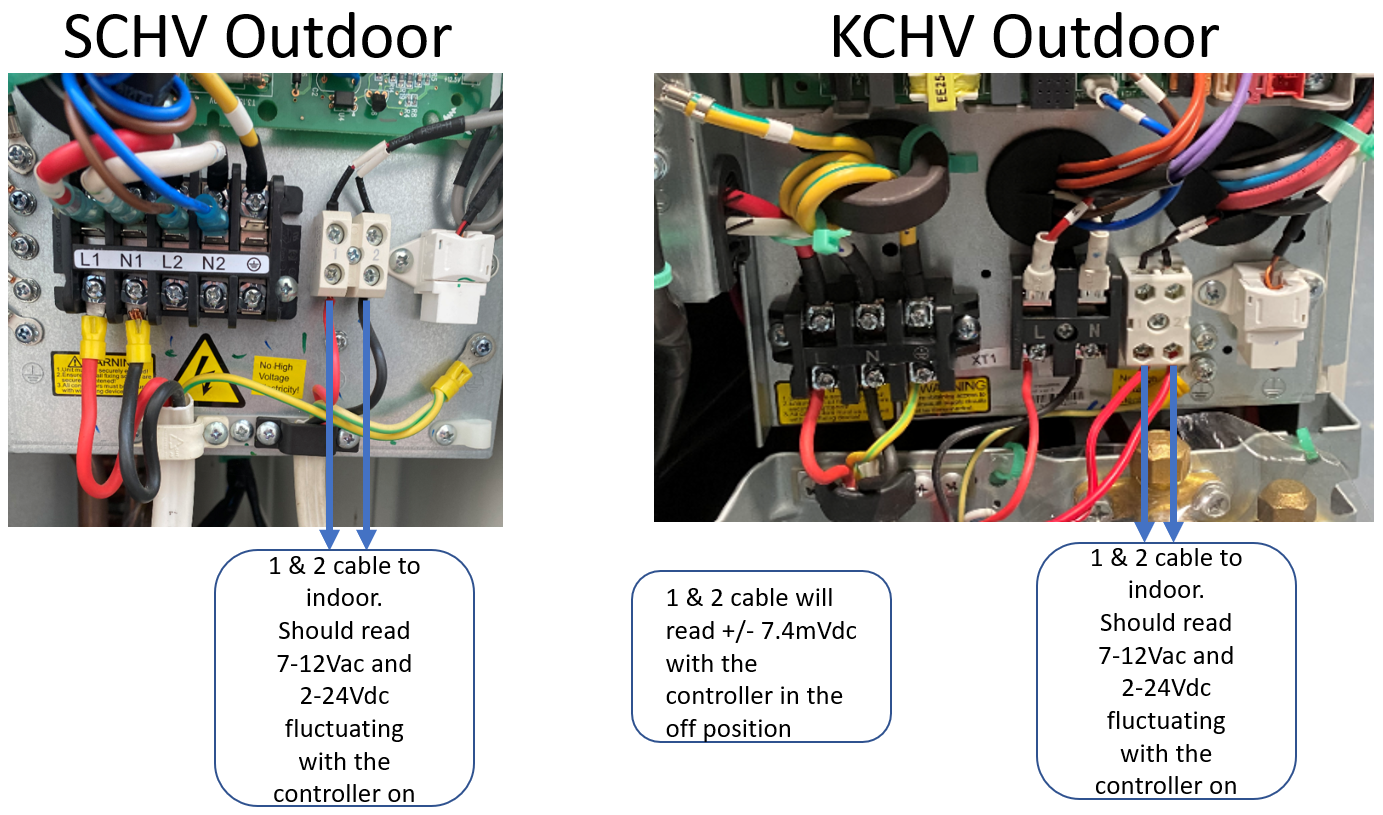
Check Communication Voltage (Wall Controller ON)
Measure across terminals 1 and 2 (terminal-to-terminal, NOT to earth or neutral):
- At the indoor unit terminal block, and
- At the outdoor unit terminal block
Expected readings:
- 7–12 VAC (fluctuating)
- 6–24 VDC
What This Confirms
- If you get the correct reading at one end, you should get the same reading at the other end
- Same at both = cable OK
- Voltage at one end only = cable fault (break or loose connection)
Important Notes
- Voltage is supplied from the indoor PCB
- Fluctuating readings are normal
- No voltage will be present if the wall controller is OFF
Outdoor Power Check
- Confirm 240V supply at outdoor unit:
- L1 to N1 = 240V
- L1 to Earth = 240V
If There Is NO Voltage on Terminals 1 & 2
Follow these steps:
Check indoor unit power
- Confirm correct voltage
- Check breaker and isolator
Check indoor PCB fuse
- Replace if blown
- If it blows again → possible PCB or wiring issue
Check indoor PCB output
- If unit has power but no comms voltage → indoor PCB likely faulty
Check communication cable
- Perform continuity test
- Inspect for breaks or loose wiring
Practical Fault-Finding (Field Checks)
Wall Controller
- Confirm correct model
- Check for faults
- ❗ Incorrect or faulty controllers can cause E6
Indoor Fan Test
- Run system in Fan Only mode
- Fan runs → indoor unit likely OK
- Most faults will be outdoor unit or communication wiring
PCB Inspection
Check indoor and outdoor boards for:
- Blown fuses
- Burn marks (top and underside)
- Rodent or insect damage
- Corrosion
Wiring Checks
- Confirm:
- No broken wires
- Tight terminals
- Correct connections
Power Supply Quality
Check at both units:
- Active to Neutral
- Neutral to Earth
Poor Neutral or Earth can cause communication faults
Customer Questions
Ask if there have been:
- Recent electrical works (solar, switchboard changes)
- Power surges
Dedicated Circuit
- System must be on a dedicated circuit
- No other equipment sharing the supply
Third-Party Devices
Disconnect:
- Zone systems
- Third-party controllers
Retest system
Invertair Add-On Cooler Specific Checks
DO NOT connect 24V from TQ heater to terminals 1 & 2
- This will damage indoor or outdoor PCB
Invertair add-on coolers are only compatible with TQ heaters using:
- The correct supplied cable
- Connected to the COM port on heater board
Quick Summary (Technician Guide)
Outdoor LEDs on without mains power → normal
Fan runs → issue usually outdoor or wiring
No voltage on terminals 1 & 2 → check indoor PCB, fuse, or cable
Same voltage at both ends → cable OK
Different/no voltage → cable or PCB issue
Communication cable (terminals 1 & 2) must NOT be run with 240V mains cables
- Running together will cause E6 faults and signal interference
Always check wiring, power quality, and external devices before replacing parts
Neutral/Earth issues are a common hidden cause