⚠️ Customer Safety Notice
This article contains general information intended for homeowners and occupants. Installation, servicing, repairs, electrical work, gas work and refrigerant-related work must only be carried out by appropriately qualified and licensed personnel.
Before performing any checks or maintenance, ensure the equipment is switched off and safe to access. Do not remove covers, enter roof or ceiling spaces, work at heights or attempt repairs unless you are qualified to do so.
If in doubt, contact an authorised service agent or licensed tradesperson. Safety must always take priority.
Overview
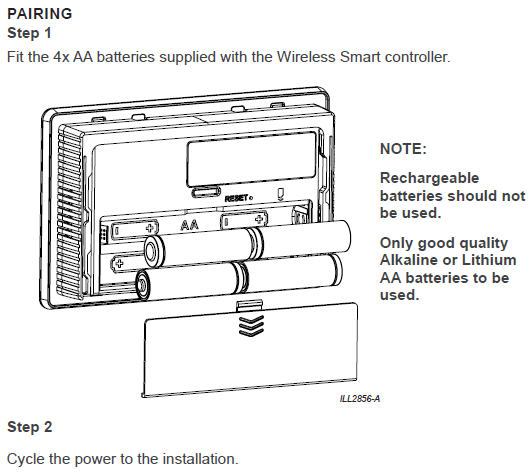
After replacing the batteries in a MagIQtouch RF (Wireless) Controller, you may find that:
- The display powers on normally, but
- The appliance does not respond to any commands
This behaviour is most often caused by the controller unintentionally entering Diagnostic Mode during battery replacement.
Why This Happens
When removing or refitting the battery cover, many users place the controller:
- Face‑down
- On its side
- On a soft or uneven surface
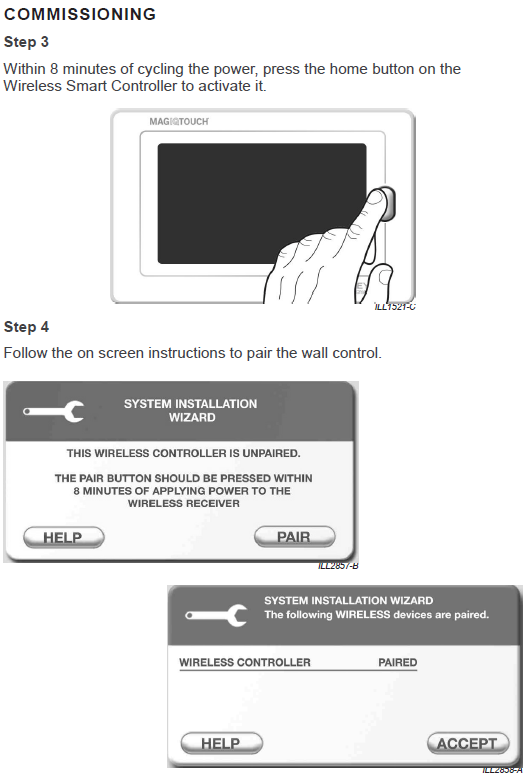
This can unintentionally press the HOME (side) button at the exact moment the batteries are being installed.
If the HOME button is pressed during power‑up, the controller enters Diagnostic Mode, which prevents it from controlling the appliance — even though the display appears normal.
How to Fix the Issue
A repair is not required, and pairing is not lost.
Follow these steps:
1. Remove the Batteries
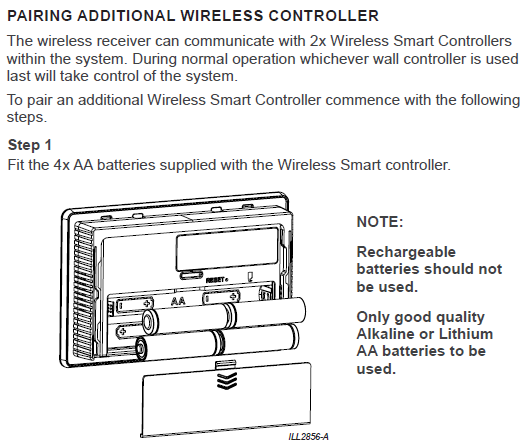
Take out all four AA batteries.
2. Carefully Reinsert the Batteries
Insert the batteries again without pressing the HOME button.
Tip:
Hold the controller in your hand during battery insertion rather than resting it on a surface — this prevents accidental side‑button activation.
3. Resume Normal Operation
Once powered correctly, the controller automatically exits Diagnostic Mode and will operate the appliance normally.
No re‑pairing is needed — all pairing data is preserved.
Preventing the Issue in Future
To avoid accidental Diagnostic Mode activation during battery replacement:
- Insert batteries while holding the controller upright
- Avoid placing the controller face‑down or on its edge
- Ensure fingers, surfaces, or objects are not pressing the HOME button
- Insert batteries one at a time to maintain control
Factors Affecting Battery Life
Battery lifespan in the MagIQtouch RF controller varies depending on several environmental and usage factors.
1. RF Signal Strength
Weak RF signal = higher transmitter power = faster battery drain.
2. Battery Type
- Lithium AA → Longest life
- Alkaline AA → Standard performance
- Cheap carbon zinc → Very short life; not recommended
3. Usage Patterns
- Frequent screen activation
- High foot‑traffic areas
- Constant or frequent wake‑ups
- Children pressing buttons regularly
- Using the controller as the main household control point
4. Environmental Conditions
- High heat reduces battery efficiency
- Very cold temperatures reduce output voltage
- Direct sunlight near the controller increases battery load
When to Replace Batteries
The controller will display a Low Battery warning when voltage drops below the safe operating level.
Recommended Best Practice
- Replace batteries annually as part of scheduled maintenance
- Use Lithium AA batteries for longest service life
- Inspect terminals for corrosion when replacing batteries
- Never use rechargeable batteries (they operate at lower voltage)
Troubleshooting Short Battery Life
If batteries are lasting less than 3 months, check the following:
1. Poor RF Signal Quality
- Long distance between controller and receiver
- Thick walls, steel framing, or metal roofing
- Nearby electronic interference (Wi‑Fi routers, TVs, RF security systems)
2. Battery Corrosion or Loose Contacts
- Clean battery terminals
- Ensure firm battery seating
- Look for corrosion or moisture ingress
3. Excessive Wake Cycles
- Controller is mounted near a doorway or busy hallway
- Frequent pressing or accidental bumping
- Children waking the controller repeatedly
4. Incorrect Mounting Location
Avoid installing the controller:
- In direct sunlight
- Near heat sources (TVs, ovens, heaters)
- On external walls
- In strong drafts
- In direct duct airflow
These factors can all increase battery consumption.
Summary
A non‑responsive appliance after battery replacement is not a hardware fault.
It is usually caused by the controller entering Diagnostic Mode due to accidental HOME‑button activation.
A simple battery removal and careful reinsertion restores normal operation — with no need to re‑pair the controller.
Additionally, following the recommended battery‑type, maintenance, and installation practices will significantly extend battery life and reduce service calls.