12 Volt DC to 24 Volt AC Installing the 24V AC retrofit iCPMD Kit (Pt# 123226) - 865512-A Lit 24V Drain Valve Kit
24V AC Retrofit iCPMD Kit – Installation (Drain Valve & Solenoid)
Applies to: LCQi, LPQi, TBSi, TBQi (inverter products only)
Summary
This article provides step‑by‑step instructions to install Seeley International’s 24V AC retrofit iCPMD kit (P.No. 123226), replacing legacy 12V DC components: Drain Valve P.No. 107714, Solenoid Valve P.No. 834320, Water Sensor P.No. 833699, and iCPMD Box P.No. 122694.
Commissioning should then be performed per Install Manual P.No. 865208 (start at page 24, set water level).
Safety & Warnings
- Isolate mains power and water prior to any work; switch the electronics module isolator OFF.
- Licensed personnel only: All service and maintenance must be performed by suitably trained and licensed technicians.
- Inverter-only: Do not install this kit on non‑inverter products; doing so will cause Fault Code 7 and may damage the fan/motor collet. Intended variants: LCQi, LPQi, TBSi, TBQi.
- Isolation switch screw: The isolation switch cannot be activated unless the securing screw is fixed in place after reassembly.
- Drain discharge: Do not drain directly onto the roof; discharge to a suitable point in accordance with local regulations.
- Cable management: Ensure cables are oriented per the legend and do not rest in water once the tank is filled.
Kit contents (P.No. 123226)
- Solenoid Valve: P.No. 834320 (24V AC)
- Drain Valve: P.No. 107714 (24V AC) with O‑ring, nut, drain adaptor, lock nut
- Water Sensor: P.No. 833699
- iCPMD Box: P.No. 122694 (24V AC)
- Replacement cables and solenoid cover (as supplied)
Procedure
1) Remove electronics module
- Turn the electronics module isolating switch OFF; isolate mains power and water.
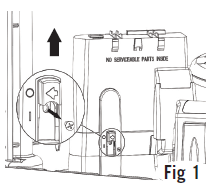
- Remove securing screw beneath the isolation switch; lift the module up and away from the mounting stand (Fig. 1).
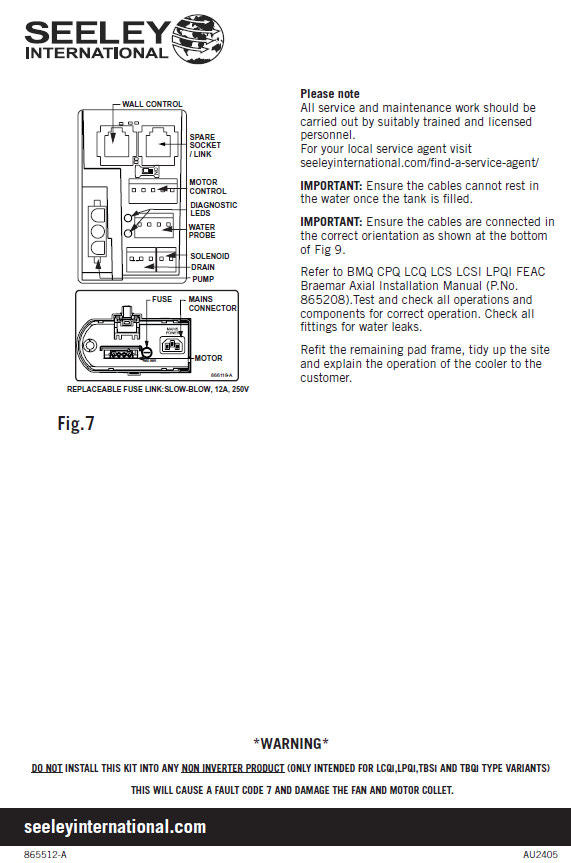
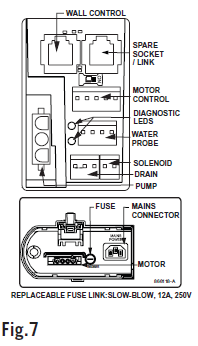
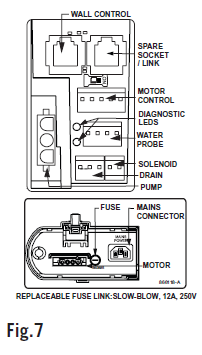
- Disconnect the motor plug and all peripheral connections (see Fig. 7).
2) Replace solenoid valve (P.No. 834320 – 24V AC)
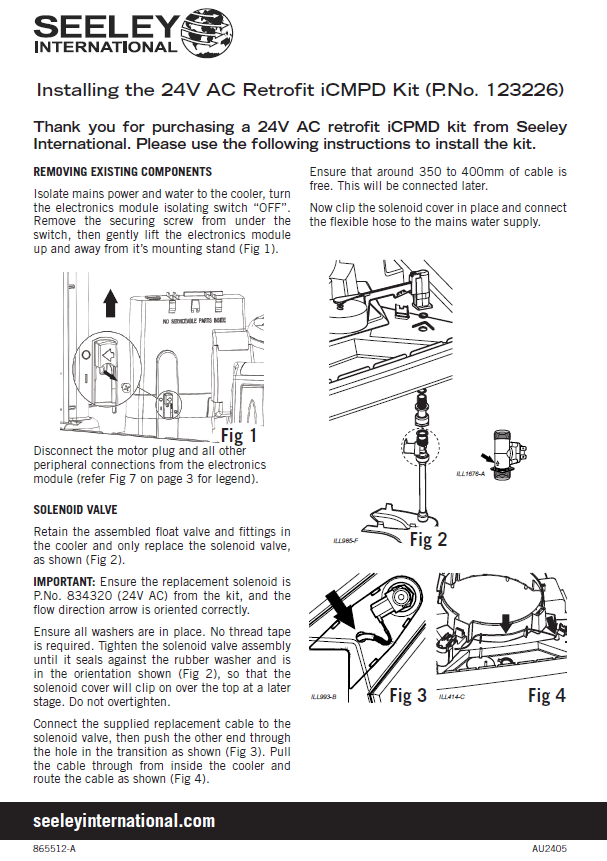
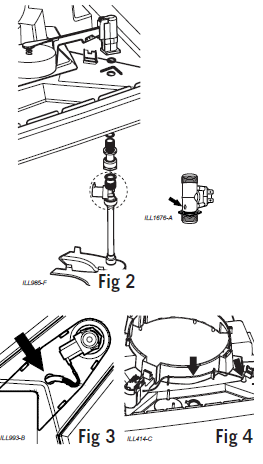
- Retain the assembled float valve and fittings; only replace the solenoid valve (Fig. 2).
- Ensure the flow direction arrow is correct; washers in place. No thread tape required.
- Tighten until sealed against the rubber washer—do not overtighten.
- Connect the replacement cable; route through the transition hole, pull inside the cooler, then route as shown (leave 350–400 mm free) (Figs. 3–4).
- Clip the solenoid cover in place and connect the flexible hose to mains water.
3) Replace drain valve (P.No. 107714 – 24V AC)
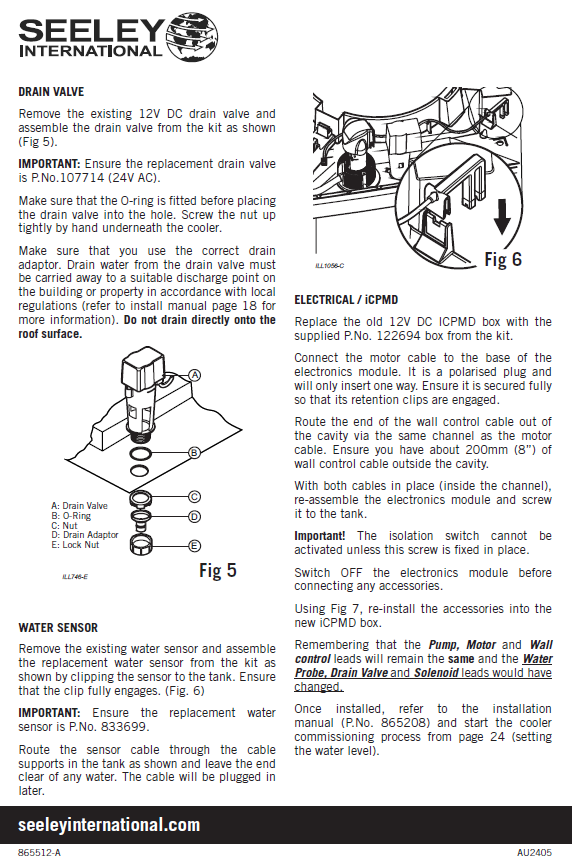
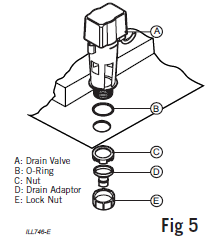
- Remove the existing 12V DC drain valve; assemble the new valve as shown (Fig. 5).
- Fit the O‑ring; insert the valve; hand‑tighten the nut underneath the cooler.
- Use the correct drain adaptor and discharge to a suitable point per local regulations; do not drain onto roof.
4) Replace water sensor (P.No. 833699)
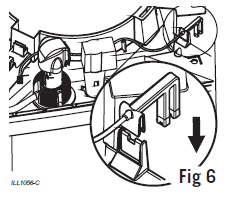
- Remove the existing sensor; clip the new sensor to the tank and ensure the clip fully engages (Fig. 6).
- Route the cable through tank cable supports and leave the end clear of water; connect later.
5) Replace iCPMD box (P.No. 122694 – 24V AC) & reconnect leads
- Replace the old 12V DC iCPMD with the supplied 24V AC box.
- Connect the motor cable to the base of the electronics module (polarised connector; ensure retention clips engage).
- Route the wall control cable via the same channel; leave ~200 mm (8”) outside the cavity.
- Re‑assemble the electronics module and screw it to the tank (isolator requires the screw installed).
- With the electronics module OFF, reconnect accessories per Fig. 7:
- Remain the same: Pump, Motor, Wall control
- Changed positions: Water Probe, Drain Valve, Solenoid
Commissioning & Final checks
- Refer to BMQ/CPQ/LCQ/LCS/LCSI/LPQI/FEAC Braemar Axial Installation Manual (P.No. 865208): start commissioning at page 24 (set water level).
- Test and confirm all operations; inspect all fittings for water leaks.
- Refit the remaining pad frame, tidy the site, and explain cooler operation to the customer.
Troubleshooting
- Fault Code 7 occurs if the kit is installed on non‑inverter products—remove kit; inspect fan/motor collet
- Isolation switch not activating? Confirm the securing screw is installed after reassembly.
- Cables touching water or mis‑oriented connectors can lead to operational faults—re‑route and correct orientation per Fig. references.
4 Page Pdf attached,