12V DC to 24V AC Retrofit iCPMD Kit – Installation (Drain Valve, Solenoid & iCPMD) - 865512-B Literature
⚠️ Safety Notice – Evaporative Cooling Products
This equipment must only be installed, commissioned, serviced and repaired by suitably qualified and licensed personnel.
Before commencing work, complete a task-specific risk assessment and ensure safe roof access, fall protection requirements, electrical safety procedures, adequate service clearances and appropriate PPE have been considered. All work must comply with applicable regulations, standards and manufacturer requirements.
Particular care must be taken when working at heights, around electrical components, moving parts, water systems, wet surfaces, roof spaces, ceiling spaces and confined spaces.
Do not proceed if safe access, weather conditions, required clearances, confined space risks or appropriate safety controls cannot be achieved and maintained.
Safety takes priority over diagnosis, repairs, installation schedules and customer expectations. If the task cannot be completed safely, it must not proceed until the risks have been adequately controlled.
Kit: P/No. 123226 / 123233
Applies to: LCQi, LPQi, TBSi, TBQi (Inverter models only)
Summary
This procedure outlines installation of the 24V AC retrofit iCPMD kit, replacing legacy 12V DC components:
- Solenoid Valve – P/No. 834320
- Drain Valve – P/No. 107714
- Water Sensor – P/No. 833699
- iCPMD Box – P/No. 122694 (230V variant referenced)
Commissioning must be completed using Installation Manual P/No. 865208 (start at water level setup).
⚠️ Critical Safety & Warnings
- Isolate mains power and water before starting work.
- Turn electronics module isolator OFF before disconnecting or reconnecting components.
- Licensed technicians only.
Product Compatibility (Critical)
- ✅ Only for inverter models: LCQi, LPQi, TBSi, TBQi
- ❌ Do NOT install on non‑inverter units
- Will cause Fault Code 7
- May damage fan and motor collet
Procedure
1. Remove Electronics Module
- Turn isolator OFF and isolate power + water.
- Remove screw under isolation switch.
- Lift module clear of mounting stand.
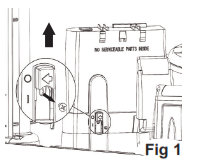
- Disconnect:
- Motor plug
- All peripheral connections (refer Fig. 7)
2. Replace Solenoid Valve (P/No. 834320 – 24V AC)
✅ Important updates from B version applied
- Retain existing float valve assembly
- Replace solenoid only
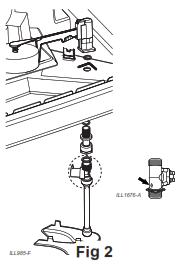
Key installation points:
- Confirm 24V AC solenoid (834320) is used
- Ensure flow direction arrow is correct
- Ensure all washers are fitted
- ❌ No thread tape required
- Tighten until sealed (do not overtighten)
Cable routing:
- Connect supplied cable
- Feed through transition opening
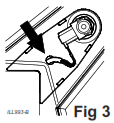
- Route internally as per layout
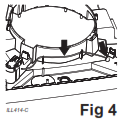
- Leave 350–400 mm free cable
Finish:
- Clip solenoid cover on
- Connect flexible hose to mains water
3. Replace Drain Valve (P/No. 107714 – 24V AC)
- Remove existing 12V DC valve
- Assemble new valve as per kit
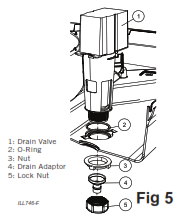
Critical requirements:
- Confirm correct part: 107714 (24V AC)
- Fit O-ring before installation
- Tighten nut by hand underneath cooler
Drain compliance:
- Must discharge to approved drainage point
- ❌ Do NOT drain onto roof surface
4. Replace Water Sensor (P/No. 833699)
- Remove existing sensor
- Clip new sensor onto tank
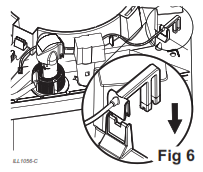
Key checks:
- Confirm correct part: 833699
- Ensure clip is fully engaged
- Route cable through tank supports
- Leave connector clear of water
5. Replace iCPMD Box & Reconnect Wiring
- Replace old 12V DC iCPMD with:
- P/No. 122694 (230V) or kit equivalent
Reconnect:
Motor cable → base of electronics module
- Polarised connector
- Ensure retention clips engage
Wall controller cable:
- Route via same channel
- Leave ~200 mm outside cavity
6. Reassemble Electronics Module
- Refit module to tank
- Reinstall securing screw
⚠️ Important:
- Isolation switch will NOT operate without this screw installed
7. Reconnect Accessories (Fig. 7 Layout)
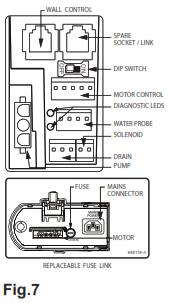
With electronics module OFF:
✅ Remain the same:
- Pump
- Motor
- Wall control
? Change positions:
- Water probe
- Drain valve
- Solenoid
Commissioning & Final Checks
- Follow Installation Manual P/No. 865208
- Start at water level setup (commissioning section)
Final checks:
- Test full operation
- Check all connections
- Inspect for leaks
- Confirm correct cable routing
- Refit pad frames
- Explain operation to customer
⚠️ Critical Installation Checks (Often Missed)
- Cables must not sit in water once tank is filled
- All connectors must be:
- Correct orientation
- Fully seated (per Fig. 7)
Troubleshooting
Fault Code 7
Cause:
- Installed on non-inverter unit
Action:
- Remove kit
- Inspect fan & motor collet for damage
Isolation Switch Not Working
Cause:
- Mounting screw not installed
Action:
- Refit securing screw to enable switch
Water / Electrical Issues
Cause:
- Incorrect cable routing or orientation
Action:
- Re-route cables above water level
- Confirm wiring matches Fig. 7 layout