
Changed email address on Wi-Fi account - need to delete MagIQtouch Wi-Fi account and create a new account
⚠️ Customer Safety Notice
This article contains general information intended for homeowners and occupants. Installation, servicing, repairs, electrical work, gas work and refrigerant-related work must only be carried out by appropriately qualified and licensed personnel.
Before performing any checks or maintenance, ensure the equipment is switched off and safe to access. Do not remove covers, enter roof or ceiling spaces, work at heights or attempt repairs unless you are qualified to do so.
If in doubt, contact an authorised service agent or licensed tradesperson. Safety must always take priority.
As the existing email address is also the username on the account it is not possible to just change the email address associated with the MagIQtouch Wi-Fi account.
If the email address associated with an account changes:
- Delete the current MagIQtouch account and create a new account.
- Enter new account details in MagIQtouch wall controller to link account to system.
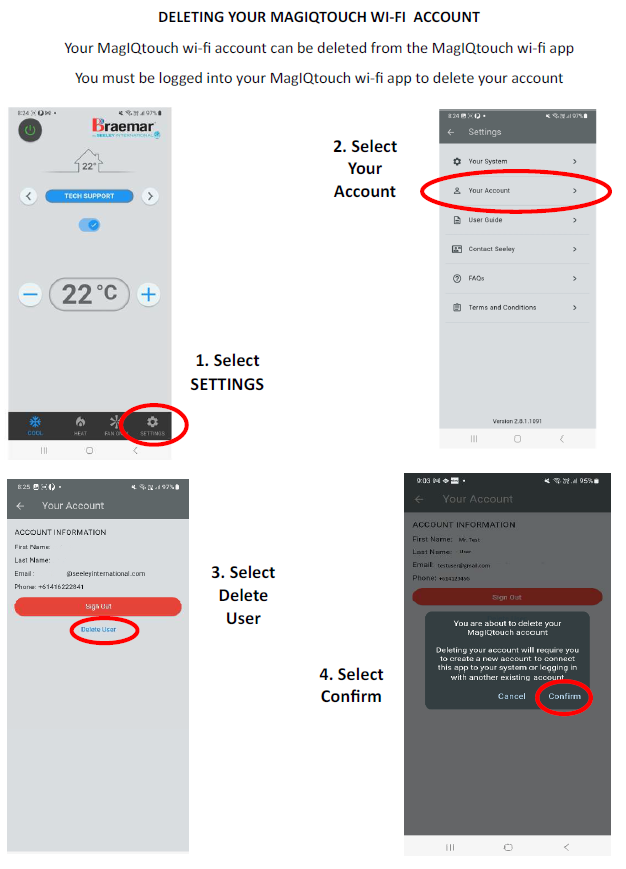
Attached and below is information on deleting the current account and on how to create a new account and link it to the system.
Click here to View YouTube Video deleting your MagIQtouch Wi-Fi account
Click here to view YouTube - MagIQtouch Wi-Fi App setup