
KGHV Dominator Series – E6 Fault: “Inner and Outer Board Communication”
⚠️ Safety Notice – Reverse Cycle Air Conditioners
This equipment must only be installed, commissioned, serviced and repaired by suitably qualified and licensed personnel.
Before commencing work, complete a task-specific risk assessment and ensure electrical isolation procedures, safe access, adequate service clearances and appropriate PPE have been considered. All work must comply with applicable regulations, standards and manufacturer requirements.
Particular care must be taken when working around electrical systems, refrigerant circuits, moving parts, roof spaces, ceiling spaces, confined spaces and working-at-heights hazards where applicable.
Do not proceed if safe access, required clearances, confined space risks or appropriate safety controls cannot be achieved and maintained.
Safety takes priority over diagnosis, repairs, installation schedules and customer expectations. If the task cannot be completed safely, it must not proceed until the risks have been adequately controlled.
Possible Safety Float Triggered by Full Condensate Tray
Condensate Pump Spacer (Part 655540RP)
Overview
The E6 fault (shown as “inner and outer board communication” on XE71 or “inner and outer board com” on LE60) normally indicates PCB communication issues.
However, it can also be triggered by the safety float switch if the condensate tray fills, particularly during cooling mode.
Recent field reports on later-build Dominator V2 units show that insufficient pump suction clearance can slow condensate removal, causing the float switch to trigger and report an E6 fault.
A field and production fix has been released - Condensate Pump Spacer (Part 655540RP).
Common Causes
Blocked Drain
• Check drainpipe is clear and unobstructed.
Low Airflow Settings
• Airflow may have been set too low during commissioning.
• Excess condensate may overwhelm the tray and pump.
Pump Issues
• Impeller blocked by debris.
• Bent pump bracket or pump sitting flush on tray floor.
• Pump requires approx. 5 mm clearance from tray base.
Float Switch Mounting
• Should be positioned 8–10 mm above tray base.
• Incorrect mounting may cause early triggering.
Important Note
There is no user reset for this fault.
Once triggered:
• Indoor fan and condensate pump are locked out.
• Unit will not recover until manually reset or water evaporates (hours to days).
Technician Procedure – Reset Fault & Apply Corrective Fix
Recommended Parts
- Condensate Pump Spacer – Part# 655540RP
- 2 x Large Flat (Mud Guard) Washers included with pump spacer
1. Clear / Reset the Fault
- Remove the access panel to the pump.
- Manually hold the float switch down to clear the lockout.
- Run unit in Fan‑Only mode to activate drain pump.
- Verify pump operation:
• Confirm water evacuation.
• Check for good flow and no obstructions.
2. Install the Condensate Pump Spacer (Part 655540RP)
The pump spacer provides approx. 4 mm clearance to prevent the pump from sealing against the tray.
- If the pump is sitting flush on the tray base:
• Clip the spacer onto the bottom of the pump.
3. Additional Fitment Requirements
6. Enlarge Pump Mounting Holes
• On Water Tray, enlarge pump mount holes to 10 mm.
• This allows vertical adjustment after the spacer is installed.
7. Fit Large Flat (Mud Guard) Washers (supplied in Part# 655540RP)
• The 2 × 4 mm screws securing the pump must have wide washers.
• Prevents screws pulling into the enlarged holes.
4. Pump Height / Alignment Adjustment
- After spacer installation:
• If the pump is bottomed out on the tray:
– Spacer is mandatory.
• If the pump leans outward after pump spacer fitment:
– Use the 10 mm holes to raise the pump a few mm until level.
Important:
• Remove all swarf from the tray after drilling.
• Debris may be sucked into the pump, causing further faults.
- Confirm the pump is level and has correct clearance.
- Release float switch and refit access panel.
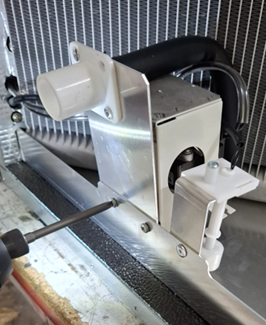 Unscrew the pump bracket
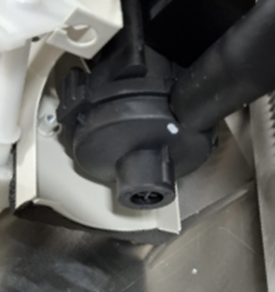
Lift pump assembly up and expose the inlet
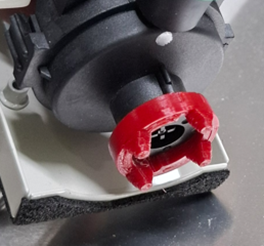
Fit the Condensate Pump Spacer
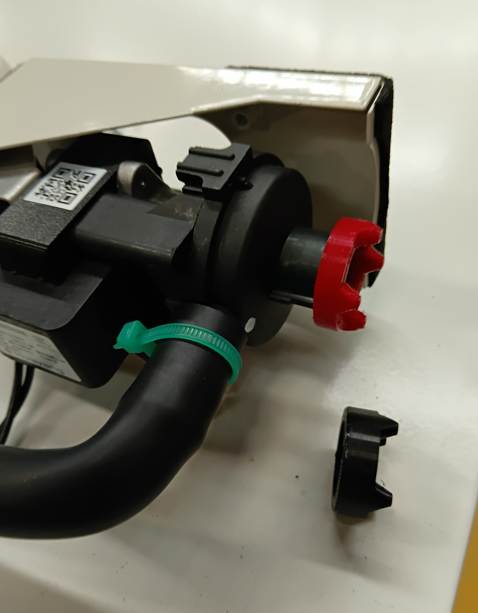
Condensate pump spacer pushed all the way on
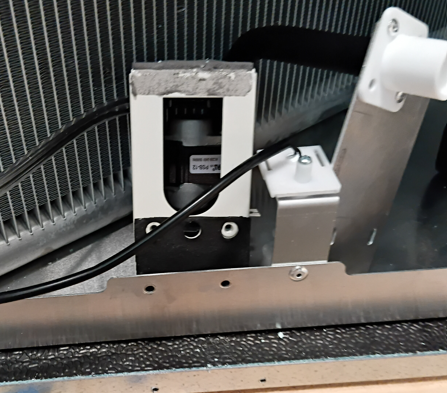
Screws removed from pump
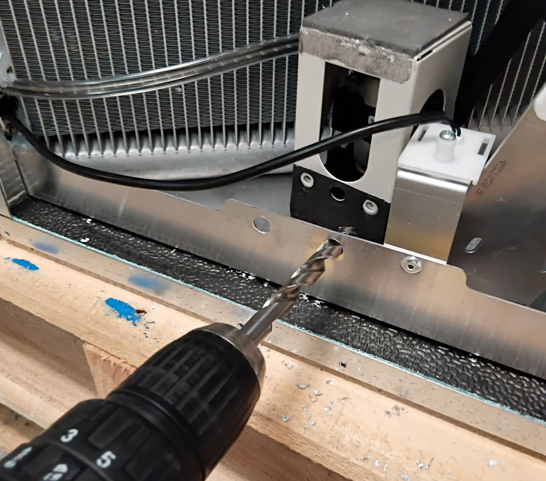
Mount holes drilled out to 10mm
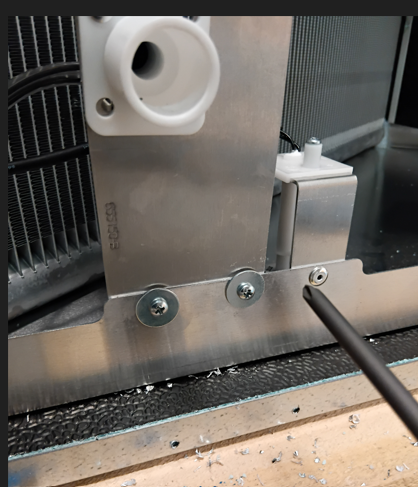
Pump re-installed with large flat (mud guard) washers and pump spacer fitted
(Image of Condensate Pump Spacer Part No. 655540 and installation position here)
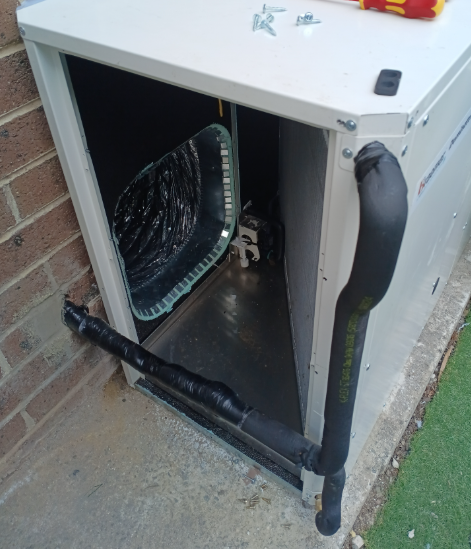
External Installations – Alternative Access Method
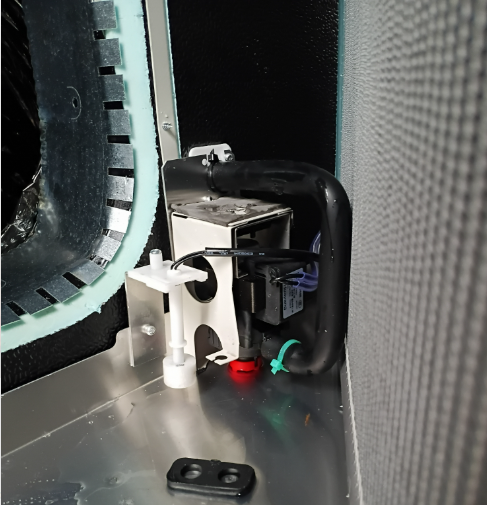
- Remove screws on top of pump.
- Lower pump slightly.
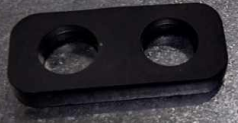
- Remove rubber pad from pump top.
- Refit pump with the spacer installed.

Click here to view Video - How to raise Pump Height by Removing Rubber Block
Additional Diagnostic Checks
If the Drain Tray Is Still Full
- Spacer ensures clearance, but diagnose root cause:
1. Debris Check
- Inspect tray for dust, sawdust, insects, or buildup.
- Pump bottom clips off for impeller cleaning.
- Ensure O‑ring is correctly seated when refitting.
2. Drain Outlet Check
- Confirm drain line not blocked internally.
- Check for glue/silicone intrusion.
3. Pump Wiring (Internal units)
- Ensure pump wiring is correctly reconnected after splitting unit.
If the Tray Is NOT Full
1. Test Float Switch Continuity
- Should read ~0 ohm when float is down.
2. Confirm Wiring Paths
- 1 & 2 from outdoor → pass through float switch → connect to COM‑OUT on indoor PCB.
- H1 & H2 from controls → land on COM‑MAN on indoor PCB.
3. Communication Cable Length
- For runs >10 m, correct polarity & continuity (0 ohm) is critical.