
⚠️ Safety Notice – Reverse Cycle Air Conditioners
This equipment must only be installed, commissioned, serviced and repaired by suitably qualified and licensed personnel.
Before commencing work, complete a task-specific risk assessment and ensure electrical isolation procedures, safe access, adequate service clearances and appropriate PPE have been considered. All work must comply with applicable regulations, standards and manufacturer requirements.
Particular care must be taken when working around electrical systems, refrigerant circuits, moving parts, roof spaces, ceiling spaces, confined spaces and working-at-heights hazards where applicable.
Do not proceed if safe access, required clearances, confined space risks or appropriate safety controls cannot be achieved and maintained.
Safety takes priority over diagnosis, repairs, installation schedules and customer expectations. If the task cannot be completed safely, it must not proceed until the risks have been adequately controlled.
XK60 and XK117 Fault code access
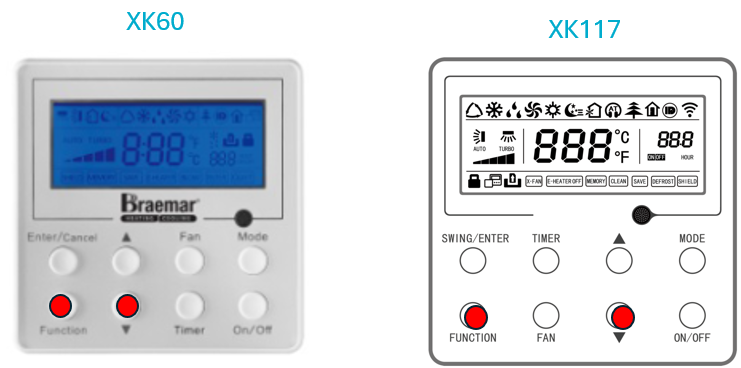
Accessing Fault log on XK60 and XK117
Press "FUNCTION" and " ▼ " at the same time for 5 seconds
Press " ▲ " to change from "00" to "04" ( last 5 fault codes)
"00" is the most recent fault code
Press "ENTER/CANCEL" to exit fault Log
(Process for both XK60 and XK117 is the same but button layout is different)
Other parameters (05-14) can also be viewed from this menu, such as
: Thermistor Temperatures
:Expansion valve steps
:Compressor and Fan Speeds etc
Once you have accessed fault log as detailed above press the "MODE" button to view other parameters as shown in table below
Use " ▲" to page through parameters
Press "ENTER/CANCEL" to exit parameters
