
Using Seeley Evaporative Coolers with WaterManager™ (solenoid, drain and water sensor probes) on Rainwater Systems in conjunction with Pressure Pumps
Why Choose Salinity Control WaterManager™ for Rainwater?
When using rainwater, every drop counts. The Salinity Control WaterManager™ system is the most economical and water-efficient option because it only drains water when salinity levels are high, maintaining optimal water quality without unnecessary waste.
In comparison:
- Timed Drain – Drains water at fixed intervals (every 1–2 hours), regardless of water quality.
- Continuous Bleed – Constantly bleeds water during operation, using significantly more water over time.
By choosing Salinity Control (solenoid, drain and water sensor probes), you:
- Save Rainwater – No unnecessary draining.
- Reduce Operating Costs – Lower water consumption.
- Maintain Water Quality Automatically – Intelligent monitoring ensures efficient cooler performance.
Scenario 1:
FC2 / FC02 – Water Not Detected (Rainwater or Pure Water)
Cause:
Rainwater is often too pure and lacks minerals, so water sensor probes fail to detect it within 20 minutes, triggering FC2 / FC02 fault (2 red flashes).
Solutions:
- Initial Setup:
- Add a small amount of salt to the tank to assist initial detection.
- After the first fill and evaporation cycle, natural contaminants from the evaporation process usually allow reliable detection ongoing.
- Permanent Fix (if required):
- On occasions, adding a small amount of salt during initial start-up does not provide ongoing reliability. In these cases, a permanent fix involving the water sensor probes may be required for units fitted with WaterManager drain systems
- Fit a 1.2kΩ, 0.5W resistor across the blue and black lead connections at the plug (see image).
- This eliminates the need for adding salt manually.
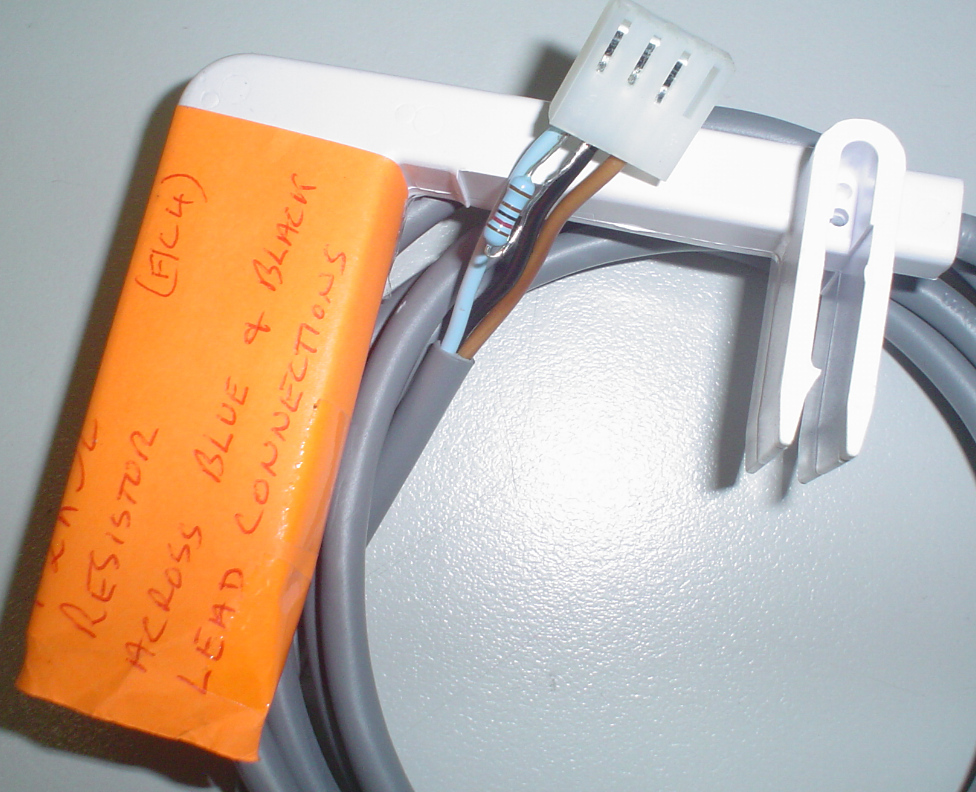
Important Notes:
Customers need to be aware the unit will operate correctly; however, after the 3-day drain delay, a Service 04 fault may display because probes detect that water is still present. This is normal and not a problem. Customers simply need to reset the cooler:
- MagIQtouch: Press Retry.
- MagIQcool: Turn the controller Off and On.
Scenario 2:
Pressure Pump Cycling & Burnout Risk
Cause:
Evaporation during cooler operation causes the float valve to call for water continuously, leading to short cycling of pressure pumps—a common complaint with rainwater systems.
Solutions:
- Consult the pressure pump supplier for methods to prevent burnout.
- Recommended methods:
- Ensure the pump is rated for constant on/off duty cycles to handle frequent starts without damage
- Install a header tank to provide a buffer of water, reducing frequent pump starts.
- Adjust pressure differentials at the pump to allow longer run times and minimise rapid cycling.
- Fit a pressure tank to the pump system. These tanks come in various capacities and allow water to be delivered at pump pressure while drawing from the pressure tank until empty before starting the pump. This reduces strain on the pump and minimizes constant cycling.
Installer Responsibility:
Please note that the water supply setup, including pump protection, is the responsibility of the installer. Burnt-out pumps caused by excessive cycling are not considered a fault of the evaporative cooler
Additional Requirements:
- Comply with local plumbing rules and standards.
- Water connection: ½” BSP.
- Install a manual ¼-turn ball shut-off valve adjacent to the cooler.
- Water supply specs:
- Max pressure: 800 kPa (115 psi).
- Min pressure: 100 kPa (15 psi).
- Minimum flow: 8 L/min during operation.
- In freezing areas, provide a drain-down facility.
- Ensure pipes are well saddled to prevent water hammer.