
Able Motor – Fan Attachment Options - How to Attach Fans to Able Motors – Collet vs Grub Screw
Applies to:
- Braemar: LCA, BM
- Coolair: CPL, LPA, LPM, LPR
- Braemar: LCB, LCQ, LCS
Purpose
Provide correct fan attachment instructions for Able motors across different evaporative cooler models.
Fan Attachment Methods by Model
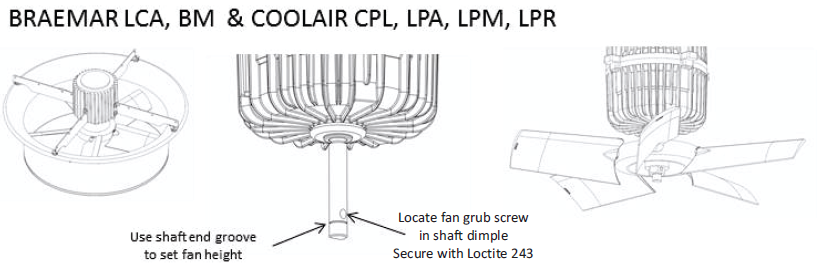
1. Braemar LCA, BM & Coolair CPL / LPA / LPM / LPR
- Use shaft end groove to set fan height.
- Locate fan grub screw in shaft dimple.
- Secure with Loctite 243 for reliable fastening.
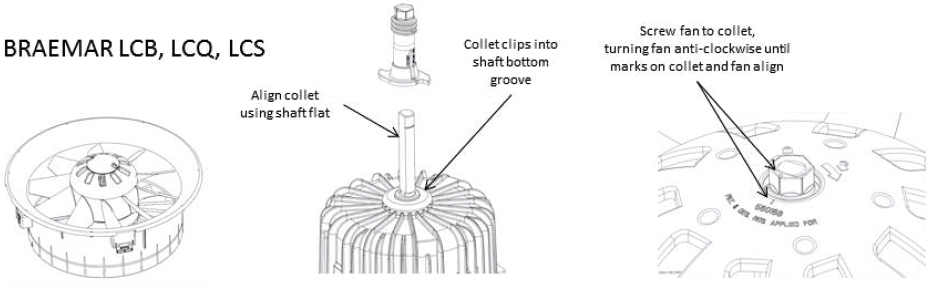
2. Braemar LCB / LCQ / LCS
- Clip collet into shaft bottom groove.
- Align collet using shaft flat.
- Screw fan onto collet anti‑clockwise until marks on collet and fan align.
Important Notes
- Always confirm collet or grub screw engagement before powering up.
- Apply Loctite 243 only on grub screw models (LCA/BM/Coolair).
- For collet systems, ensure alignment marks match for correct fan positioning.
Quick Reference Table
| Model Range | Attachment Type | Key Steps |
|---|---|---|
| LCA, BM, CPL, LPA, LPM, LPR | Grub Screw | Set height → Locate dimple → Loctite 243 |
| LCB, LCQ, LCS | Collet | Clip collet → Align shaft flat → Screw fan anti‑clockwise |
Revision Info
Document Ref: 824790‑B – Able Motor Fan Attachment Options.