
Climate Wizard CW3 / CW6S – FC13 Recorded Only When Turning Unit OFF at Thermostat
Click Link to View YouTube Video - CW3 / CW6S FC13 Occurs only when turned off at Thermostat
Diagnostic Guide
Applies To
- Climate Wizard CW3
- Climate Wizard CW6S
- MagIQtouch controllers
- Fault Code FC13 – Exhaust (Top) Motor Error
Symptom Summary
A Fault Code FC13 occurs only after turning the unit OFF at the thermostat, while:
- The unit operates normally in COOL or VENT mode
- No faults occur during normal running
- In Service Operating Screen, the fans only run when both are turned on together, not individually
Understanding Expected Operation
Normal shutdown behaviour (CW3/CW6S)
When COOL mode is switched OFF at the thermostat:
- Bottom (Supply) fan stops immediately
- Top (Exhaust) fan continues to run for 20 minutes
- This is the drying cycle, preventing moisture and protecting cooling cores.
- After 20 minutes, the exhaust fan switches off automatically.
If the exhaust fan fails to run during this drying cycle, the PCBA detects no communication from the top motor and logs FC13 Exhaust Motor Error.
Motor/PCBA Wiring Summary
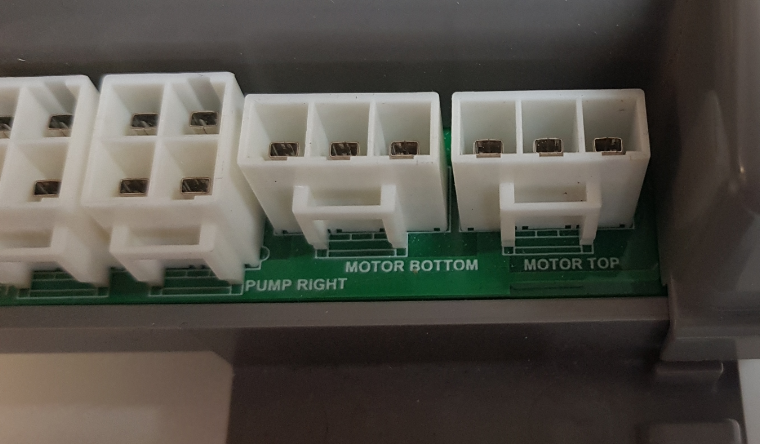
Each motor has two connections to the PCBA:
| Motor | Power Cable | Communication (Signal) Cable |
|---|---|---|
| Bottom Supply Motor | 1 × power | 1 × comms |
| Top Exhaust Motor | 1 × power | 1 × comms |
Later units include colour‑coding:
- Black connectors = Top Exhaust Motor
- White connectors = Bottom Supply Motor
Incorrect wiring causes the PCBA to receive motor signals on the wrong inputs.
Cause: Communication Cables Swapped Between Motors
This symptom set always indicates that the motor communication cables have been accidentally swapped on the PCBA.
Why this causes FC13 only during shutdown
During normal operation:
- Both motors run, so the PCBA receives 2 valid comms signals
- Even if swapped, the PCBA “sees” two active feedback signals, so no fault is triggered
During shutdown:
- The bottom fan stops, but
- The top exhaust fan must continue to run for 20 minutes
Because the comms cables are swapped:
- The PCBA expects top fan feedback on the top motor input, but receives nothing
- The PCBA logs FC13 Exhaust Motor Error
Why both motors only run together in Service Mode
In Service Mode:
- Running fans individually fails because each motor is getting the wrong comms signal
- Running fans together causes both motors to send feedback, allowing the PCBA to see activity on both inputs, so both run
This confirms swapped communication cables.
Diagnostic Procedure
Step 1: Enter Service Operating Screen
- Navigate to:
Menu → Settings → Service Mode → Service Operating Screen
Step 2: Test motors individually
- Turn Supply (Bottom) Fan ON → likely will not run
- Turn Exhaust (Top) Fan ON → likely will not run
Step 3: Turn both fans ON together
- Both motors now run
- This behaviour confirms swapped communication connections
Corrective Action
1. Isolate power
- Turn OFF mains power at isolator
- Ensure safe access to the PCBA enclosure
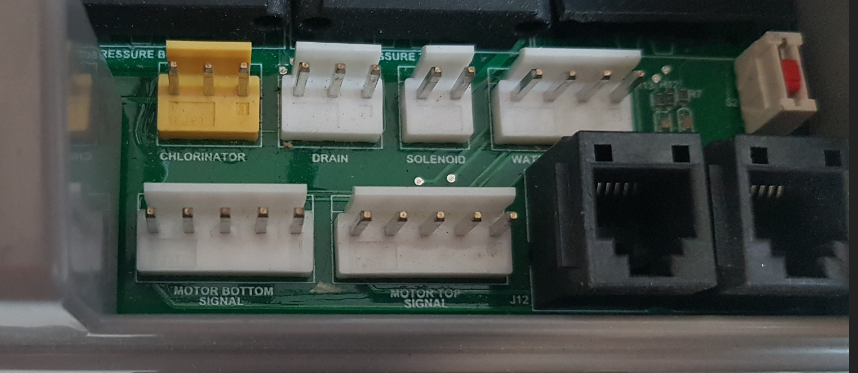
2. Inspect motor communication cables
Check the PCBA motor signal inputs:
| PCBA Terminal | Should Receive |
|---|---|
| TOP MOTOR SIGNAL | Top Exhaust Motor comms cable |
| BOTTOM MOTOR SIGNAL | Bottom Supply Motor comms cable |
Correct colours where applicable:
- Black = Top
- White = Bottom
If these are reversed → swap them.
3. Swap the two communication cables (if incorrect)
- Disconnect and reconnect into correct PCBA inputs
- Ensure cables are seated firmly
- Confirm no damage to cable sheathing or connectors
4. Restore power and retest
- Reconnect mains power
- Enter Service Mode → Motor Test
- Test each motor individually:
- Each motor should now run independently
- Exit Service Mode
- Run unit normally for at least 10 minutes
- Turn OFF at thermostat
- Confirm:
- Exhaust fan runs for 20 minutes
- No FC13 occurs
Resolution
If communication cables were swapped:
- Motor test now works correctly
- Exhaust fan runs during drying cycle
- FC13 disappears and does not recur
If FC13 still occurs:
- Check for damaged comms cables
- Check motor power cables
- Check for loose connectors at motor end
- Replace motor if signal feedback cannot be restored
Notes for Technicians
- This fault is extremely common after motor replacement, PCBA replacement, or wiring loom handling
- CW3/CW6S motor connectors are physically similar, making misconnection possible
- Always verify correct comms cable routing before closing the service panel
Important Motor Identification
- Top Motor = Exhaust Motor (FC13)
- Bottom Motor = Supply Motor (FC7)
- Always follow the printed labels on the PCBA, not the physical connector orientation.
(Motor power/comm cable locations shown in Control Module Wiring Diagram – PDF pges.16–18)
Click Link to View YouTube Video - CW3 / CW6S FC13 Occurs only when turned off at Thermostat