
⚠️ Safety Notice – Commercial Evaporative Cooling Products
This equipment must only be installed, commissioned, serviced and repaired by suitably qualified and licensed personnel.
Before commencing work, complete a task-specific risk assessment and ensure safe roof access, fall protection requirements, electrical isolation procedures, service clearances and appropriate PPE have been considered. All work must comply with applicable regulations, standards and manufacturer requirements.
Particular care must be taken when working at heights, in roof spaces, ceiling spaces and other restricted access areas. Additional consideration must be given to confined working conditions, electrical hazards, moving parts, water systems, wet surfaces, manual handling risks and weather conditions.
Do not proceed if safe access, weather conditions, required clearances, confined space risks or appropriate safety controls cannot be achieved and maintained.
Safety takes priority over diagnosis, repairs, installation schedules and customer expectations. If the task cannot be completed safely, it must not proceed until the risks have been adequately controlled.
(Technical Explanation & 859749-L Installation and Operation Manual Page References)
Fault Code 16 Description
Climate Wizard CW‑H coolers use the PLC (Programmable Logic Controller) to communicate with external control systems such as:
- Multi‑Magic Wall Controller
- Building Management System (BMS)
- Modbus controller
- BACnet (MS/TP or IP) supervisor
These external systems send regular “check‑in” messages to the cooler. The cooler relies on these messages to know:
- what mode it should run in
- what fan speed to use
- whether cooling is allowed
- whether restrictions (lockouts) are applied
If these messages stop for more than 5 minutes, the cooler assumes communication has been lost and triggers Fault Code 16.
Because the cooler no longer knows what instructions to follow, the cooler cannot continue normal operation until communication is restored.
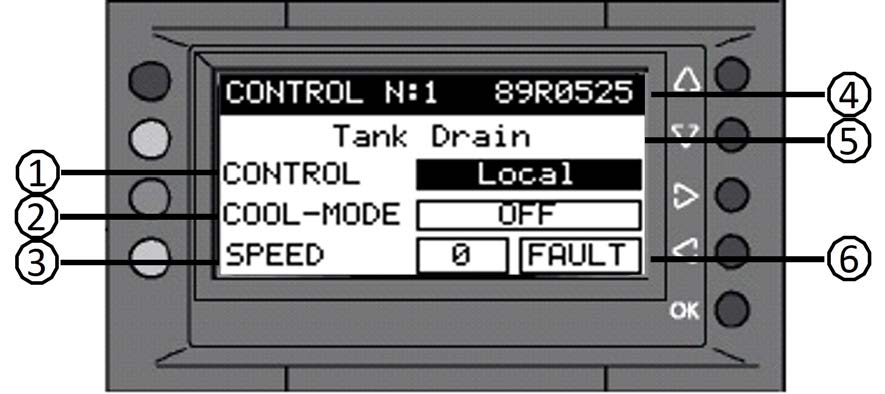
Expanded Technical Explanation
1. Why the Cooler Needs Communication
When under external control (WALL, BMS, MODBUS, BACNET), the PLC expects a continuous stream of control packets. These packets confirm:
- operating mode (VENT / IEC / DEC / SUPERCOOL)
- target fan speed
- enable/disable signals
- lock high/lock low commands
- Modbus/BACnet register activity
- Wall Controller network status
If these packets stop, the PLC has no valid instructions to continue operating.
Manual Reference: Fault Code 16 description — p.29
2. How Communication Works (RS‑485 or Ethernet)
RS‑485 (Wall Controller, Modbus, BACnet MS/TP)
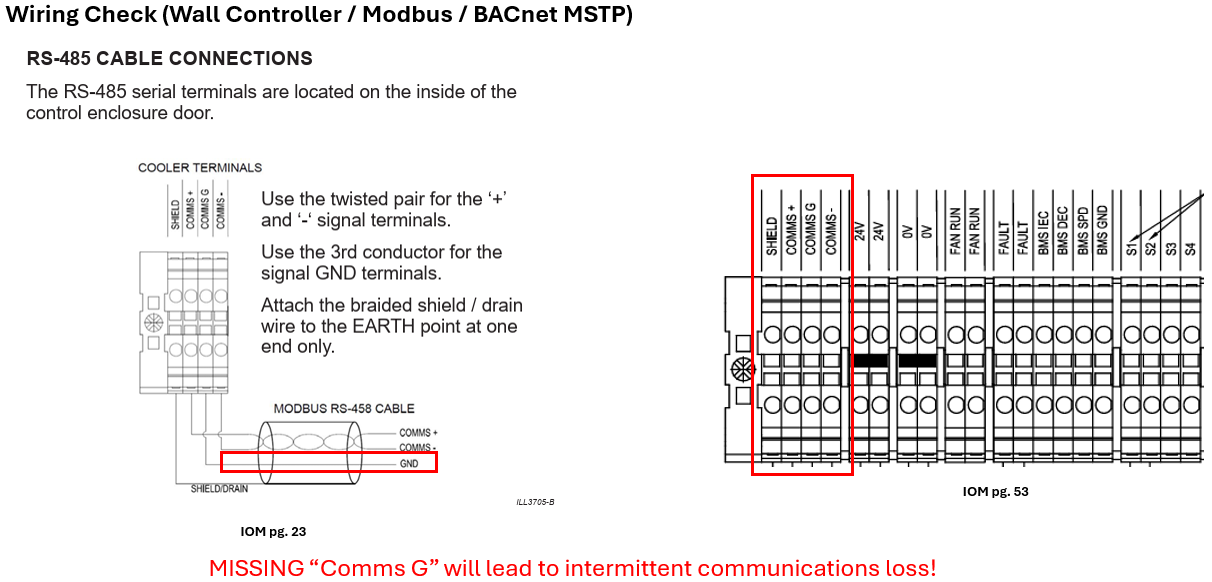
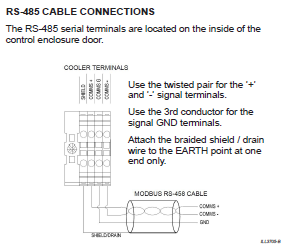
- Uses a twisted‑pair cable (+ / –) plus GND
- Devices are “daisy‑chained”
- Cable shield must be grounded at one end only
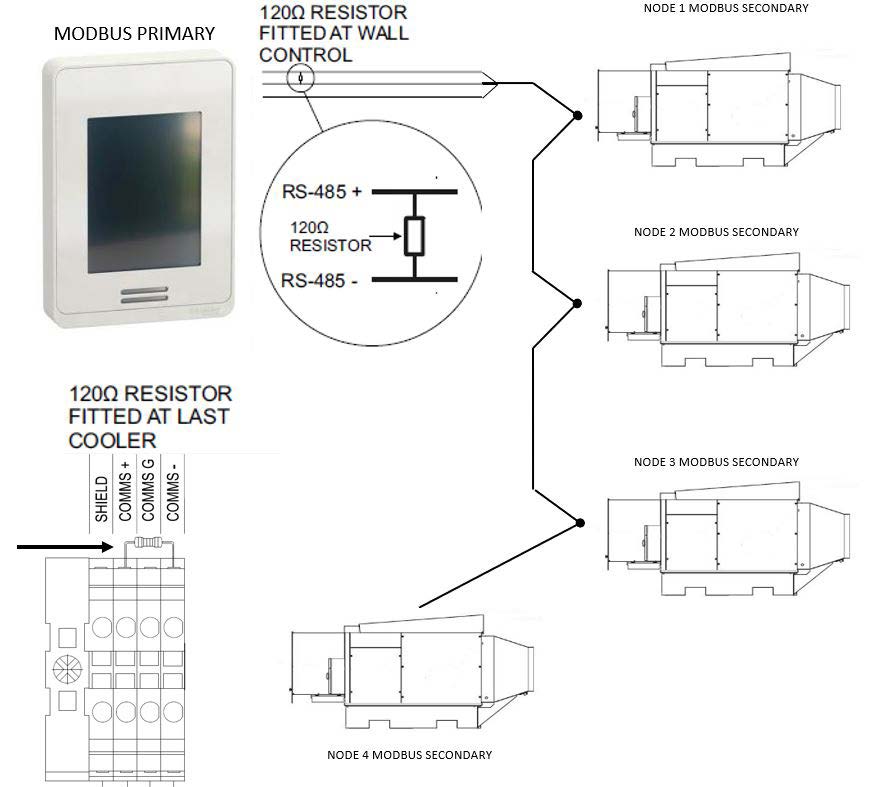
- The system MUST have exactly two120Ω terminating resistors
- one at the primary controller
- one at the last cooler in the chain
Manual Reference: RS‑485 wiring rules & termination — p.23
Ethernet (BACnet IP)
- Uses an RJ45 cable
- Requires correct IP address, gateway, subnet mask, and BACnet port
- Each cooler must have a unique Device ID
Manual Reference: BACnet IP setup — p.22
3. What Communication Loss Causes Internally
When the PLC stops receiving external commands:
- It cannot confirm mode or speed
- It cannot respond to BMS outputs
- It cannot determine whether cooling is allowed
- It cannot verify lockouts
- It cannot update external systems on cooler status
- It pauses operation to prevent incorrect behaviour
Therefore, until communication returns,
the cooler cannot continue normal operation.
Manual Reference: Fault Code 16 behavior — p.29
4. Real‑World Causes Technicians Commonly See
- Loose RS‑485 terminal screws
- Reversed polarity (+/– swapped)
- Missing or extra terminators
- Cable shield grounded at both ends
- Broken RS‑485 cable at a bend or cable tie
- Duplicate Modbus/BACnet/Wall Controller addresses
- Wrong baud rate or parity
- Controller/BMS offline or rebooting
- BACnet network switch failure
- Modbus master not polling within 5 minutes
Manual References: - RS‑485 setup — p.23
- Modbus — p.21
- BACnet — p.22
- Wall Controller — p.20
Troubleshooting Procedure
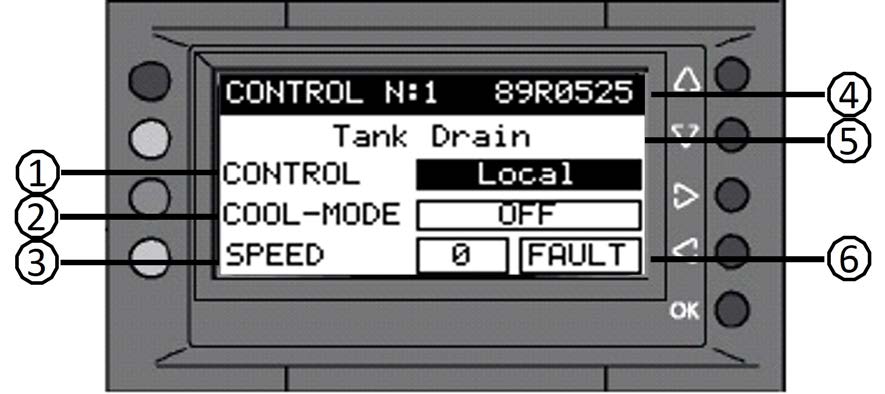
1. Confirm Primary Control Method Setting
Ensure the cooler is set to the correct control source:
- WALL
- BMS
- MODBUS
- BACNET
If incorrect, the cooler will ignore the real controller.
Manual Reference: Control screen — p.18
2. Inspect RS‑485 Wiring (Most Common Cause)
Check:
- correct +/– polarity
- GND connected where required
- shield connected at ONE end only
- no star networks (must be daisy‑chain only)
- no crushed, split, or stretched cables
- correct cable type (shielded twisted pair, 120Ω characteristic impedance)
Manual Reference: RS‑485 rules — p.23
3. Check Terminating Resistors
Verify only these 2 terminators are installed:
- At the primary controller (Wall Controller/BMS/Modbus master)
- At the last cooler in the chain
All intermediate coolers MUST NOT have terminators.
Manual Reference: RS‑485 termination — p.23
4. Verify Node or Device Addressing
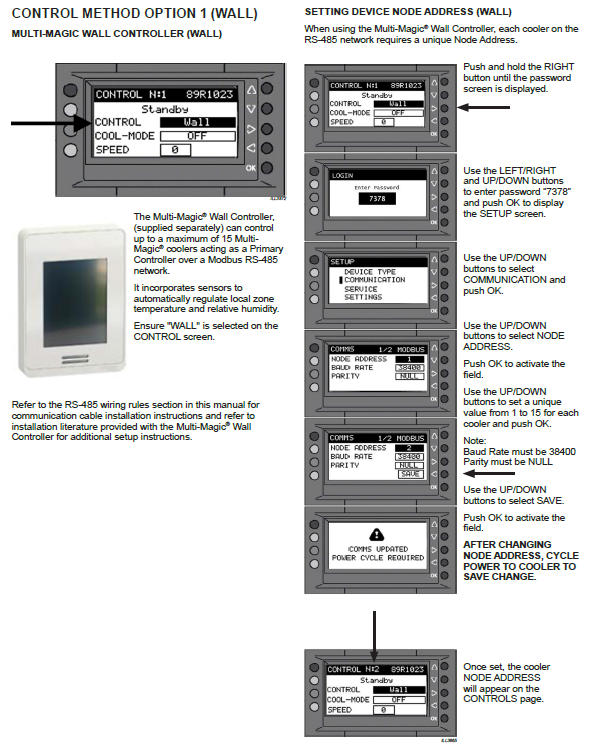
Wall Controller (RS-485)
- Each cooler: Node 1–15
Manual Reference: p.20
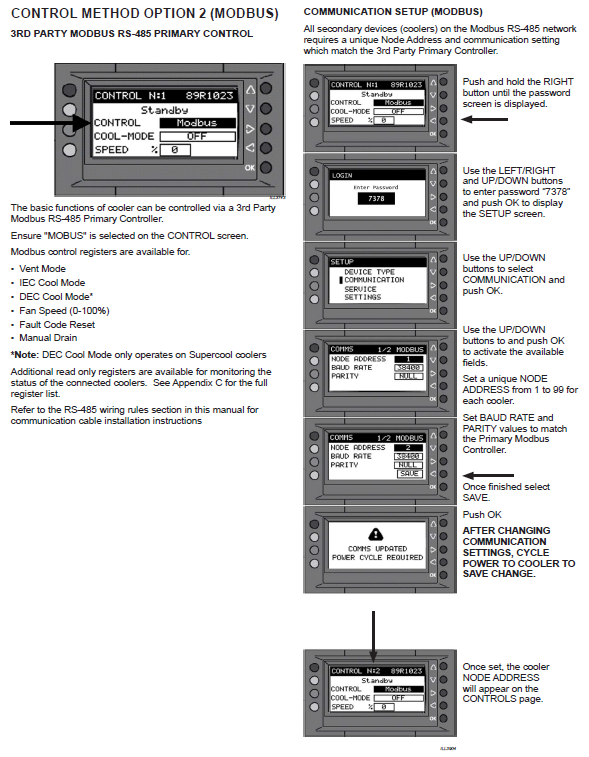
Modbus (RS485)
- Each cooler: Address 1–99
Manual Reference: p.21
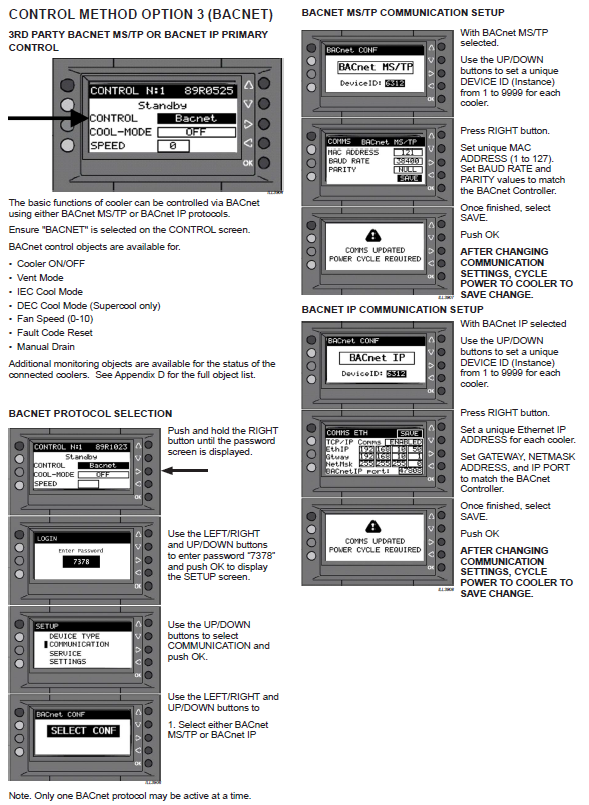
BACnet MS/TP
- Unique Device ID (1–9999)
- Unique MAC (1–127)
Manual Reference: p.22.
BACnet IP
- Unique Device ID
- Unique IP Address
Manual Reference: p.22
Duplicate addresses = guaranteed communication instability.
5. Confirm Baud Rate & Parity Across All Devices
Common default:
- 38400 baud
- NULL parity
Every single device must match exactly.
Manual Reference: Modbus/BACnet/WC comms setup — pp.20–22
Remember:
Changing communication settings requires cooler power cycling.
6. Check Primary Controller Activity
The BMS/Modbus/BACnet/Wall Controller MUST send data packets at least every 5 minutes to avoid Fault 16.
Manual Reference: p.29
Check:
- Is the controller online?
- Is the BMS polling the cooler?
- Is the Modbus/BACnet master active?
- Are there network outages or switch faults?
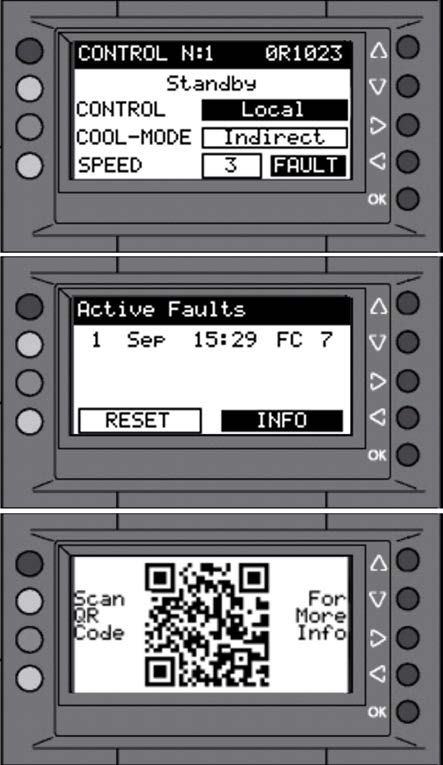
7. Reset the Fault
After resolving the issue:
- Open ACTIVE FAULTS
- Press RESET
- If necessary, cycle power
Manual Reference: Fault reset — p.28
Manual Cross‑Reference Summary (Fault 16)
| Topic | Manual Page |
|---|---|
| Fault Code 16 description & remedy | p.29 |
| Control Method selection | p.18 |
| Wall Controller communication setup | p.20 |
| Modbus addressing & settings | p.21 |
| BACnet MS/TP & BACnet IP setup | p.22 |
| RS‑485 wiring rules & terminators | p.23 |
| Fault display & reset | p.28 |
Technician Summary of Checks – Fault Code 16
Use this quick reference list to confirm all communication‑related items are correct before resetting the fault.
✅ 1. Confirm Primary Control Method (PLC – CONTROL Screen)
- Ensure correct mode is selected: WALL / BMS / MODBUS / BACNET
- If wrong, the cooler may ignore the real controller
Manual Reference: p.18
✅ 2. Inspect RS‑485 Wiring Thoroughly
- Verify +/− polarity is correct
- Confirm GND is connected where required
- Cable is shielded twisted pair (120Ω characteristic impedance)
- Shield grounded at one end only
- Wiring is a true daisy‑chain, not star / multi‑drop
- Cables routed away from high‑voltage runs
Manual Reference: p.23
✅ 3. Check Terminating Resistors (120Ω)
- Exactly two terminators installed:
- One at the primary controller
- One at the last cooler in the chain
- No terminators on intermediate coolers
Manual Reference: p.23
✅ 4. Verify All Device Addresses Are Unique
- Wall Controller (RS‑485): Node 1–15
- Modbus: Address 1–99
- BACnet MS/TP: Device ID 1–9999 / MAC 1–127
- BACnet IP: Unique Device ID + IP Address
Manual References: p.20–22
✅ 5. Confirm Baud Rate & Parity
- All devices must match exactly
- Default for most installations: 38400 baud / NULL parity
- Cycle power to apply communication settings
Manual References: p.20–22
✅ 6. Confirm Primary Controller Activity
- Wall Controller, BMS, Modbus, or BACnet master must be sending packets
- Primary controller must poll at least once every 5 minutes
Manual Reference: p.29
✅ 7. Reset the Fault After Fixing the Issue
- Go to ACTIVE FAULTS → RESET
- Cycle power if communication settings were changed
Manual Reference: p.28