
CW‑80 – Exhaust Motor Replacement & Communication Cable Upgrade (Gen1 & Gen3 Compatible)
This solution covers the full process for replacing the CW‑80 exhaust motor, including installation of Pt# 118819 – Exhaust Motor Communications Plug & Cable Replacement Kit, and applies whether the customer receives a Gen1 or Gen3 exhaust motor.
Required Parts
- 118819 – Exhaust Motor Communications Plug & Cable Replacement Kit
- 117867 – Exhaust Motor Power Plug & Cable Replacement
Exhaust Motor Communication Plug & Cable Replacement Kit
Part Number: 118819 (not included standard with motor)
Includes new M12 plug and user-assembled socket
Note: Pt# 118819 required if a qualified technician confirms water ingress in the original plug or socket during inspection.
New spare exhaust fan motors are designed to work with older systems, so replacement is not required if damage isn't evident. Each installation should be carefully assessed individually to determine suitability.
Exhaust Motor Power Plug & Cable
Part Number: 117867 (not included with motor)
Used to connect power to the exhaust motor
1. Safety Warnings
- Isolate and lock out the power before performing any work.
- Risks include: 3‑phase supply voltage, rotating fans, sharp edges, and water ingress.
- Do not operate fans without weatherseals and guards installed.
2. Access the Exhaust Motor
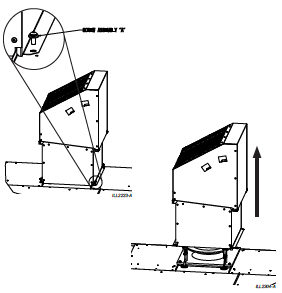
Remove the exhaust weatherseal assembly to access the motor.
3. Remove the Existing Communication Cable
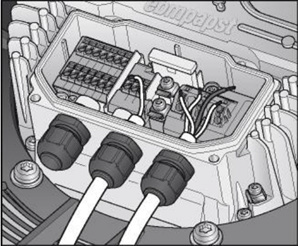
- Open the motor terminal box.
- Identify and disconnect all communication terminals.
- Remove cable from gland and cut cable ties.
- Discard the old plug & cable assembly.
4. Determine Which Motor Version You Are Installing (Gen1 or Gen3)
Gen1 Motor Indicators
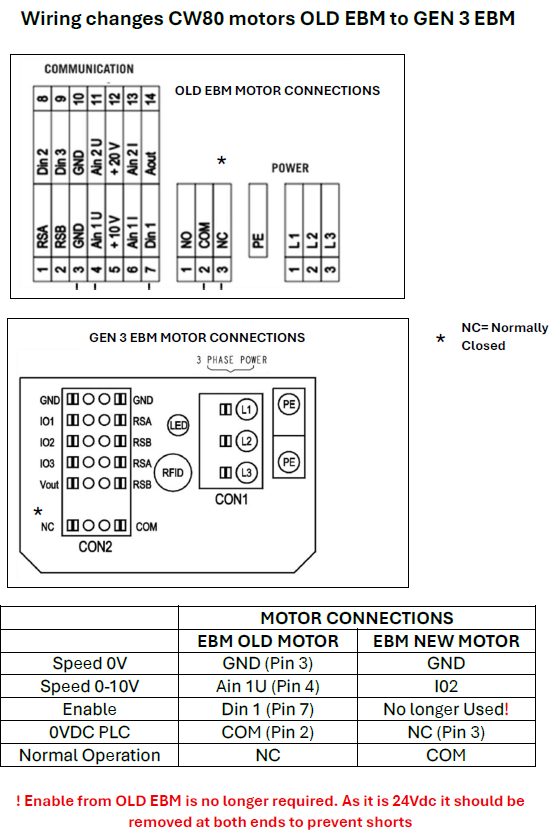
- Wiring diagram matches “CW‑80 EBM OLD MOTOR WIRING”
- WHITE‑3 & BLACK‑3 enable wires present and used
Gen3 Motor Indicators
- Wiring diagram matches “CW‑80 EBM GEN3 MOTOR WIRING”
- WHITE‑3 & BLACK‑3 not used
- Notes specifying the removal of the enable wiring
5. Enable Circuit Handling (Critical Step)
If fitting Gen1 motor:
- KEEP WHITE‑3 & BLACK‑3 connected.
(Used for 24 V enable signal)
If fitting Gen3 motor:
REMOVE WHITE‑3 & BLACK‑3 completely at both ends.
Gen3 motors no longer use an external enable signal.
Units after Serial ≥ 20170001 (April 2020)
Do not have an enable relay fitted.
6. INSTALLATION OF Pt# 118819 – Exhaust Motor Communications Plug & Cable Replacement Kit
The following steps are taken directly from the official Seeley installation instructions.
STEP 1 – Disable Enable Signal (If required)
Older CW‑80 models (pre‑Apr 2020) include an exhaust fan enable relay.
The PLC wires controlling the relay must be removed completely before fitting the new communication kit.
This prevents accidental shorts.
If the CW-80 cooler was built before April 2020 (serial number less than 20170001), it includes a 24V exhaust fan enable relay.
This relay is no longer needed and must be fully disconnected before installing the new motor plug and socket. Leaving it connected could cause electrical shorts.
What to do:
Use the original wiring diagram that came with the cooler.
Find the wires that control the fan enable relay. In most cases, these are labelled:
Wire 05120
Relay R04
Remove these wires completely from the PLC output.
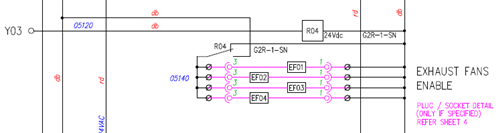
If the cooler was built after April 2020 (serial number 20170001 or higher), it doesn’t have this relay, so you can skip this step.
STEP 2 – Remove Exhaust Weatherseal
Remove weatherseal assembly to access the motor.
STEP 3 – Remove Old Communication Plug & Cable
(Already performed in Step 3 of the main process but included here for completeness.)
- Open terminal box
- Disconnect wiring
- Remove cable through gland
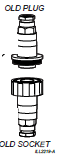
- Remove cable ties and discard the old plug & socket
STEP 4 – Fit the New Communication Cable into the Motor
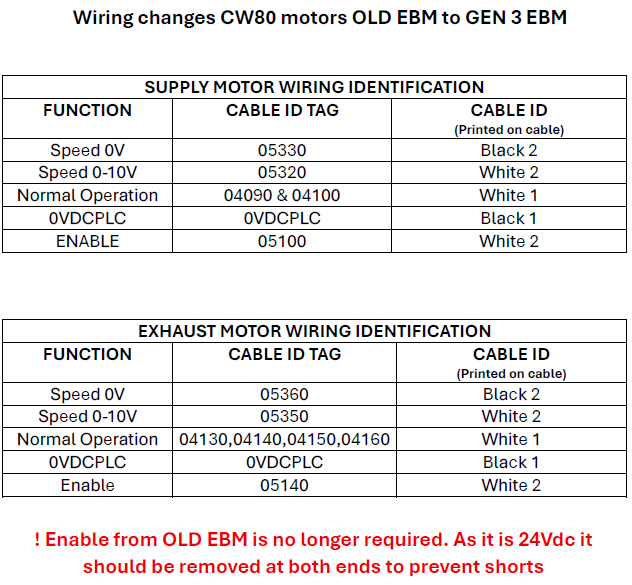
Feed the new cable through the gland and wire according to motor type:
Gen1 Motor Wiring (Original Motor)
| Wire | Function |
|---|---|
| WHITE‑1 | Status 24 V |
| BLACK‑1 | Status (Signal) |
| WHITE‑2 | Fan Speed (0–10 V) |
| BLACK‑2 | Fan Speed GND |
| WHITE‑3 | Enable 24 V |
| BLACK‑3 | Enable return |
Gen3 Motor Wiring (New Spare)
| Wire | Function | Action |
|---|---|---|
| WHITE‑1 | Status 24 V | Connect |
| BLACK‑1 | Status (Signal) | Connect |
| WHITE‑2 | Fan Speed (0–10 V) | Connect |
| BLACK‑2 | Fan Speed GND | Connect |
| WHITE‑3 | Not used | Remove |
| BLACK‑3 | Not used | Remove |
STEP 5 – Remove Old Field‑Wireable Socket
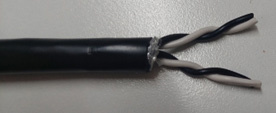
Cut off and discard the original socket.
Strip cable back 25 mm and remove the 3rd pair (White‑3 / Black‑3) when not required.
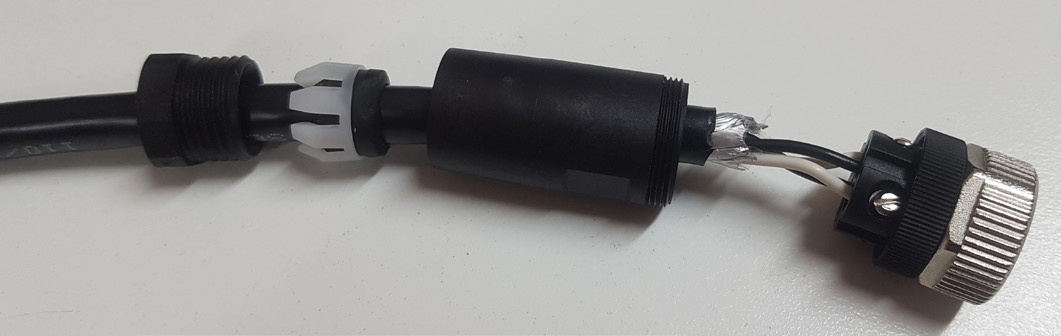
STEP 6 – Fit the New Field‑Wireable Socket (Included in Pt#118819)
- Slide backshell onto cable
- Strip conductor insulation back 6 mm
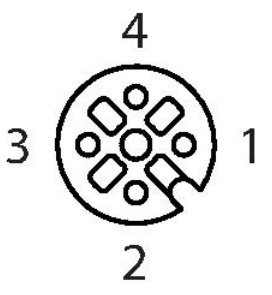
- Wire socket using M12 pinout (below)
- Tighten backshell and cable gland so the seal is fully engaged
M12 Socket Pinout (from Pt#118819)
| Motor Wire | Pin | Function |
|---|---|---|
| WHITE‑1 | Pin 2 | Status 24 V |
| BLACK‑1 | Pin 1 | Status (Signal) |
| WHITE‑2 | Pin 4 | Fan Speed (0–10 V) |
| BLACK‑2 | Pin 3 | Fan Speed GND |
| WHITE‑3 | N/A | Not used |
| BLACK‑3 | N/A | Not used |
STEP 7 – Finalise Assembly
- Fit terminal box cover (Torque: 1.5 ± 0.2 Nm)
- Cable‑tie all wiring to motor frame
STEP 8 – Functional Testing
- Refit exhaust weatherseals
- Perform function test as per IOM manual
7. Technician Quick Reference — Gen1 vs Gen3 (Built‑In Cheat Sheet)
Key Differences
| Feature | Gen1 Motor | Gen3 Motor |
|---|---|---|
| Enable wiring used? | Yes: WHITE‑3 / BLACK‑3 | No – REMOVE both wires |
| Wiring complexity | 6 wires | 4 wires |
| 0–10 V speed control | Yes | Yes |
| Common field issue | Mis-wired enable circuit | Leaving enable wires connected |