FC9 – PLC Expansion Module Failure (CW‑80 / CW‑80S)
Applicable Models: CW‑80, CW‑80S
Reference: 859723-G - CW-80 Multi-Magic - Install and Operation Manual (English)
Fault Code Description:
The PLC has lost communication with the Water Manager Expansion Module (PCBA).
(Manual: Fault Code Table – p.31)
When FC9 is active, technicians may also see FC7 (Supply Motor Error) and FC13 (Exhaust Motor Error) because the motor I/O signals flow through the same expansion module.
(FC7/13 descriptions – p.31)
1. Symptoms
- FC9 logged on PLC
- FC7 and FC13 often appear simultaneously across all motors
- No fan activity or incomplete status on Monitor screens
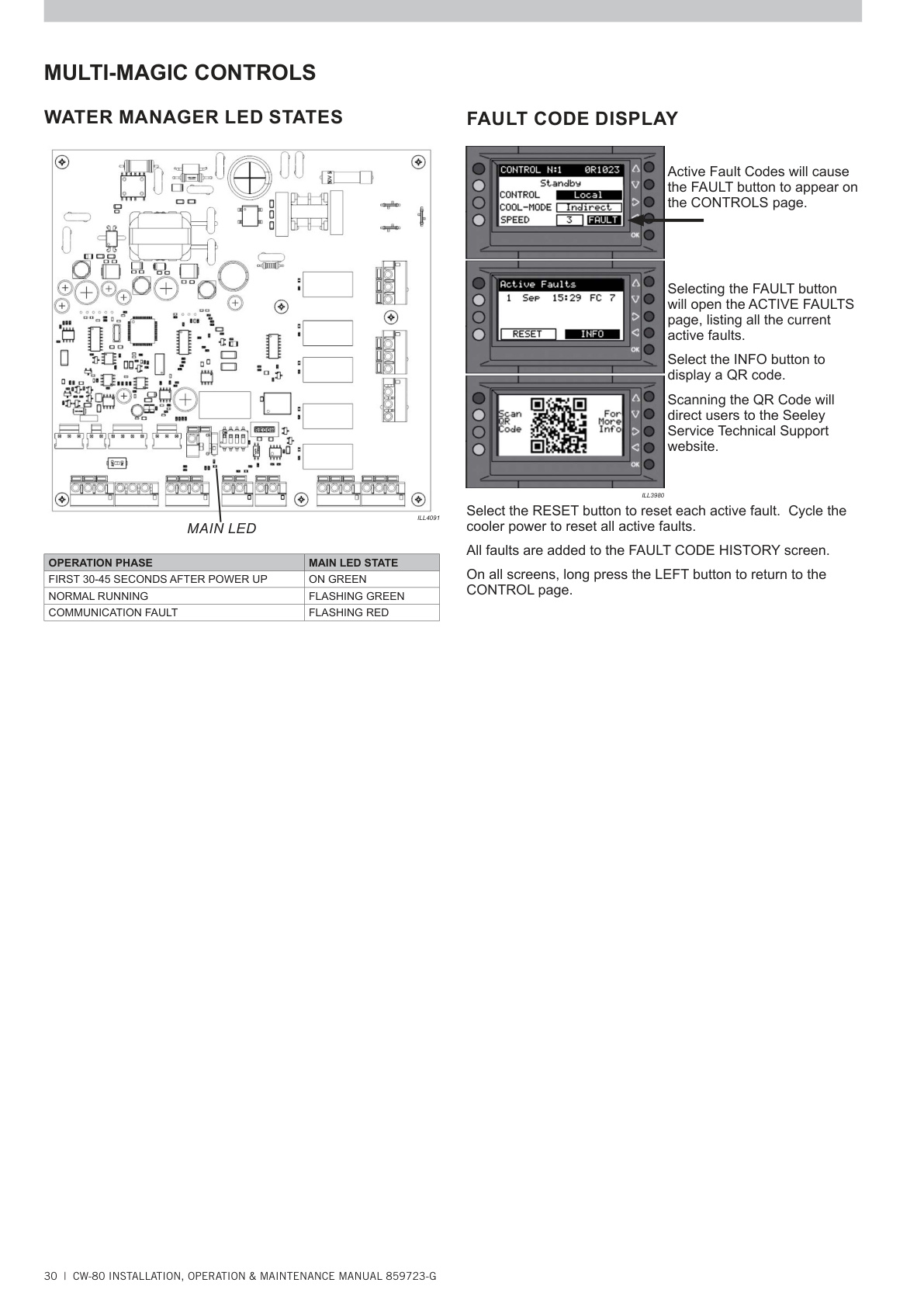
- Water Manager PCBA LED flashing RED indicating comms fault
(LED State Table – p.30)
2. Likely Causes
- Loose communication cable between PLC and Expansion Module
- Water Manager PCBA not powered (loss of 24 VAC)
- Faulty Water Manager PCBA
- Faulty PLC communication interface
3. Step‑by‑Step Troubleshooting
Step 1 — Check Communication Cable (On‑Site Visual Inspection)
- Reseat the comms cable at both ends (PLC and PCBA).
- Check for loose connectors, bent/damaged pins, corrosion, moisture or dust.
(Fault Code 9 Remedy – p.31)
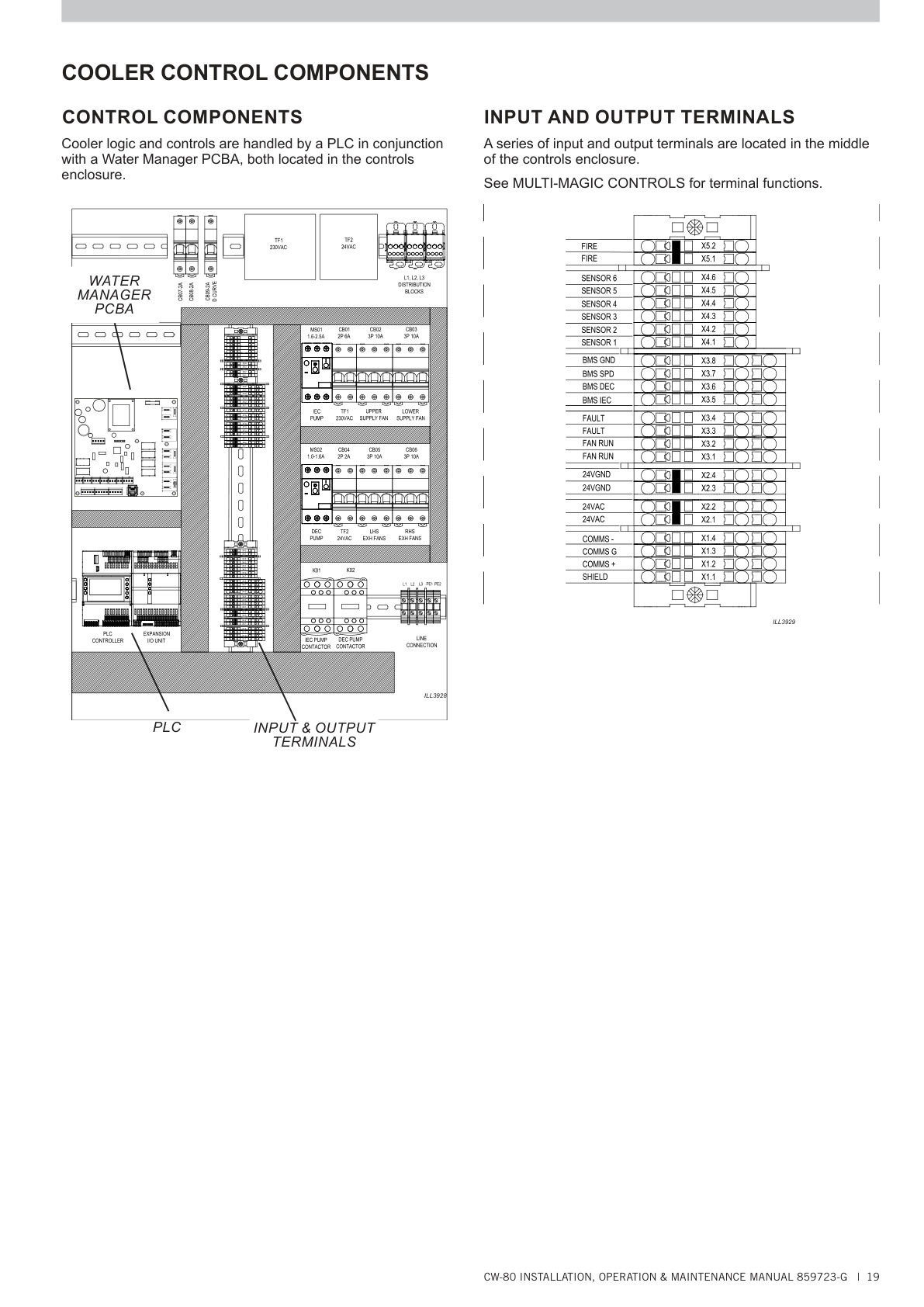
(Location of PCBA shown in “Cooler Control Components” – p.19)
Step 2 — Check Water Manager PCBA LED State
LED meanings (Water Manager LED Table – p.30):
- Flashing GREEN → Normal
- Flashing RED → Communication fault
- Solid GREEN (first 30–45s) → Startup period
If Flashing RED → PLC and module are not communicating.
Step 3 — Power‑Cycle the Cooler
- Isolate mains supply, wait 10–15 seconds, restore.
(Active faults clear on power cycle – p.30)
FC9 can occur when the PLC boots before the expansion module fully initialises.
Step 4 — Verify 24 VAC Power to Expansion Module
The Water Manager PCBA requires a stable 24 VAC supply via TF1/TF2.
(24 VAC supply details – p.16)
Check:
- Transformer outputs
- Low‑voltage fuses
- Burnt smell or heat damage on PCBA
Loss of 24 VAC will cause FC9 and secondary FC7/FC13.
Step 5 — Use PLC Screens to Confirm Expansion Module Status
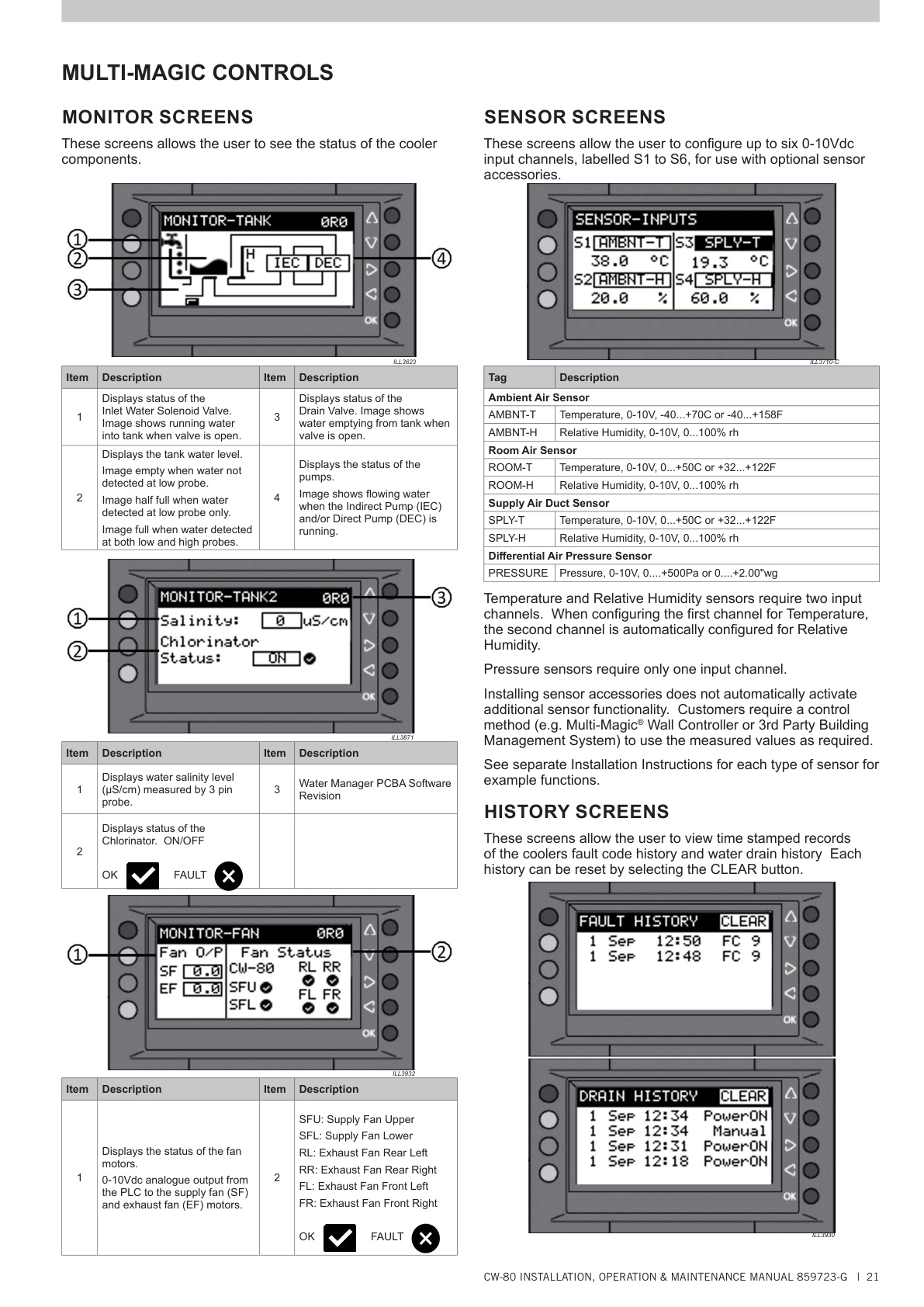
Monitor → Fan Screen
If all motors show 0V or FAULT, the module is likely offline.
(Monitor screen details – p.21)
Active Faults Screen
If FC7/FC13 appear across all fans → Comms loss, not individual motors.
(Fault behaviors – p.31)
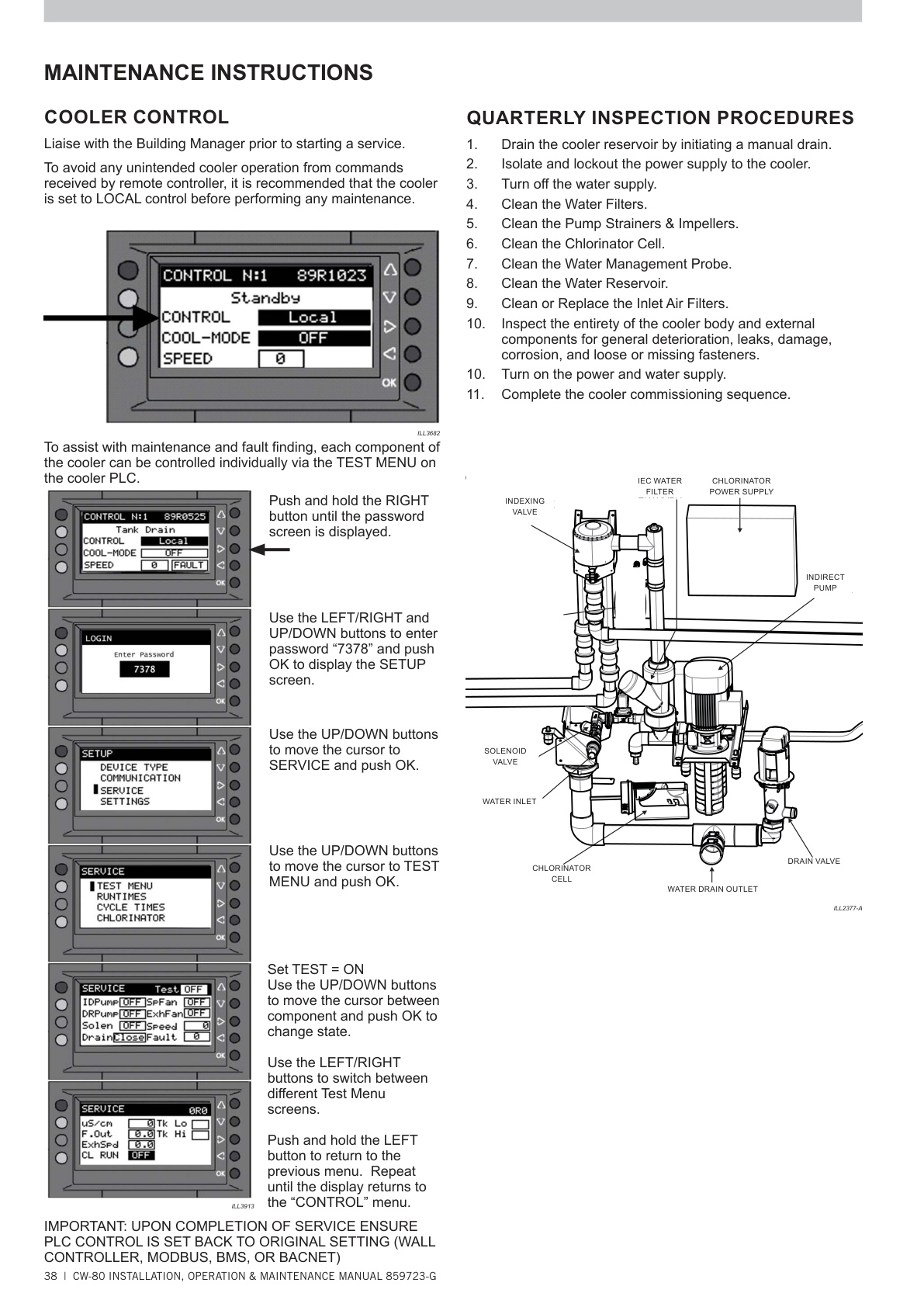
Step 6 — Use the TEST MENU to Directly Command the Fans
Path: SETUP → SERVICE → TEST MENU
(TEST Menu instructions – p.38)
Test:
- SpFAN (Supply Fans)
- ExhFAN (Exhaust Fans)
Interpret results:
- Fans run normally in TEST
→ Module is powered and responding → issue is PLC‑module comms layer - Fans do NOT respond in TEST
→ Module is not responding → likely failed module or no 24 VAC supply
4. Determining the Root Cause
A. Expansion Module (Water Manager PCBA) is likely faulty if:
- PCBA LED = Flashing RED
- 24 VAC confirmed present
- TEST MENU cannot drive fans
- FC7/FC13 present on ALL motors
- Replacing comms cable has no effect
B. PLC is likely faulty if:
- Expansion PCBA LEDs indicate normal operation
- Comms cable replaced/tested OK
- TEST MENU still cannot communicate
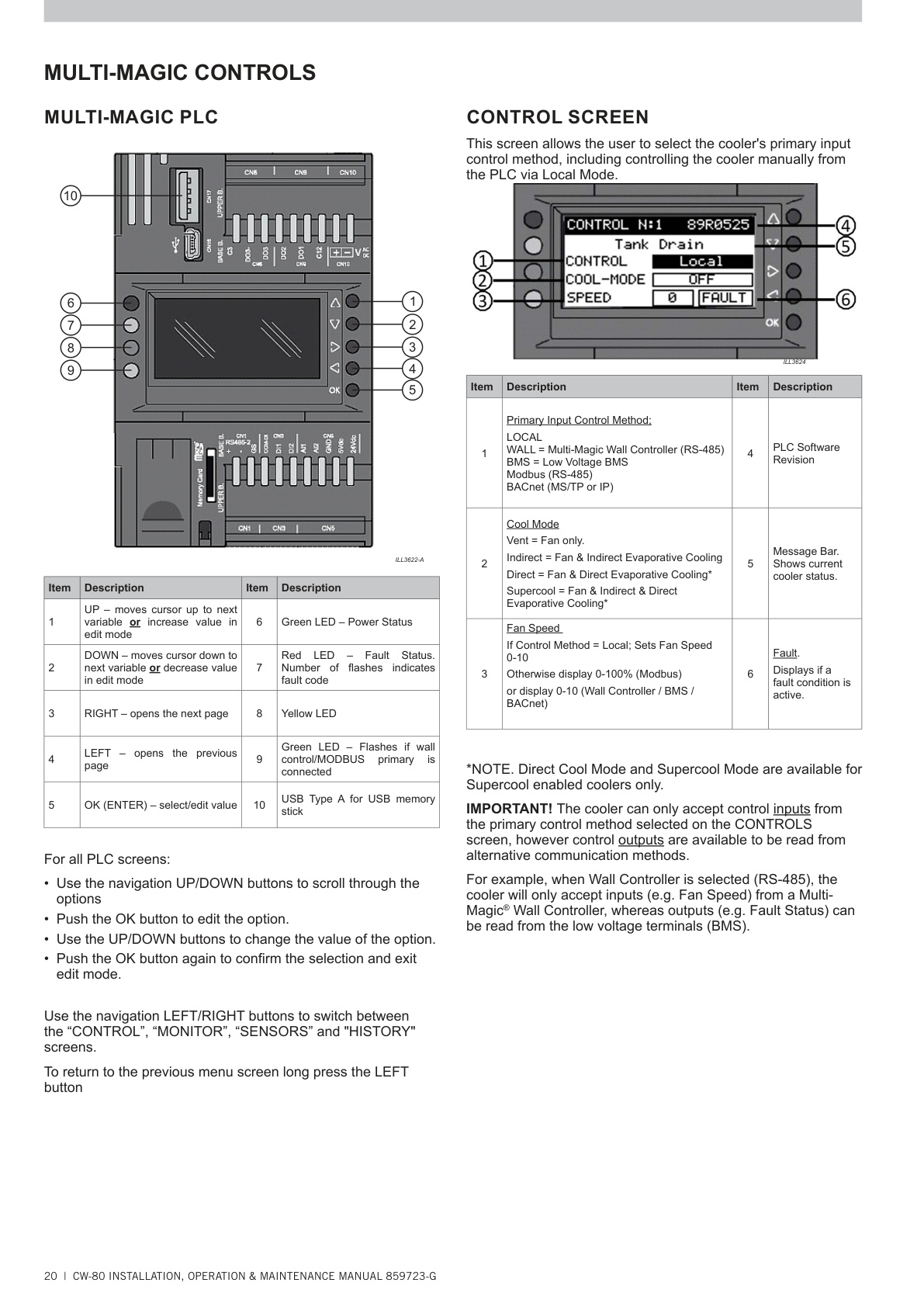
- PLC’s red fault LED continues to display FC9 after power cycling
(PLC LEDs – p.20)
5. Recommended Corrective Actions
- Reseat or replace PLC ↔ PCBA comms cable
- Restore/repair 24 VAC supply (TF1/TF2, wiring, fuses)
- Replace Water Manager Expansion Module (most common fix)
- Replace PLC if module replacement does not resolve FC9
6. Manual Page Reference Summary
| Topic | Page |
|---|---|
| Fault Code 9 Description | p.31 |
| FC7 & FC13 Motor Faults | p.31 |
| Water Manager LED States | p.30 |
| Water Manager PCBA Location | p.19 |
| PLC Indicators / Control Screens | p.20–21 |
| TEST MENU | p.38 |
| 24 VAC Supply / Transformers | p.16 |
Water Manager PCBA & PLC in Control Enclosure (manual p.19)
Use this to identify the Water Manager PCBA (expansion module) and its location in the controls enclosure (ties to Step 1 reseat cable; Step 4 24 VAC checks; and the module vs PLC decision).
PLC Front Panel — Buttons & Status LEDs (manual p.20)
Use this when checking PLC LEDs, opening Active Faults, and navigating to MONITOR / TEST MENU.
MONITOR / Fan Status Screens (manual p.21)
Use this to verify readings on MONITOR → FAN (e.g., when all motors show 0 V or FAULT during FC9).
Water Manager LED States Table (manual p.30)
Reference for Flashing GREEN = normal vs Flashing RED = comms fault used in FC9 diagnosis.
TEST MENU (SERVICE → TEST MENU) (manual p.38)
Use this when commanding SpFAN/ExhFAN to isolate whether the expansion module is responding.