⚠️ Safety Notice – Commercial Evaporative Cooling Products
This equipment must only be installed, commissioned, serviced and repaired by suitably qualified and licensed personnel.
Before commencing work, complete a task-specific risk assessment and ensure safe roof access, fall protection requirements, electrical isolation procedures, service clearances and appropriate PPE have been considered. All work must comply with applicable regulations, standards and manufacturer requirements.
Particular care must be taken when working at heights, in roof spaces, ceiling spaces and other restricted access areas. Additional consideration must be given to confined working conditions, electrical hazards, moving parts, water systems, wet surfaces, manual handling risks and weather conditions.
Do not proceed if safe access, weather conditions, required clearances, confined space risks or appropriate safety controls cannot be achieved and maintained.
Safety takes priority over diagnosis, repairs, installation schedules and customer expectations. If the task cannot be completed safely, it must not proceed until the risks have been adequately controlled.
With Troubleshooting Guide & Page References from 859749-L - CW-H Multi-Magic - Install and Operation Manual English
1. Overview
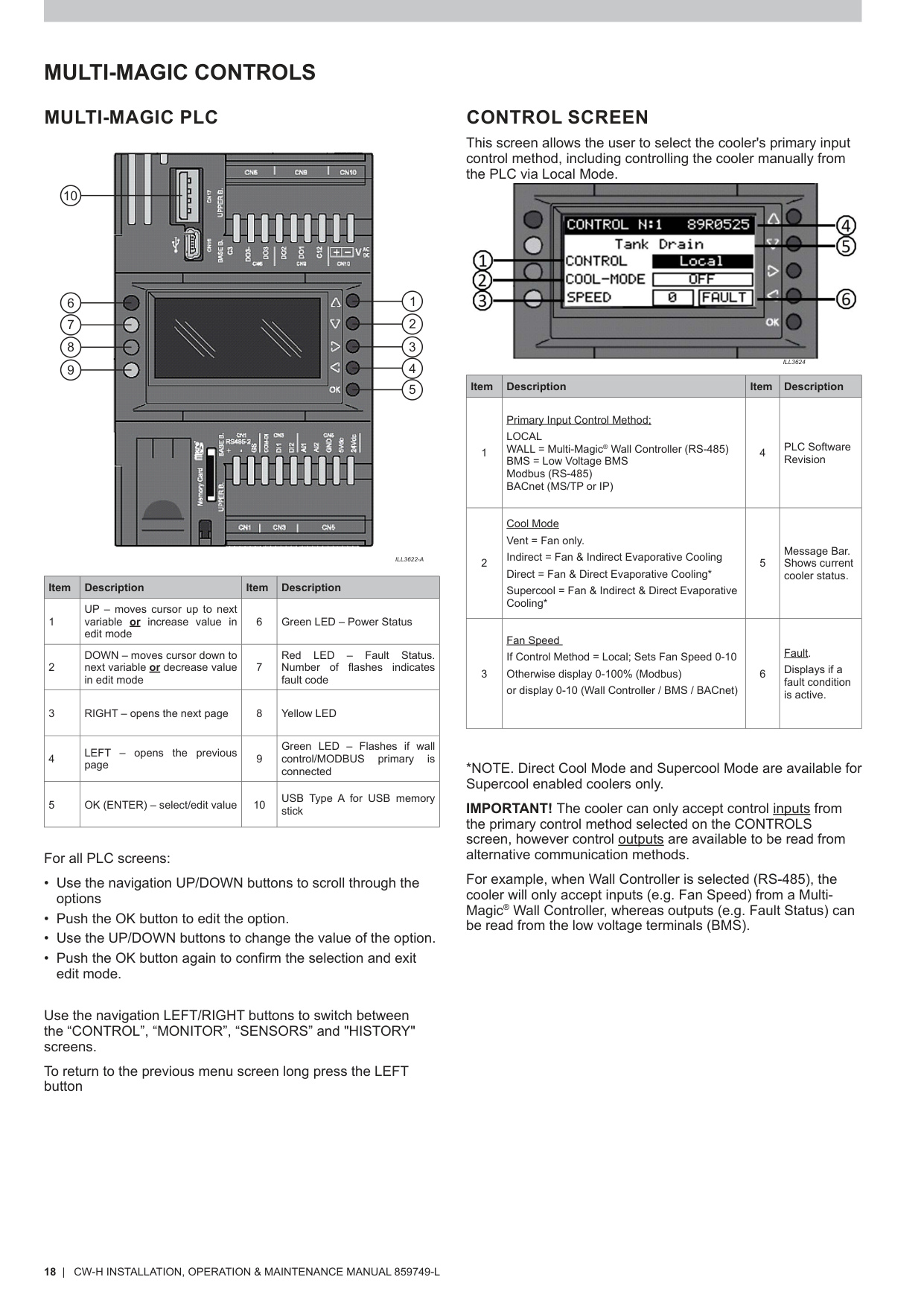
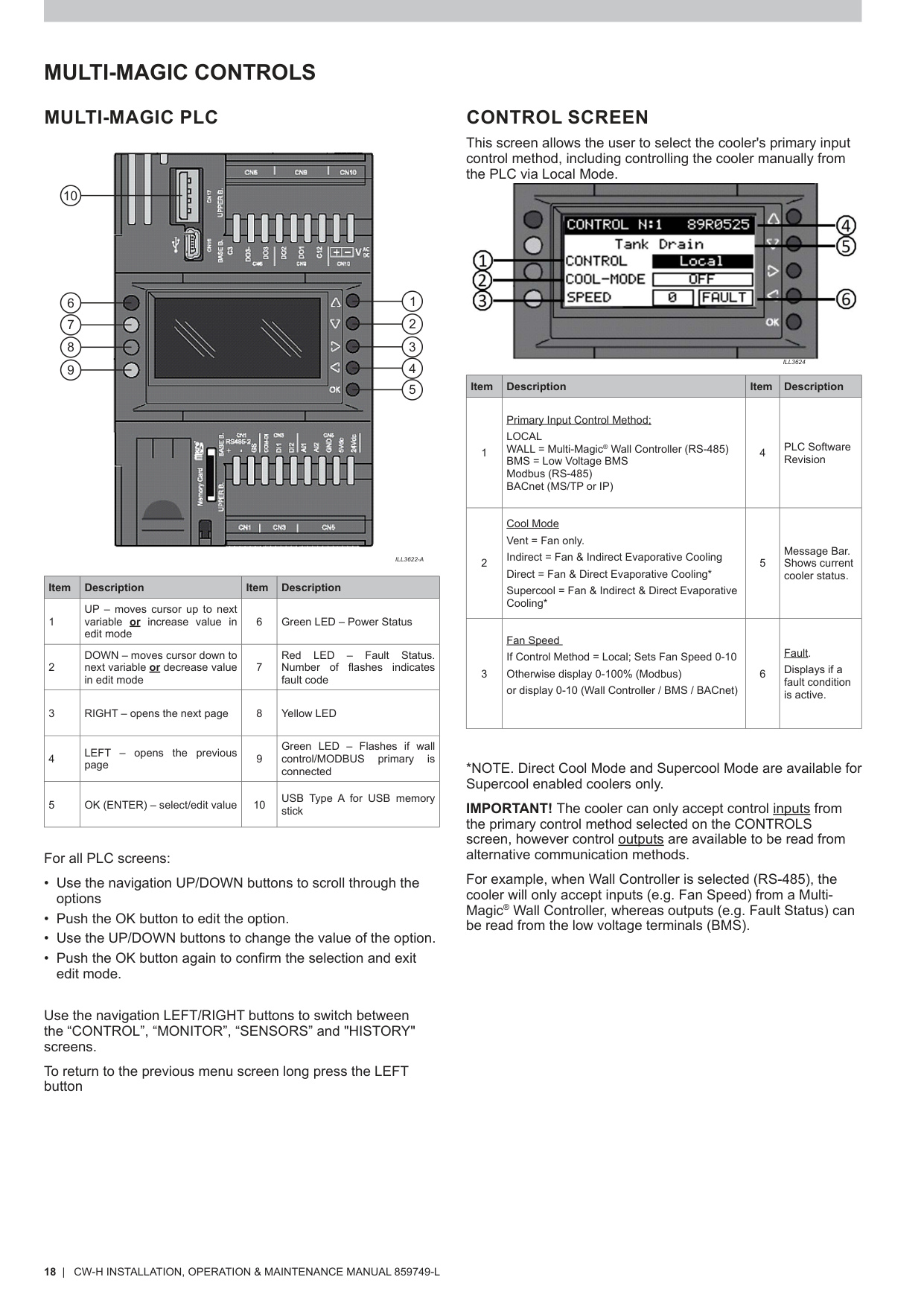
The Multi‑Magic PLC controls the cooler’s fan, pumps, salinity system, communication protocols, sensors, and overall operating logic (PLC overview – p.18).
A PLC replacement may be required when:
- The controller is unresponsive
- Repeated communication faults occur
- Fault Code 1 (PLC–PCBA communication failure) persists
- Physical damage to the display or interface
- Configuration corruption
2. Safety Requirements
Before beginning any PLC service:
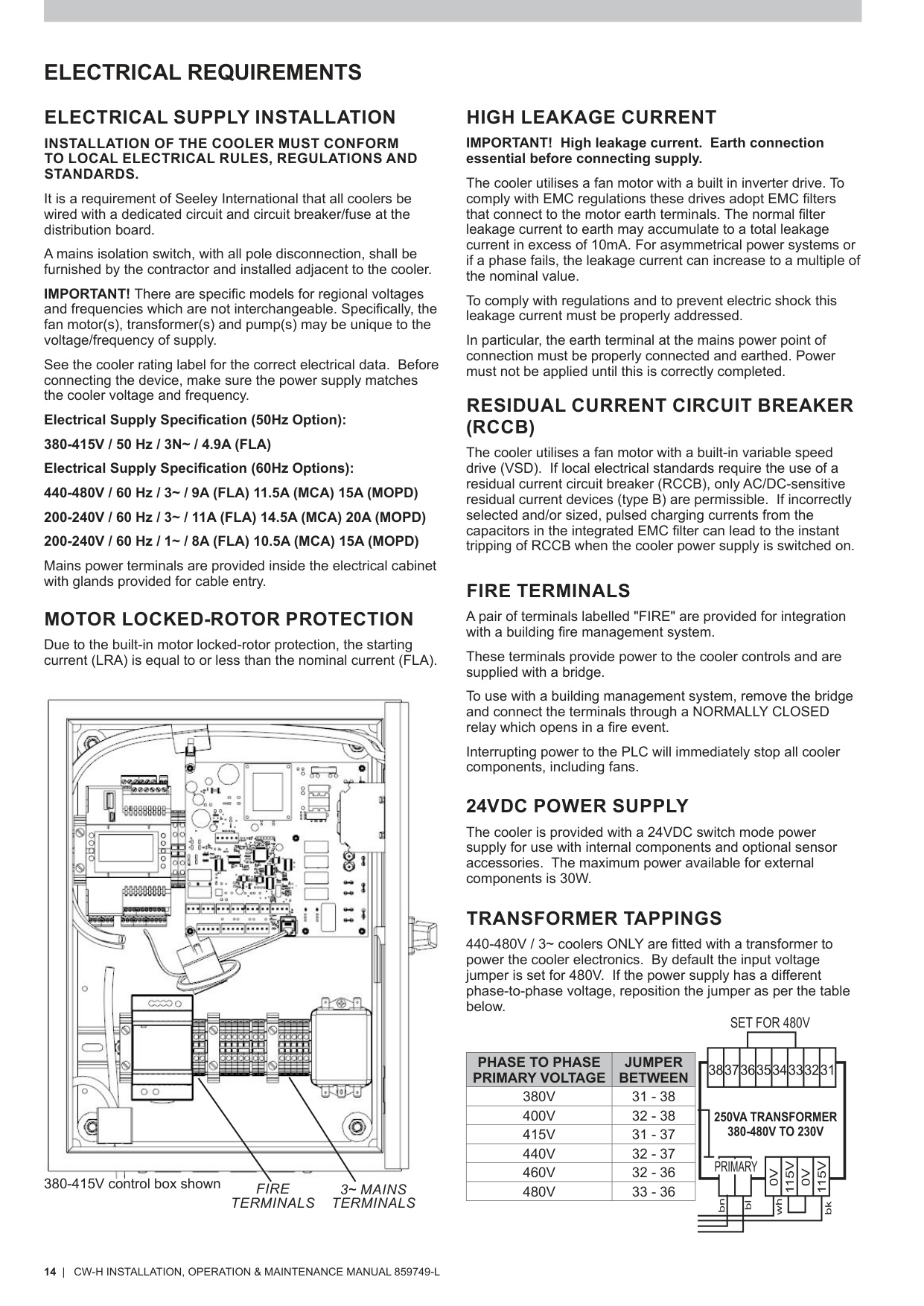
- Isolate power at the mains isolation switch (Electrical Safety – p.14).
- Use lockout/tagout where required.
- Ensure water supply is isolated if working near pumps or wet components.
3. Tools & Equipment Required
- Phillips head screwdriver
- Flat blade screwdriver
- Anti‑static wrist strap
- Replacement Multi‑Magic PLC (correct model & voltage)
4. Accessing the PLC
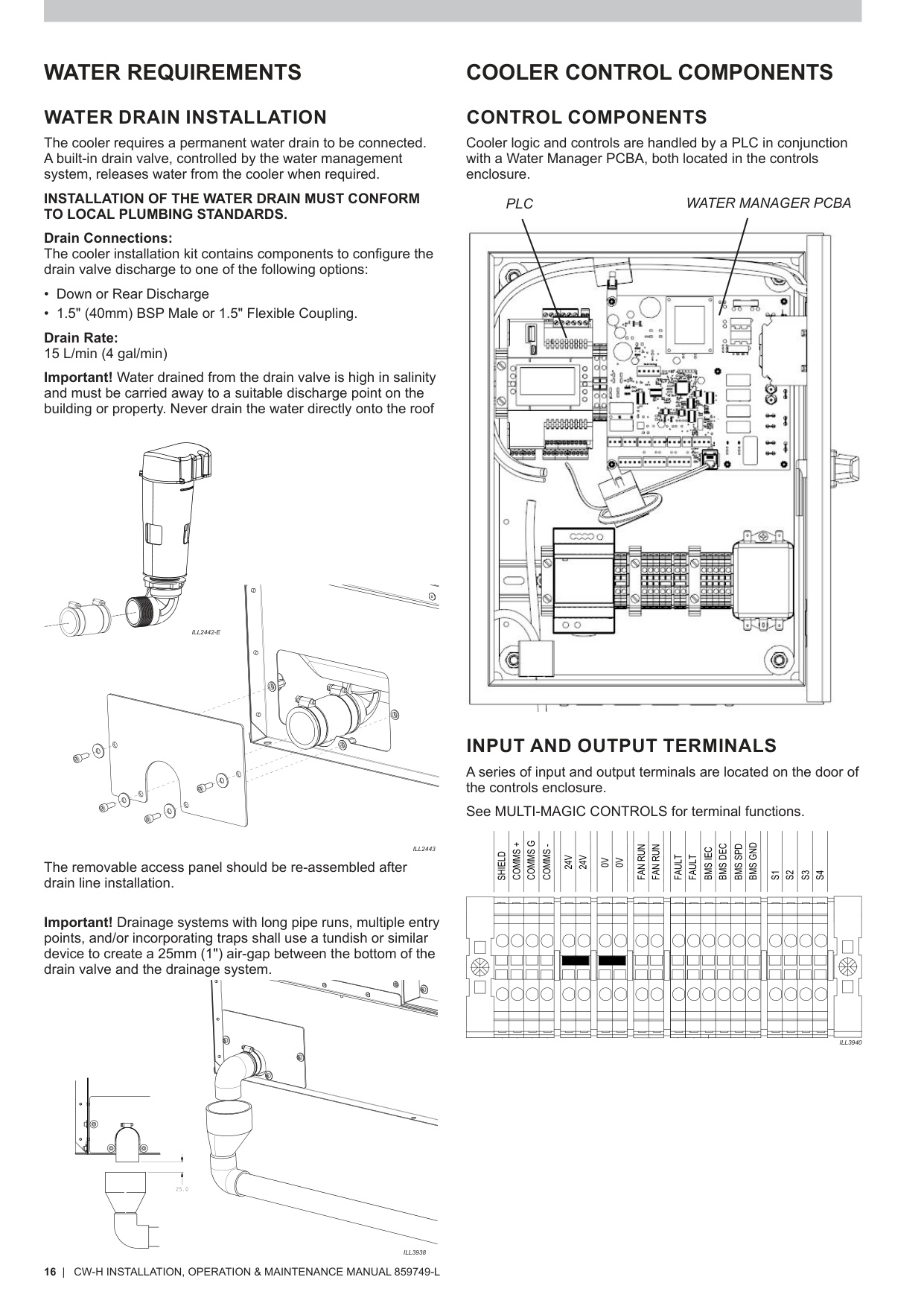
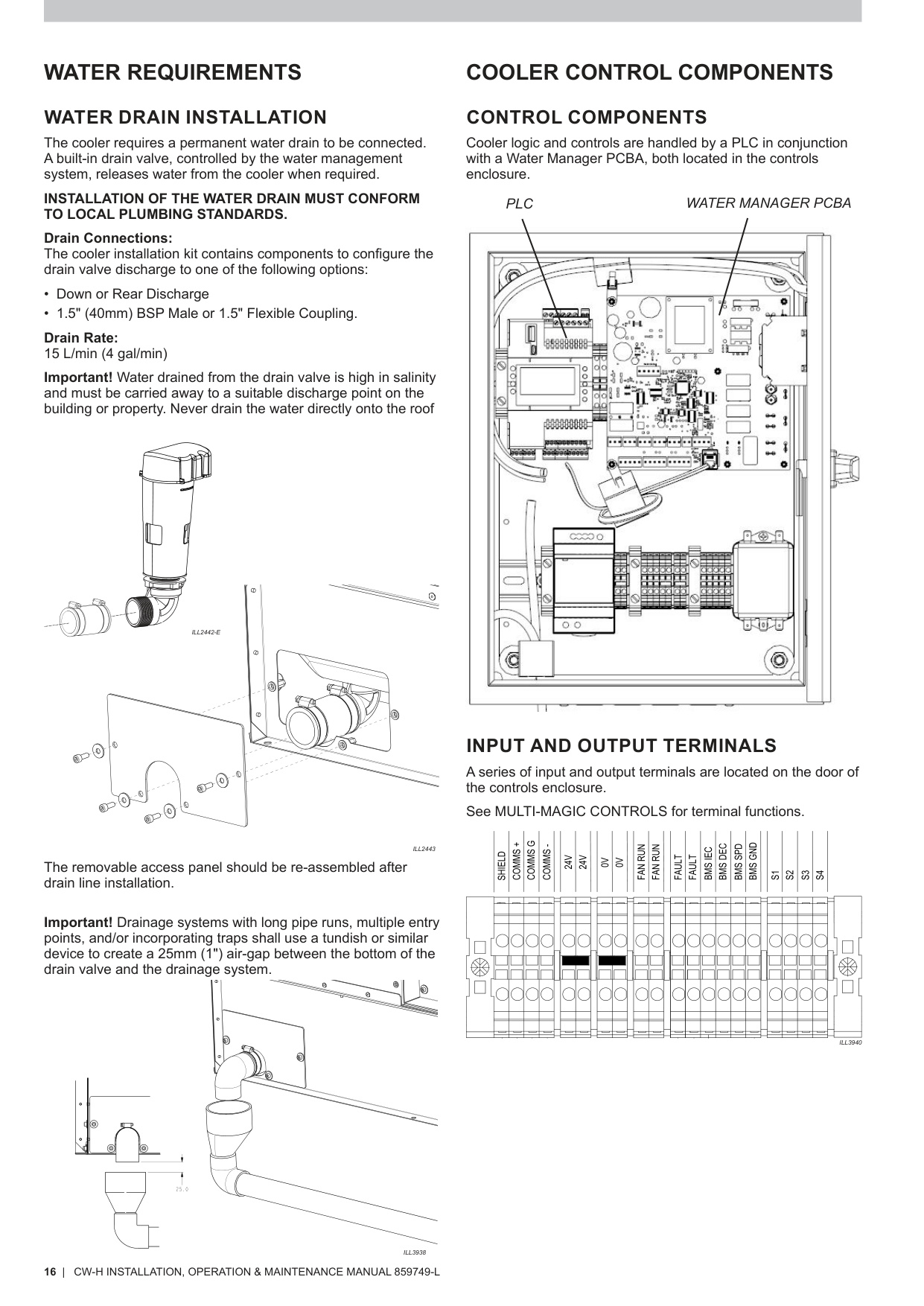
- Open the electrical enclosure door (see Cooler Control Components – p.16).
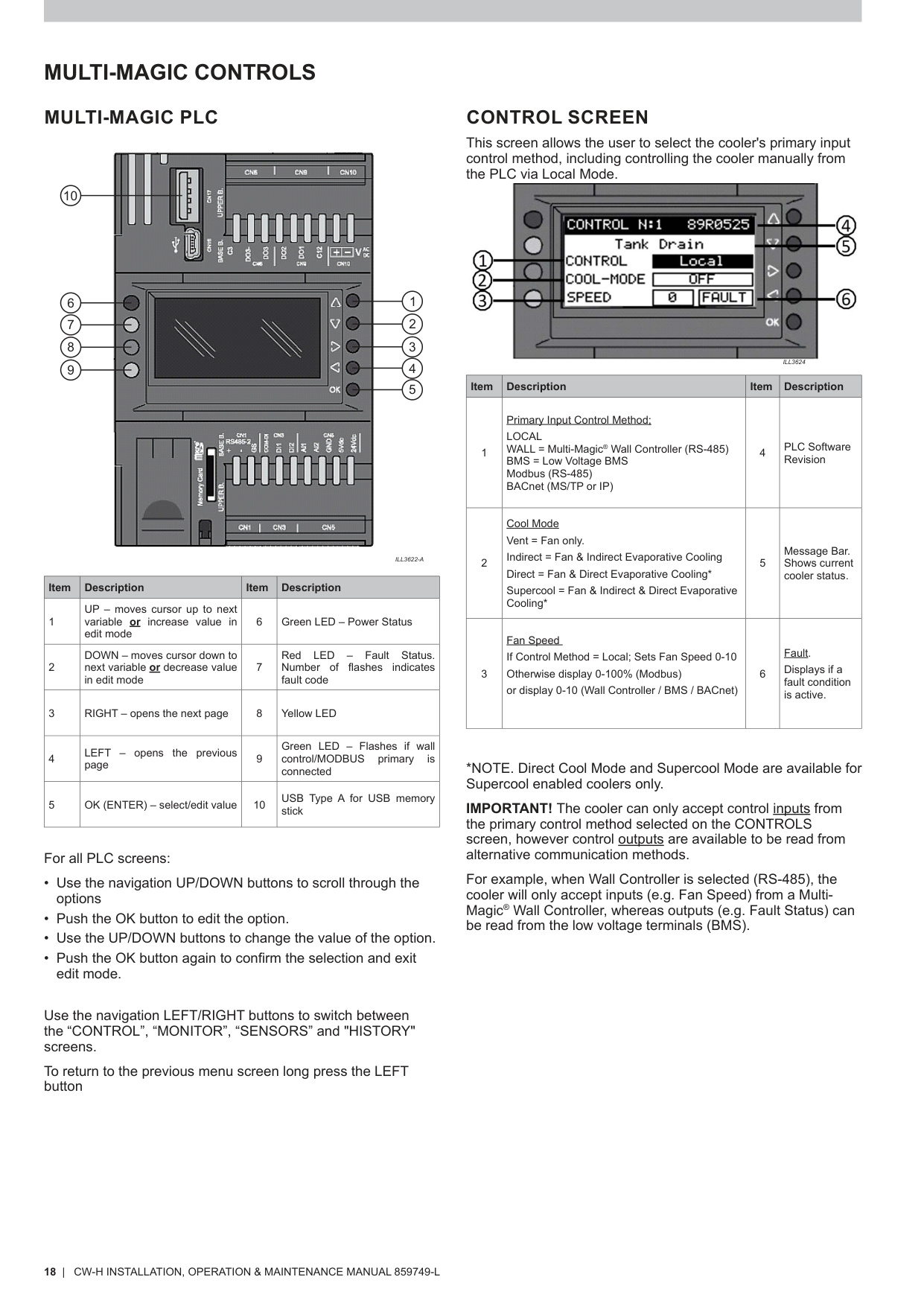
- The PLC is mounted on the enclosure door and includes the LCD screen, navigation keys, USB port, and indicator LEDs (PLC layout – p.18).
5. Removing the Existing PLC
- Isolate power before disconnecting anything.
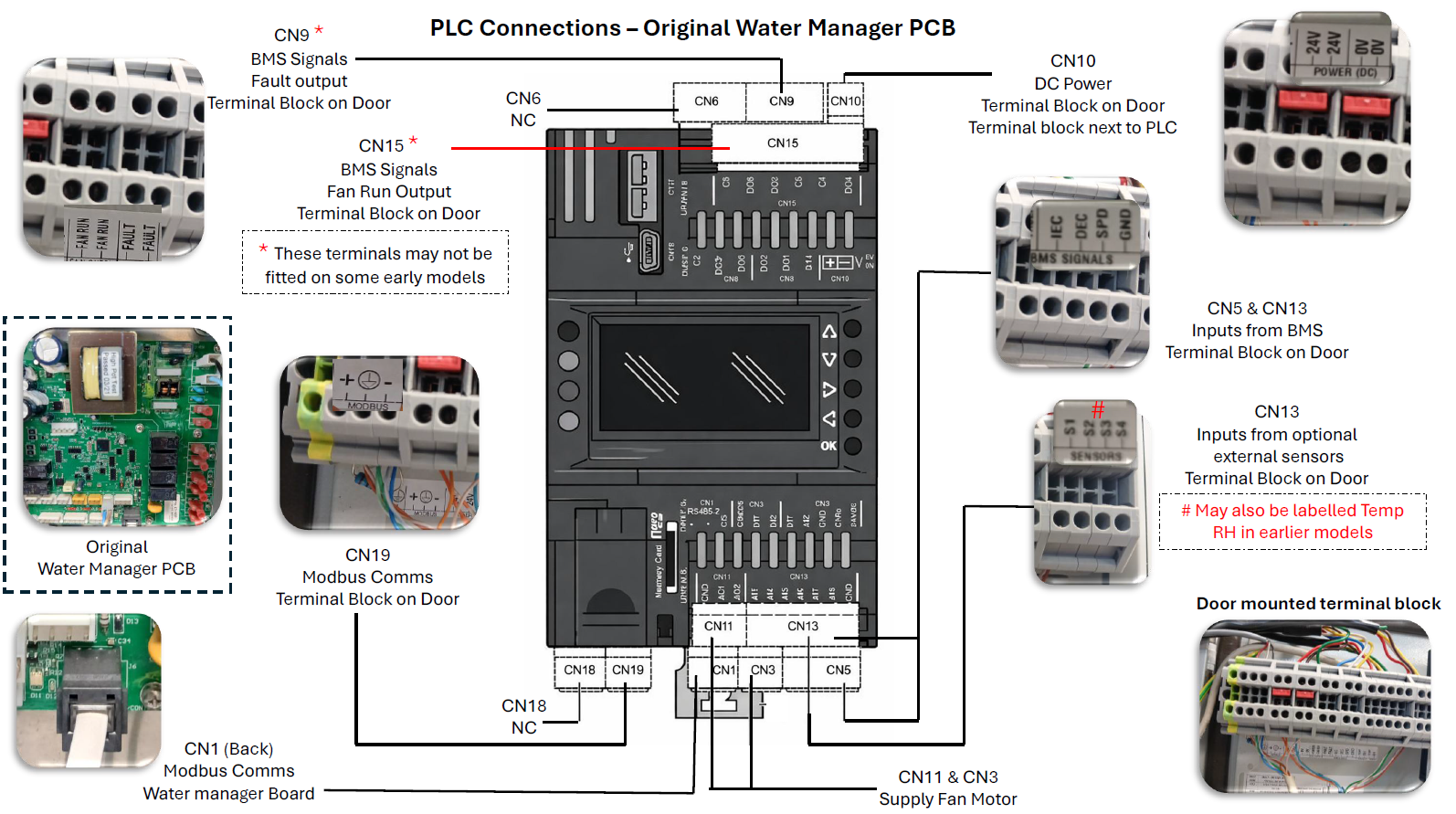
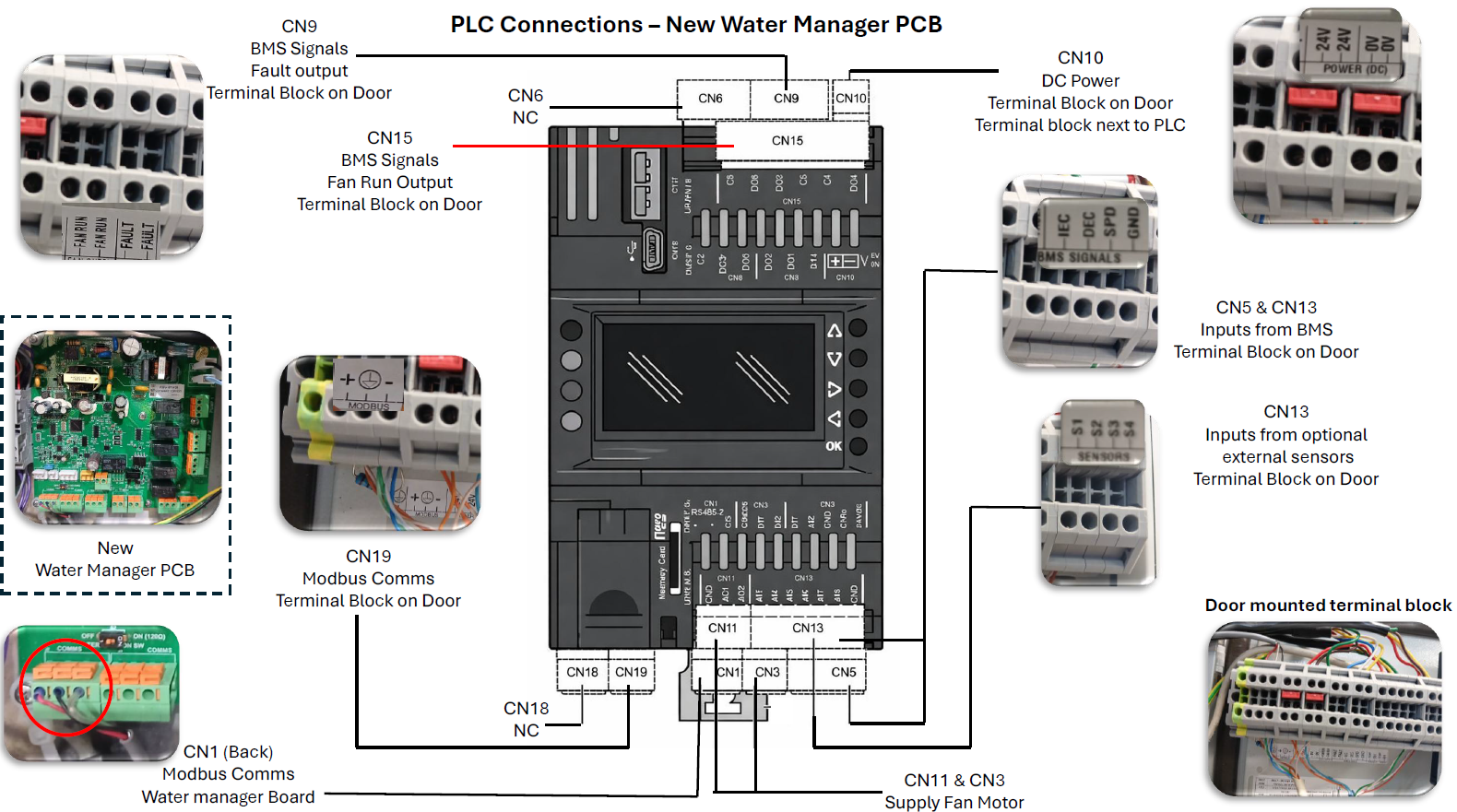
- Disconnect all connectors from the PLC:
- RS‑485 (Wall / Modbus / BACnet)
- Sensor inputs (S1–S4)
- 24VDC power
- BMS inputs/outputs
- Label the connectors for reinstallation (careful labelling and identifying connectors at this stage is important).
- Remove retaining screws and lift out the PLC carefully.
6. Installing the Replacement PLC
- Fit the new PLC and secure using the mounting screws.
- Reconnect wiring as labelled:
- 24VDC supply
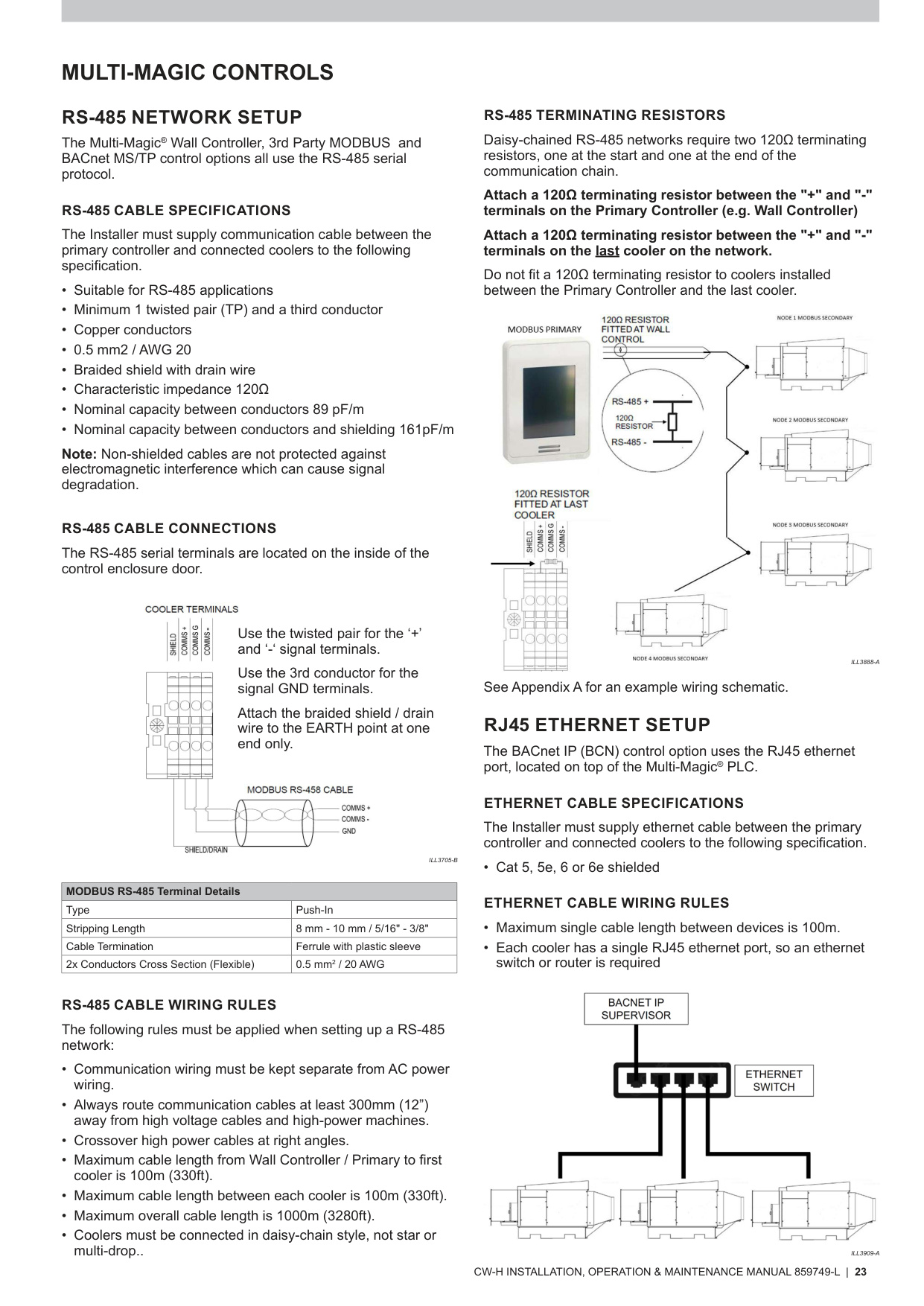
- RS‑485 (observe polarity; see RS‑485 Cable Connections – p.23)
- Sensors (S1–S4) (Sensor inputs – p.19)
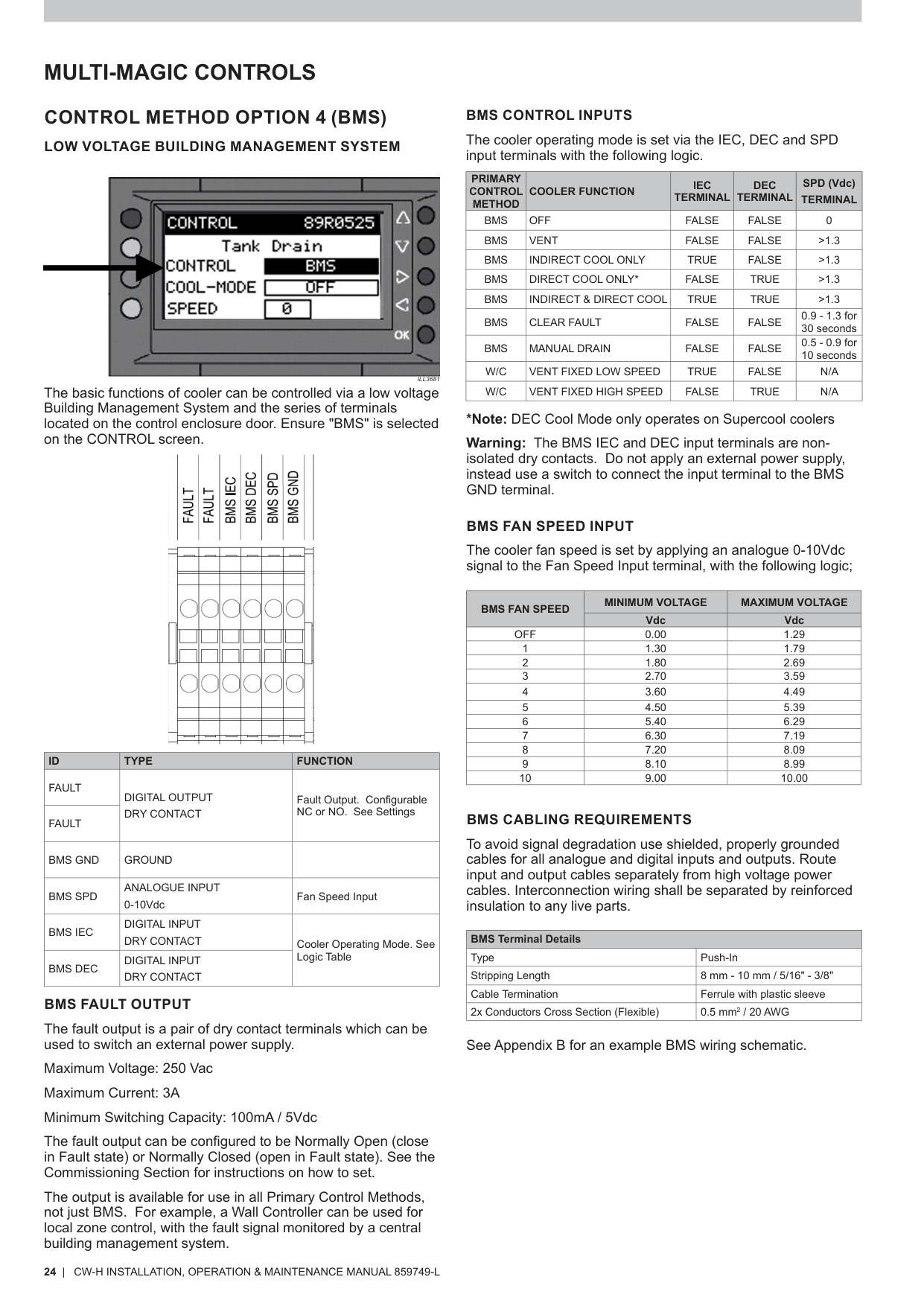
- BMS terminals (BMS Input Logic – p.24)
- Ensure the shielded RS‑485 drain is grounded only at one end (RS‑485 Shielding Rules – p.23).
7. Restoring Configuration After PLC Replacement
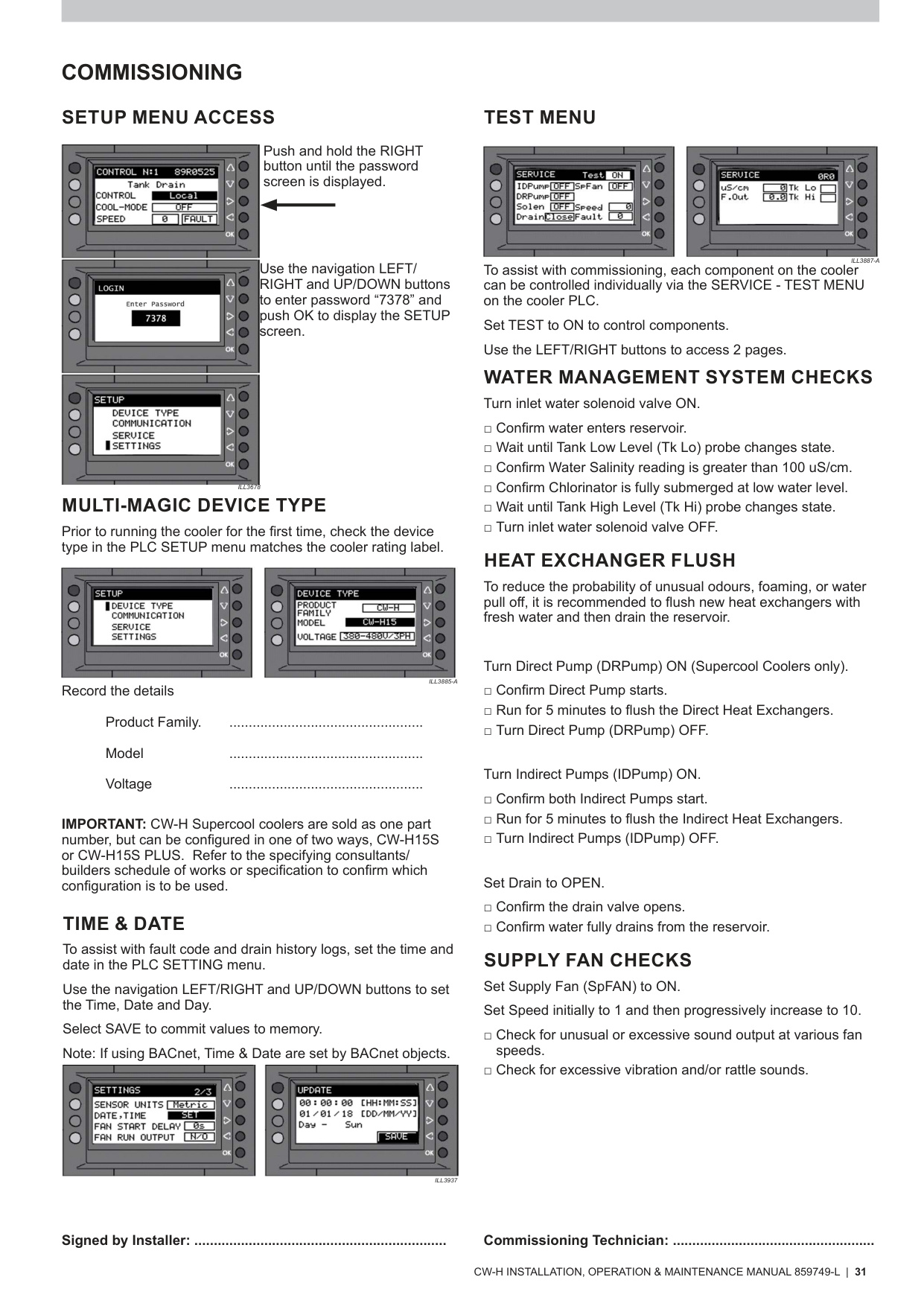
7.1 Accessing Setup Menu
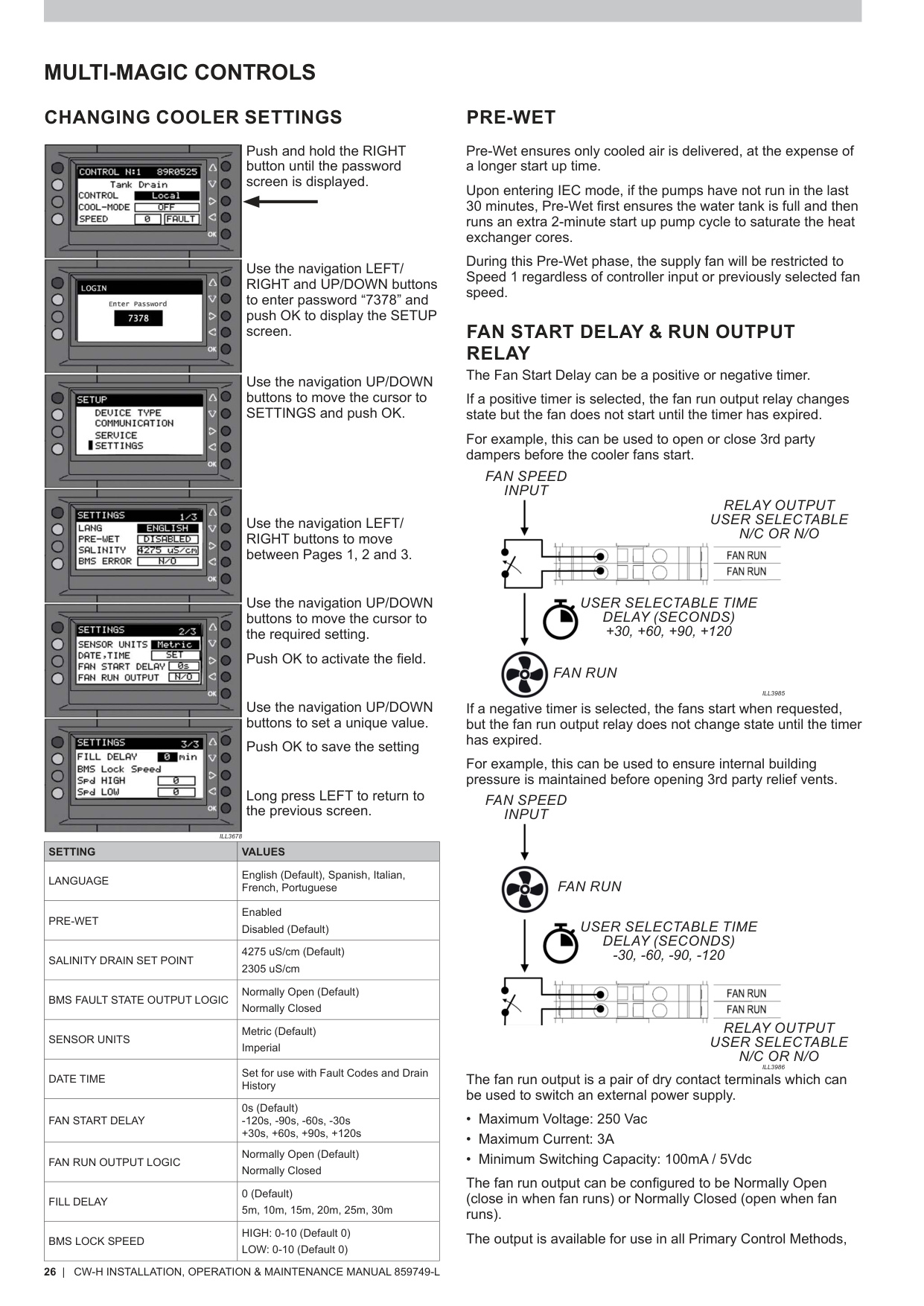
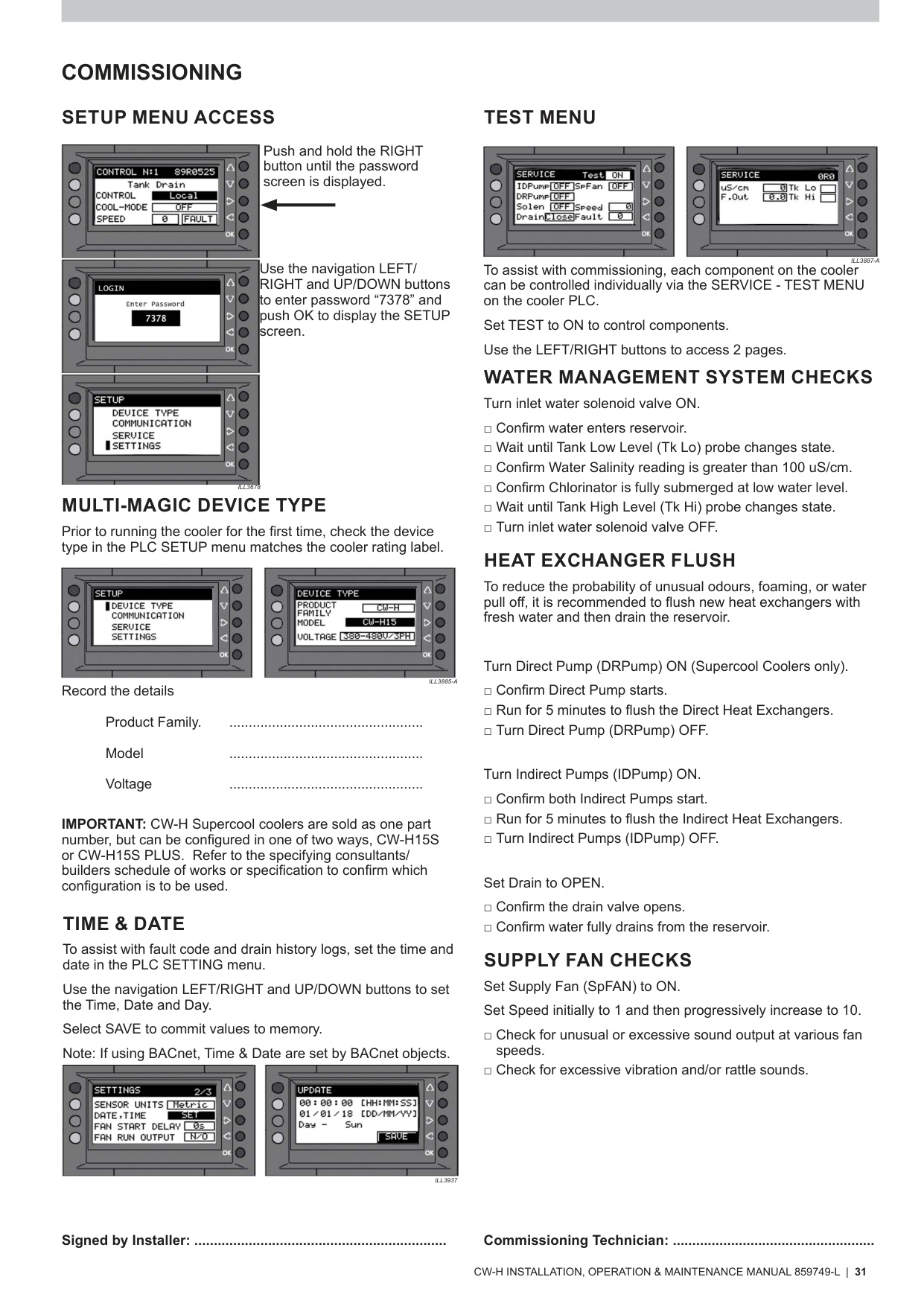
- Hold RIGHT button → password screen.
- Enter 7378.
(Setup Access – p.26)
7.2 Select Correct Device Type
Navigate SETUP → DEVICE TYPE (see p.13 & p.31):
- CW‑H15
- CW‑H15S
- CW‑H15S Plus
- CW‑H10
Important: Must match the unit rating label.
7.3 Restore Control Method
Set the correct Primary Input Control Method under CONTROL screen – p.18:
- Local
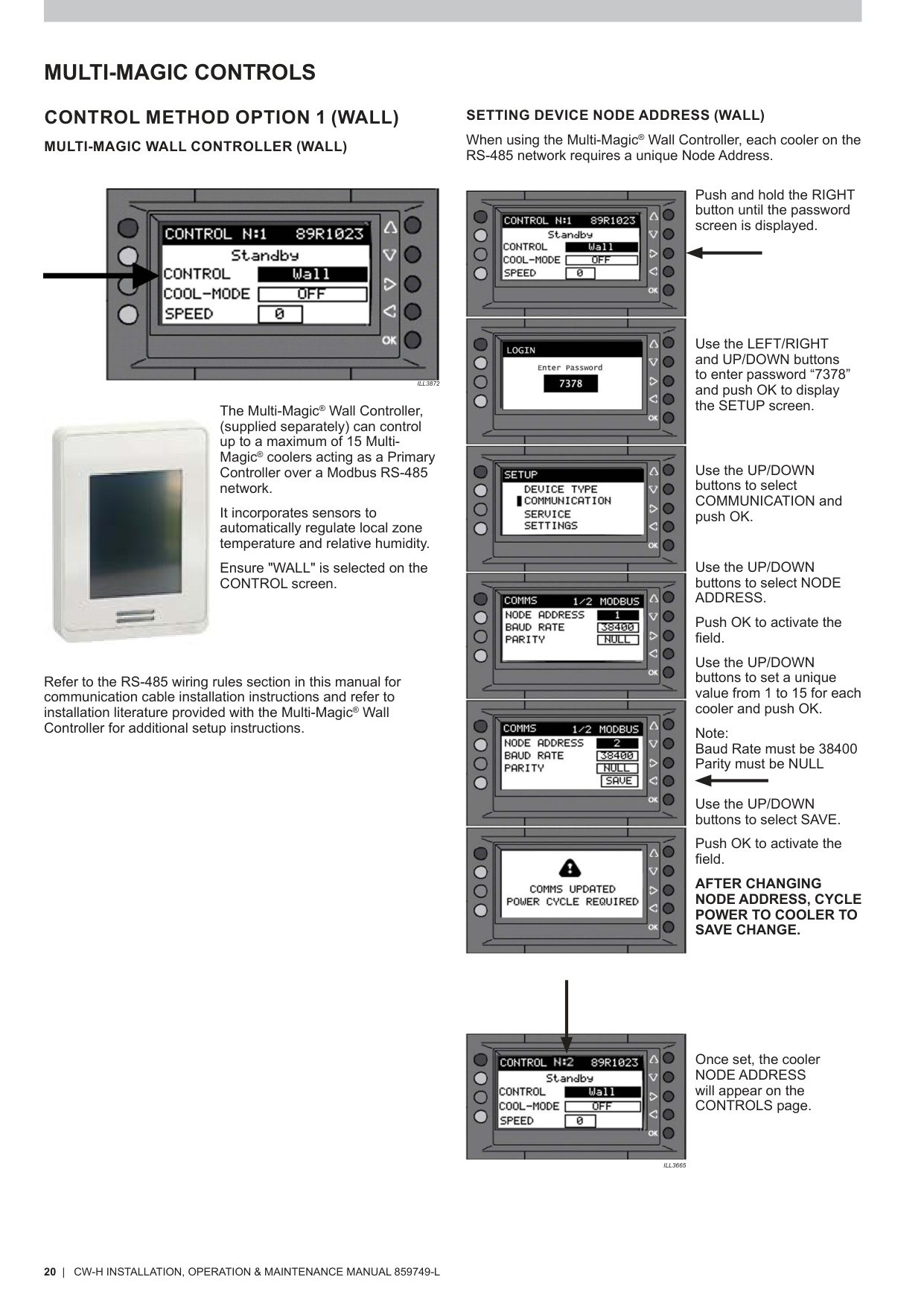
- Wall Controller (RS‑485) (Wall Controller Setup – p.20)
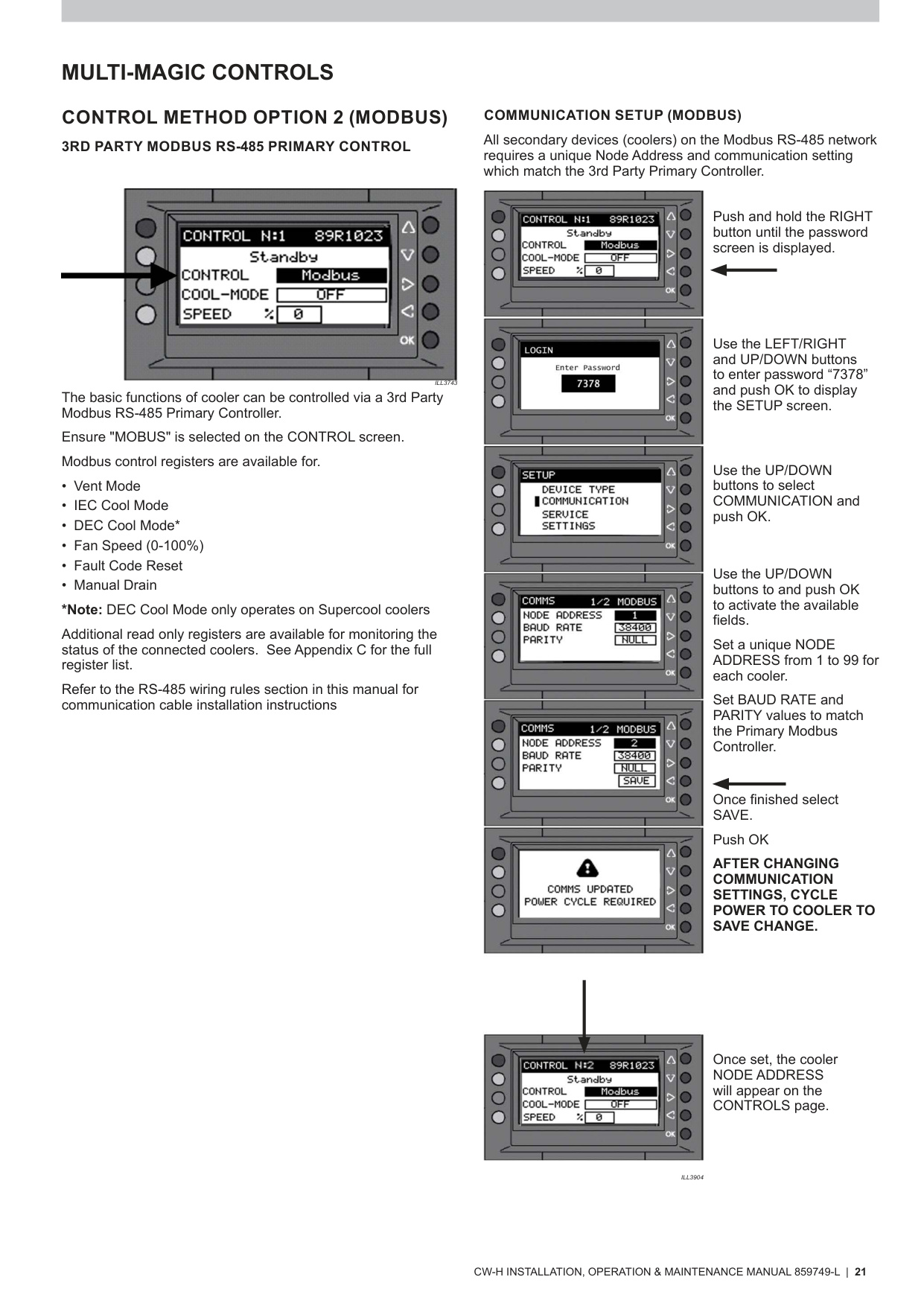
- Modbus (p.21)
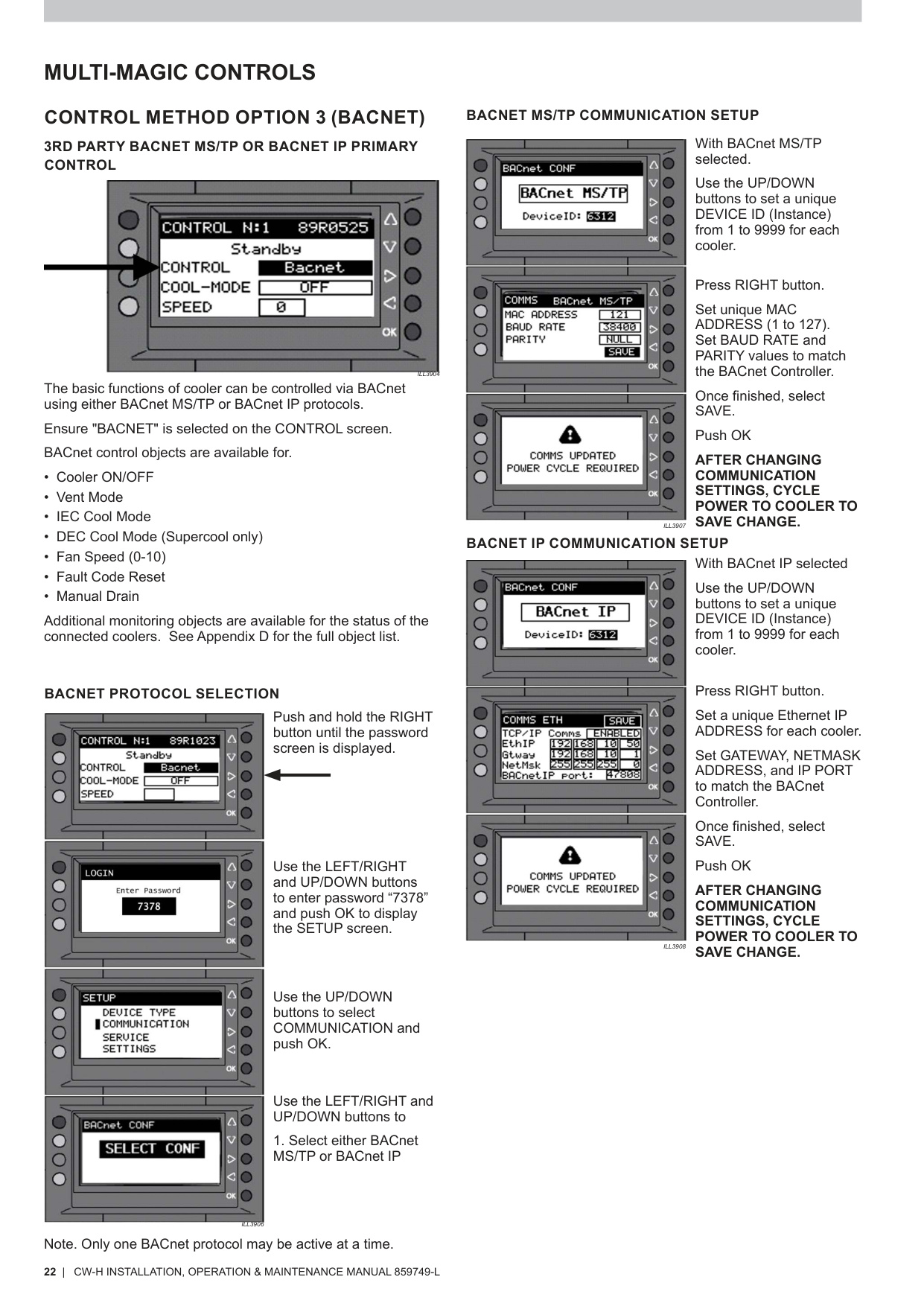
- BACnet MS/TP or IP (p.22)
- BMS Low‑Voltage Control (p.24)
7.4 Communication Settings
Wall Controller (p.20)
- Node: 1–15
- Baud Rate: 38400
- Parity: NULL
- Power‑cycle cooler after saving.
Modbus (p.21)
- Node: 1–99
- Baud/Parity must match supervisor.
BACnet (p.22)
- MS/TP: Device ID (1–9999), MAC, Baud, Parity
- IP: IP Address, Gateway, Subnet Mask, Port (47808 default)
- Power‑cycle after changes.
7.5 Cooler Settings
Under SETUP → SETTINGS (p.26) restore:
- Pre‑Wet
- Salinity Drain Set Point
- Fan Start Delay
- Fill Delay
- BMS Lock Speed
- Sensor Units (Metric/Imperial)
- Date & Time (important for fault & drain history – p.31)
8. Commissioning After PLC Replacement
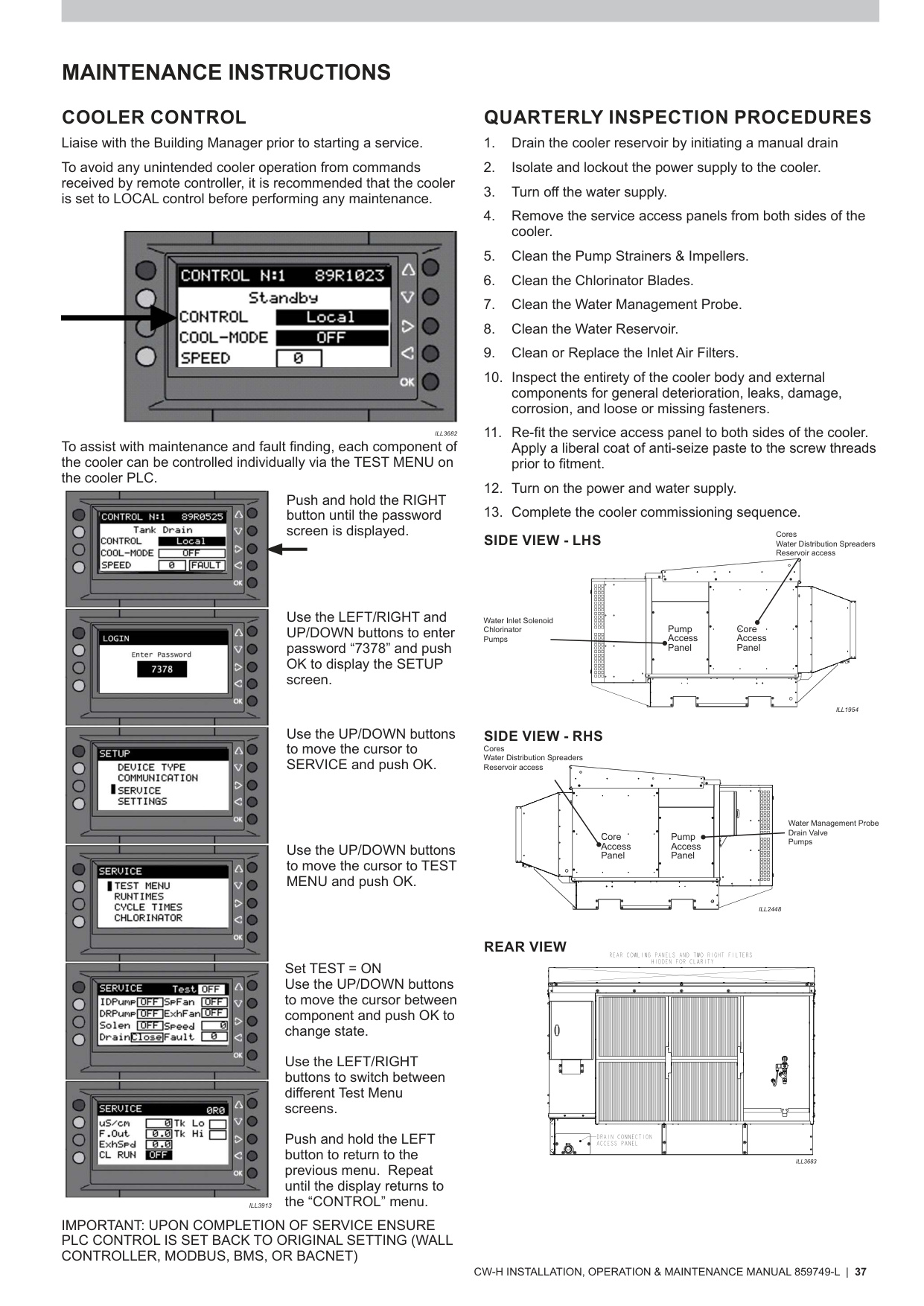
8.1 Component Testing (Service → Test Menu)
Use the SERVICE → TEST MENU on the PLC (see p.31 & p.37):
- Inlet Solenoid
- Drain Valve
- Indirect Pump
- Direct Pump (Supercool only)
- Fan (Speeds 1–10)
8.2 Water Management System Verification
Checklist from p.31:
- Tank fills until Low Probe → detected
- Tank fills until High Probe → detected
- Salinity reading present (>100 µS/cm)
- Pumps activate in correct sequence
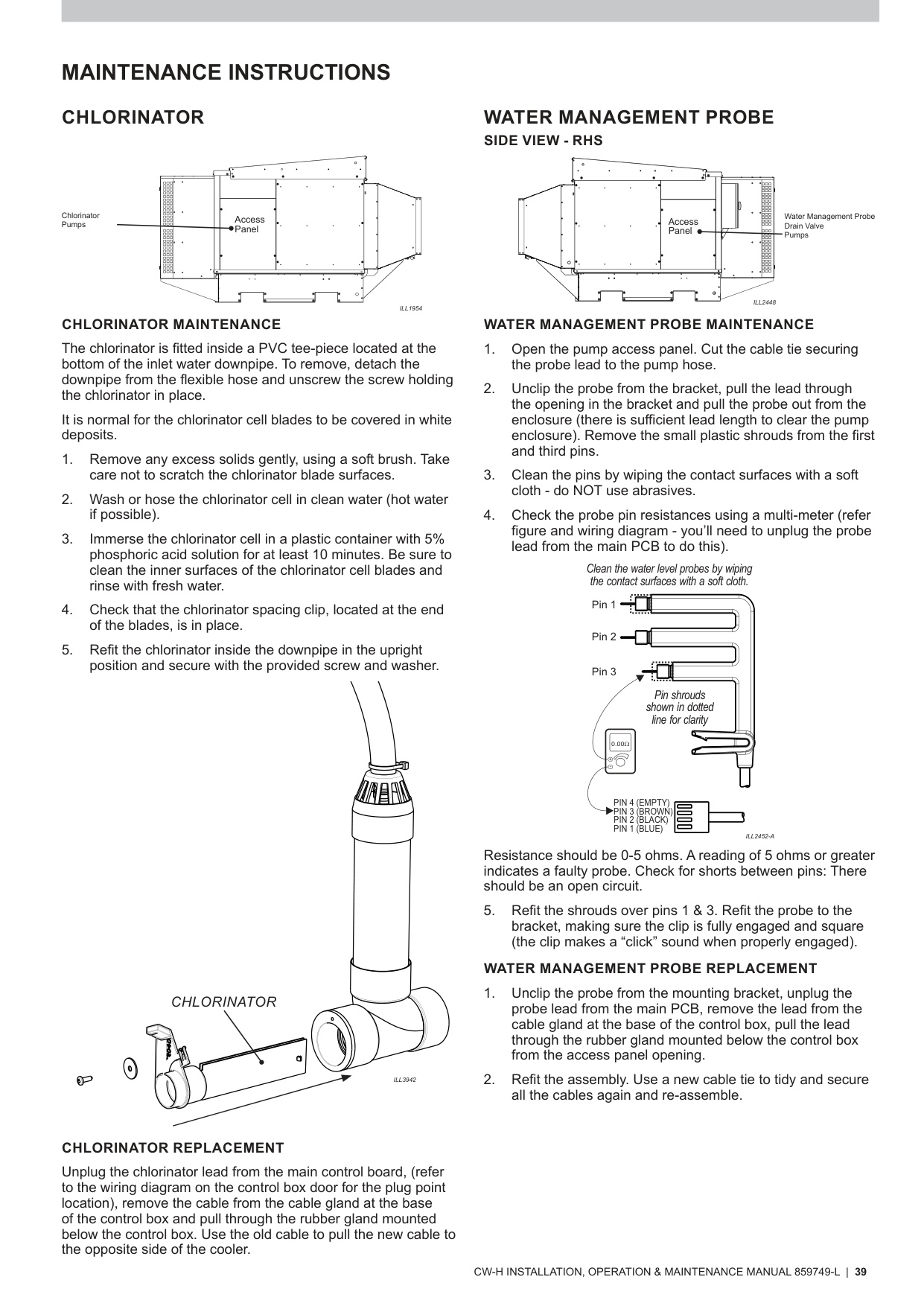
If probes misread, see Probe Maintenance – p.39.
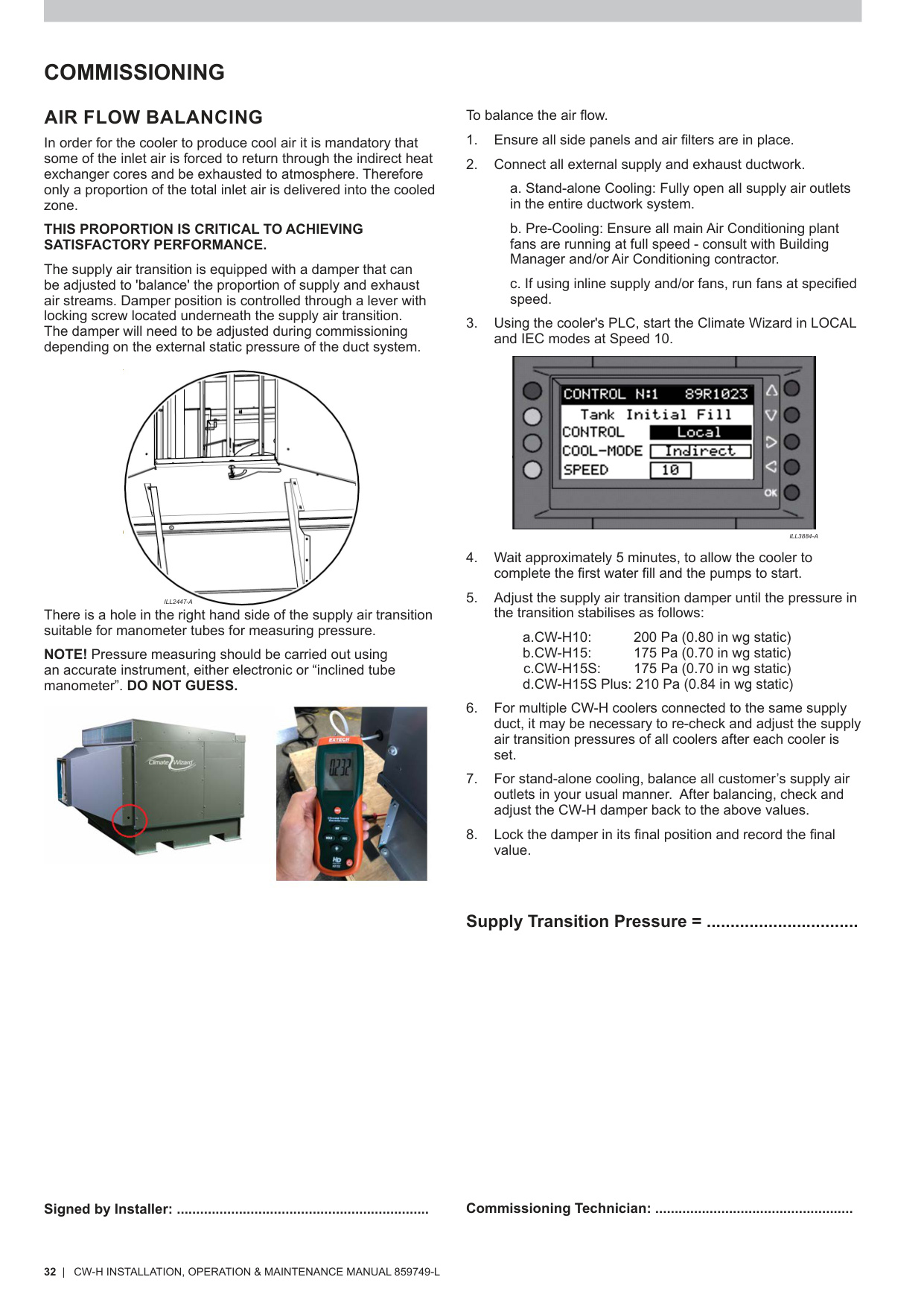
8.3 Airflow / Pressure Balancing
Refer to Air Flow Balancing – p.32:
- Run cooler in LOCAL → IEC, Speed 10 for 5 minutes
- Measure pressure at the transition test port
- Adjust transition damper to target plenum pressure:
- CW-H10: 200 Pa
- CW-H15: 175 Pa
- CW‑H15S: 175 Pa
- CW‑H15S Plus: 210 Pa
9. Troubleshooting – PLC Replacement Issues
9.1 PLC Not Powering On
Possible Causes
- No mains supply to enclosure
- Faulty 24VDC supply (p.14)
Actions
- Check isolation switch
- Verify 24VDC at PLC input
9.2 Wall Controller Not Communicating
Relevant Pages: p.20 (Wall), p.23 (RS‑485 rules), p.29 (Fault Code 16)
Possible Causes
- Incorrect primary control method
- Missing Modbus terminator
- RS‑485 polarity reversed
- Incorrect node address
Actions
- Set CONTROL → WALL
- Check 120Ω terminator at first & last device (p.23)
- Verify A/B wiring
- Confirm node 1–15
9.3 Fault Code 1 – PLC ↔ PCBA Communication Failure
Reference: p.29
Likely Causes
- Loose PCBA harness
- PCBA failure
- PLC failure
Fix
- Check PCBA status LEDs
- Reseat connectors
- Replace PCBA if PLC is new
9.4 Fault Code 7 – Supply Motor Error
Reference: p.29
Causes
- Loose motor cable
- VSD motor error
- Motor fault
Fix
- Check motor power & comms
- Check motor status via MONITOR screen – p.19
9.5 Inadequate Cooling
Reference: Troubleshooting – p.43
Causes
- Running in VENT mode
- DEC not enabled (Supercool)
- Low plenum pressure
- Dirty filters/cores
Fix
- Enable IEC or DEC
- Confirm DEVICE TYPE
- Rebalance airflow (p.32)
- Clean filters (p.40)
9.6 Water System Issues
Causes
- Blocked solenoid strainer (p.38)
- Blocked drain
- Faulty probe (p.39)
Fix
- Clean solenoid mesh
- Clean drain
- Verify probe resistance (<5 Ω)
Quick Page Reference Table
| Topic / Component | Description | Page(s) |
|---|---|---|
| PLC Overview & Button Functions | PLC interface, LEDs, navigation buttons | p.18 |
| Control Screen Functions | Control method selection, fan control, system status | p.18 |
| Monitor Screens | Live status of pumps, valves, fan, water level | p.19 |
| Sensor Screens | S1–S4 sensor configuration | p.19 |
| History Screens | Fault history & drain logs | p.19 |
| Wall Controller Setup | RS‑485 node, baud rate, parity, setup instructions | p.20 |
| Modbus Setup | Node ID, baud/parity settings, communication requirements | p.21 |
| BACnet MS/TP Setup | Device ID, MAC, baud, parity | p.22 |
| BACnet IP Setup | IP address, gateway, subnet mask, port | p.22 |
| RS‑485 Cable Specs | Cable requirements | p.23 |
| RS‑485 Connections | A/B polarity, GND, shield termination | p.23 |
| RS‑485 Wiring Rules | Shielding, daisy‑chain rules, EM separation | p.23 |
| RS‑485 Terminators | Where to install 120 Ω termination | p.23 |
| BMS Input Logic | IEC / DEC / SPD control truth‑table | p.24 |
| BMS Terminals | Fan speed, IEC/DEC contacts, BMS GND | p.24 |
| Manual Drain Function | Behaviour and restrictions | p.25 |
| Freeze Protection | Auto‑drain behaviour below 5 °C | p.25 |
| PLC Settings Menu | Pre‑Wet, delays, BMS lock speed, units, fan relay | p.26 |
| Fault Codes (Descriptions) | Complete fault table including Codes 1, 7, 16 | p.29 |
| Setup Menu Access | Password 7378, navigation | p.31 |
| Device Type Configuration | CW‑H10, H15, H15S, H15S Plus selection | p.31 |
| Test Menu (Service Mode) | Component testing (valves, pumps, fan) | p.31 & p.37 |
| Water Management Checks | Probe detection, salinity update, drain behaviour | p.31 |
| Air Flow Balancing | Plenum pressure targets (all models) | p.32 |
| Pump Maintenance | Strainers, impellers, pump housing | p.38 |
| Water Management Probe Maintenance | Cleaning, resistance testing, troubleshooting | p.39 |
| Drain Valve Maintenance | O‑rings, replacement, sealing surfaces | p.40 |
| Indirect / Direct Heat Exchanger Access | Removing cores, spreaders | p.41–42 |
| Troubleshooting Table | Cooling performance, water issues, motor errors | p.43 |
Step 4 — Climate Wizard CW‑H – Accessing the Multi‑Magic PLC (Control Enclosure & PLC Layout Pages)
Pages used: 16 & 18
Step 6 — Climate Wizard CW‑H – Installing Replacement Multi‑Magic PLC (RS‑485 Wiring, BMS Terminals, Power Connections)
Pages used: 18, 23 & 24
Step 7 — Climate Wizard CW‑H – PLC Configuration Restore (Device Type, Wall Controller, Modbus, BACnet, Setup Menu Pages)
Pages used: 26, 20, 21, 22 & 31
Step 8 — Climate Wizard CW‑H – Post‑Replacement PLC Commissioning (Test Menu, Water Management Checks, Airflow Balancing)
Pages used: 31, 32, 37 & 39