⚠️ Safety Notice – Commercial Evaporative Cooling Products
This equipment must only be installed, commissioned, serviced and repaired by suitably qualified and licensed personnel.
Before commencing work, complete a task-specific risk assessment and ensure safe roof access, fall protection requirements, electrical isolation procedures, service clearances and appropriate PPE have been considered. All work must comply with applicable regulations, standards and manufacturer requirements.
Particular care must be taken when working at heights, in roof spaces, ceiling spaces and other restricted access areas. Additional consideration must be given to confined working conditions, electrical hazards, moving parts, water systems, wet surfaces, manual handling risks and weather conditions.
Do not proceed if safe access, weather conditions, required clearances, confined space risks or appropriate safety controls cannot be achieved and maintained.
Safety takes priority over diagnosis, repairs, installation schedules and customer expectations. If the task cannot be completed safely, it must not proceed until the risks have been adequately controlled.
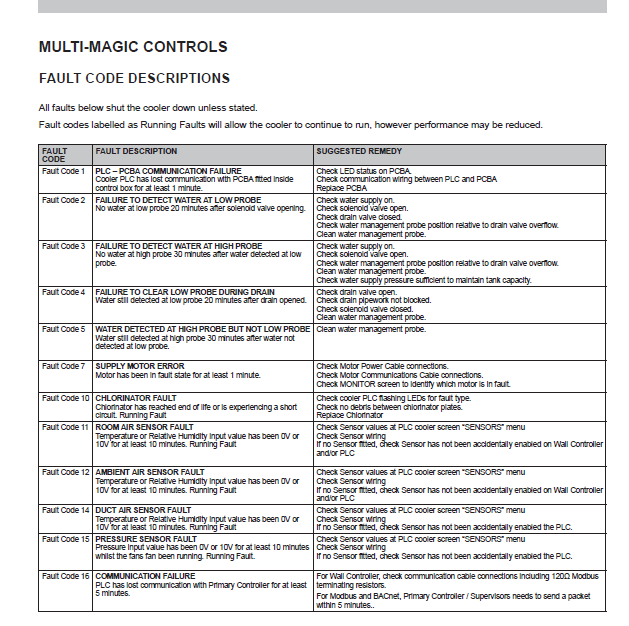
Fault Code 10 – Chlorinator Fault (CW‑H Series)
Manual References: Pdf Pages 29, 39, 19, 27
Summary
Fault Code 10 = the chlorinator isn’t working.
Most of the time it’s caused by dirt, scale build‑up, or the chlorinator wearing out.
Quick Fix:
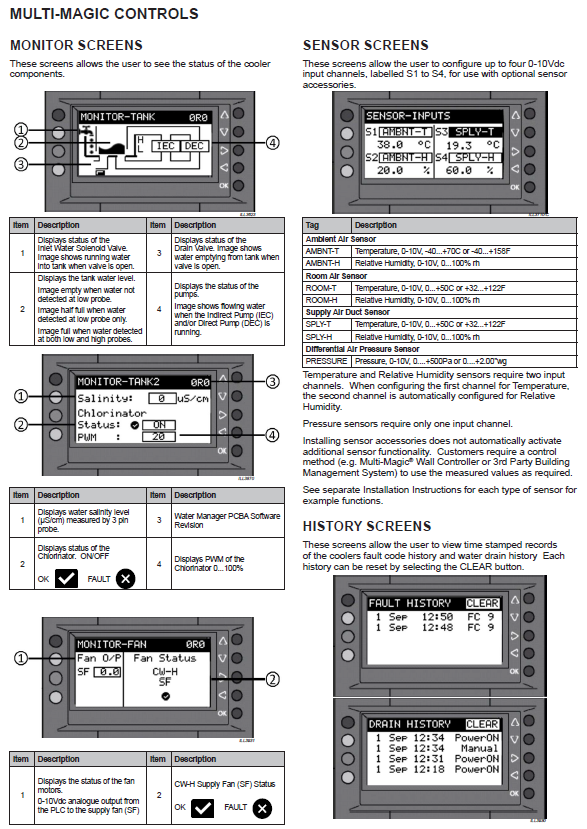
- Check water salinity on the PLC screen (page 19).
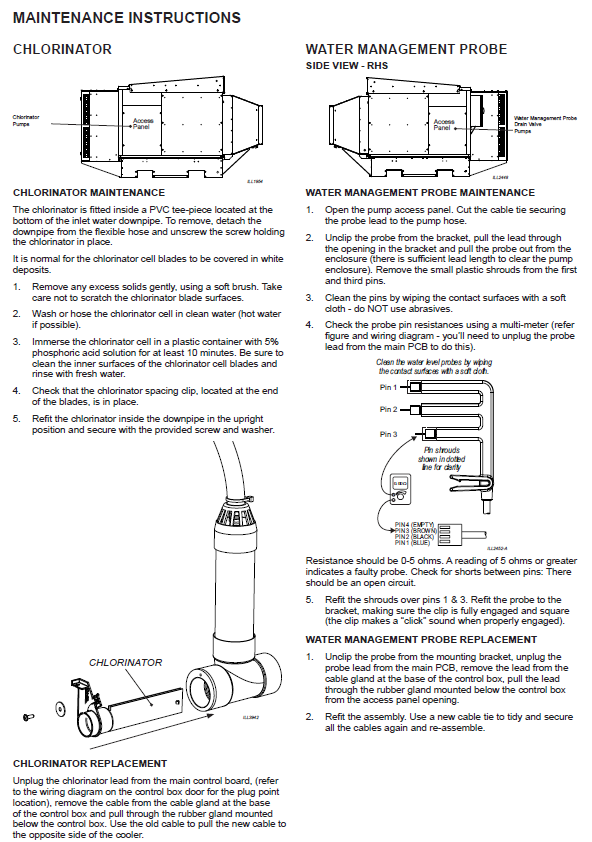
- Clean the chlorinator (page 39).
- If still faulty → replace chlorinator (page 39).
- Clear the fault on the PLC (page 28–29).
1. What Fault Code 10 Means
The PLC has detected a chlorinator fault (end‑of‑life or short circuit).
Referenced on page 29 of the manual.
The cooler continues running, but no chlorination occurs.
2. Common Causes
- Chlorinator plates clogged with mineral build‑up (page 39)
- Debris caught between plates (page 39)
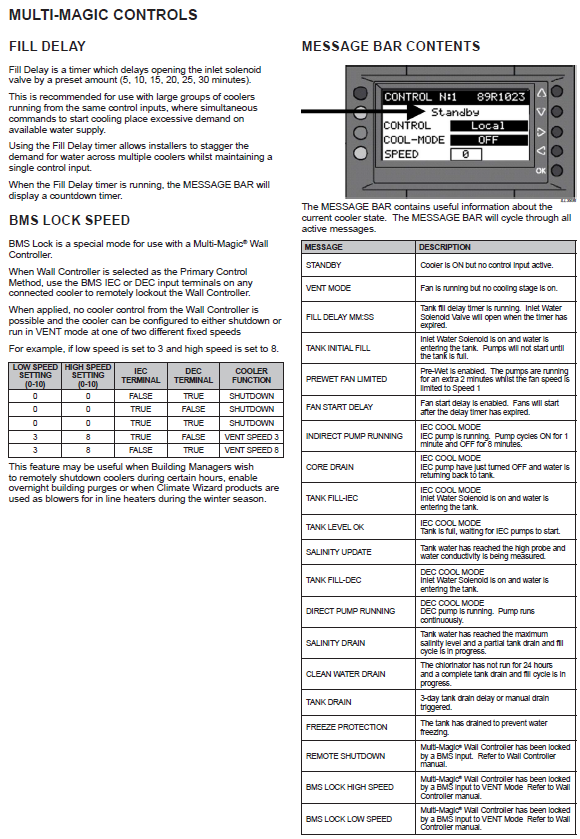
- Low water salinity (<1500 µS/cm) preventing operation (page 17)
- Chlorinator electrically shorted or worn out (page 29)
3. How to Check Water Salinity
The cooler measures water salinity automatically using a 3‑pin probe.
Steps:
- Go to PLC screen → HISTORY
- Look for Water Salinity (µS/cm)
(Displayed on page 19) - Chlorinator only runs when salinity is >1500 µS/cm
(Detailed on page 17)
If salinity reads 0, very low, or looks incorrect → probe may be dirty or faulty.
Probe verification:
- Instructions on page 39
- Resistance should be 0–5 Ω (higher = faulty)
4. How to Fix Fault Code 10
A. Clean the Chlorinator (Most common fix)
Full cleaning procedure is on page 39:
- Turn off power & water.
- Remove chlorinator from PVC tee.
- Brush off mineral deposits gently (don’t scratch plates).
- Rinse with clean warm water.
- Soak in 5% phosphoric acid for 10 minutes.
- Rinse again and reinstall upright with spacing clip intact.
B. Replace the Chlorinator (If cleaning doesn’t fix it)
Replacement steps on page 39:
- Turn off power & water.
- Unplug chlorinator cable from main PCB.
- Pull cable through the gland.
- Remove chlorinator assembly.
- Use old cable to “pull‑through” the new one.
- Reinstall and reconnect.
- Restore power and check on PLC.
5. Clear the Fault & Run Post‑Checks
Information located on pages 27–29:
After repairs:
- Check Active Faults → RESET (page 28)
- Confirm chlorinator shows ON during IEC mode (page 19)
- Ensure salinity is above 1500 µS/cm (page 17)
- Chlorinator PWM activity visible in History (page 19)
6. Chlorinator Replacement Interval
Based on maintenance schedule (page 34):
- Seasonal use: Replace every 4 years
- Year‑round commercial: Replace every 2 years