Post 2020 Climate Wizard CW‑H – Fault Codes 2, 3, 4 & 5: Water Level, Fill & Drain Probe Faults (FC2 FC3 FC4 FC5)
⚠️ Safety Notice – Commercial Evaporative Cooling Products
This equipment must only be installed, commissioned, serviced and repaired by suitably qualified and licensed personnel.
Before commencing work, complete a task-specific risk assessment and ensure safe roof access, fall protection requirements, electrical isolation procedures, service clearances and appropriate PPE have been considered. All work must comply with applicable regulations, standards and manufacturer requirements.
Particular care must be taken when working at heights, in roof spaces, ceiling spaces and other restricted access areas. Additional consideration must be given to confined working conditions, electrical hazards, moving parts, water systems, wet surfaces, manual handling risks and weather conditions.
Do not proceed if safe access, weather conditions, required clearances, confined space risks or appropriate safety controls cannot be achieved and maintained.
Safety takes priority over diagnosis, repairs, installation schedules and customer expectations. If the task cannot be completed safely, it must not proceed until the risks have been adequately controlled.
(Technical Explanation & Installation and Operation Manual 859749‑L References)
This article covers the following water‑management related fault codes on Climate Wizard CW‑H units:
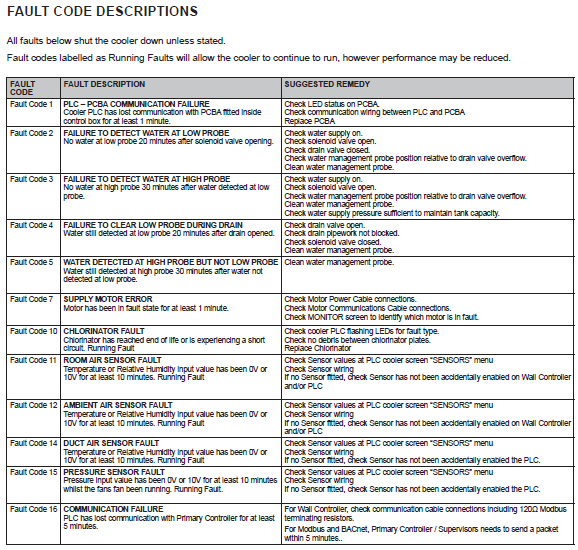
- Fault Code 2 (FC2) – Failure to detect water at Low Probe
- Fault Code 3 (FC3) – Failure to detect water at High Probe
- Fault Code 4 (FC4) – Failure to clear Low Probe during drain
- Fault Code 5 (FC5) – Water detected at High Probe but not Low Probe
These faults all relate to the Water Management System and should be diagnosed together, as they share common components, timing logic, and root causes.
Manual Reference: Fault Code Descriptions — p.29
How CW‑H Water Level Detection Works
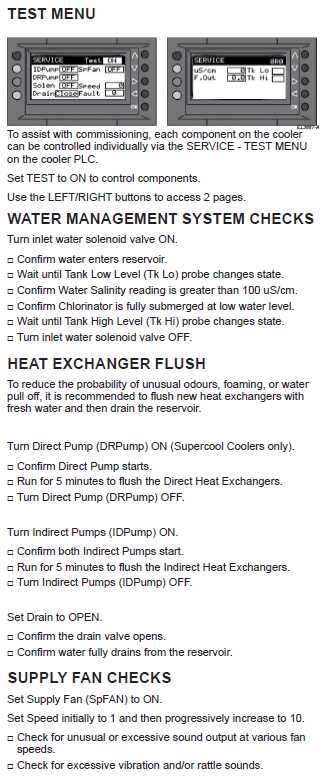
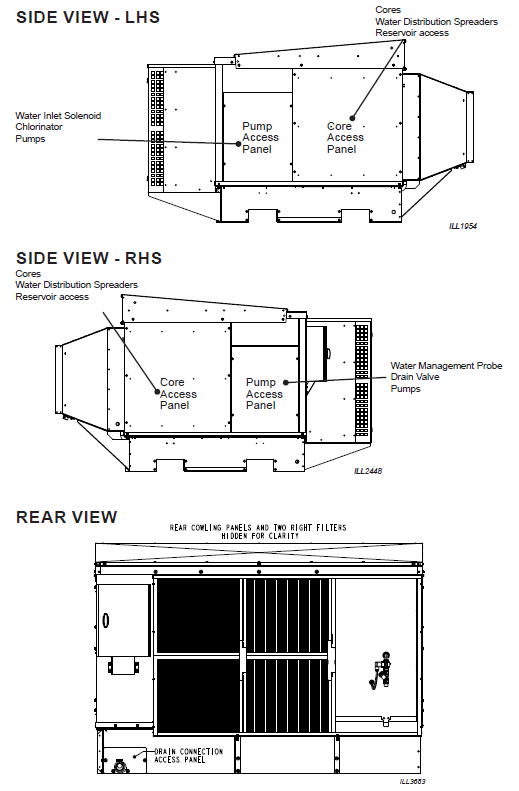
Climate Wizard CW‑H coolers use a 3‑pin water management probe installed in the tank to detect both water level and water salinity.
The probe provides two level signals:
- Low Probe – Confirms minimum safe water level for pump operation
- High Probe – Confirms the tank has reached full operational level
The PLC relies on these signals to:
- open and close the inlet solenoid valve
- permit or inhibit pump operation
- control drain and salinity cycles
- validate correct tank fill and empty sequences
If the probe does not change state within defined time limits, the PLC assumes unsafe water conditions and generates Fault Codes 2–5, shutting the cooler down.
Manual References:
Water Management System — pp.16–17
Water Management Probe — p.39
⚠️ Water Supply Requirements (Page 15)
This section is mandatory reading before diagnosing FC2 or FC3.
A very high percentage of FC2–FC5 faults are caused by water supplies that do not meet the CW‑H installation specifications, even though water is visibly connected and flowing.
The CW‑H water management logic is time‑based. Slow, restricted, unstable, or poorly isolated supplies will cause fill and drain faults.
✅ CW‑H Water Supply Specifications (From Manual Page 15)
For correct operation, each CW‑H unit must have:
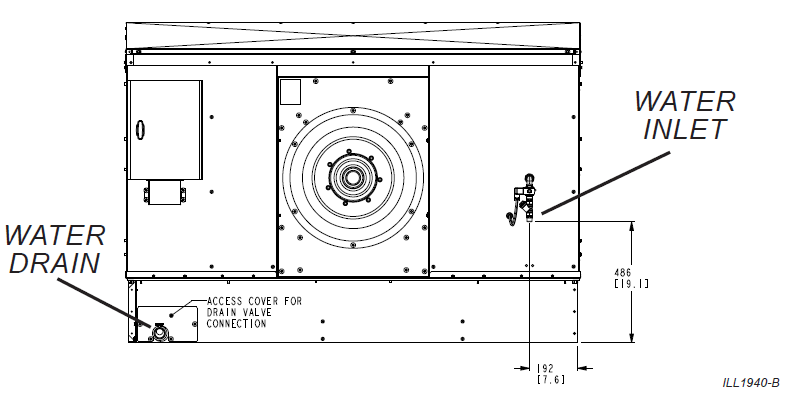
- Water connection size:
½″ BSP (permanent connection – not hose‑fed) - Minimum static pressure:
100 kPa (15 psi) - Maximum static pressure:
800 kPa (115 psi) - Minimum flow rate:
10 L/min per cooler - Recommended flow rate:
20 L/min per cooler - Maximum water temperature:
40 °C - Water quality:
Potable water suitable for human consumption - Minimum water salinity:
> 100 µS/cm - Minimum filtration:
500‑micron inlet filtration
⚠️ Supplies that fall outside any of these limits are considered non‑compliant and can directly cause FC2–FC5.
✅ Isolation & Valve Requirements
Incorrect isolation valves are a known cause of repeat FC2 and FC3 faults.
- Only ball valves or approved non‑return (check) valves are permitted for water isolation
- Gate valves, stop cocks, globe valves, or multi‑turn valves must NOT be used
Incorrect valve types can:
- shed debris into the line
- create pressure instability
- introduce back‑pressure
- cause the inlet solenoid valve to jam or stick partially open/closed
These conditions frequently result in:
- slow filling
- incomplete tank fills
- FC2 or FC3 repeating after reset
✅ Additional Installation Requirements That Affect FC2–FC5
- A manual isolation valve must be installed adjacent to the cooler
- A pressure regulator must be installed if supply exceeds 800 kPa
- If a non‑return valve is used, a pressure relief valve is recommended
- Pipework must be flushed before connection
- Water hammer must be addressed if present
- Drain‑down capability must be provided in freezing climates
Strong Diagnostic Rule (Field Proven)
If the tank cannot reliably fill from empty to the high probe within the allowed time,
you do not yet have a probe fault – you have a water supply problem.
Fault Code 2 – Failure to Detect Water at Low Probe
Fault Description
FC2 occurs when no water is detected at the low probe within 20 minutes after the inlet solenoid valve is commanded open.
The PLC assumes water is not entering the tank and shuts the cooler down.
Manual Reference: p.29
Common Causes
- Water supply isolated or undersized
- Pressure below 100 kPa at the unit
- Inlet strainer partially blocked (< 500 µm effective)
- Incorrect isolation valve type restricting solenoid
- Solenoid valve not opening
- Drain valve stuck open
- Cooler out of level
- Fouled or contaminated probe
Troubleshooting Procedure
- Confirm isolation valve type (ball or non‑return only)
- Verify pressure and flow at the cooler
- Inspect and clean inlet strainer
- Confirm solenoid valve opens during fill
- Verify drain valve fully closes
- Observe physical water entry into tank
- Clean water management probe
- Confirm cooler is level
⚠️ Do not replace probes or PCBA until water supply compliance is confirmed.
Fault Code 3 – Failure to Detect Water at High Probe
Fault Description
FC3 occurs when water is detected at the low probe, but not at the high probe within 30 minutes.
The tank is filling but not reaching the required full level.
Manual Reference: p.29
Common Causes
- Flow rate below specification
- Pressure regulators set too low
- Blocked or restrictive isolation valves
- Partial drain valve leakage
- Multiple coolers filling on a shared supply
- Probe contamination
Troubleshooting Procedure
- Confirm supply satisfies Page 15 specifications
- Inspect isolation valve type and operation
- Measure or verify flow rate
- Inspect strainer and solenoid valve
- Check drain valve sealing
- Observe tank fill time and level rise
- Clean and inspect probe
? Repeated FC3 is almost always a supply or drain issue.
Fault Code 4 – Failure to Clear Low Probe During Drain
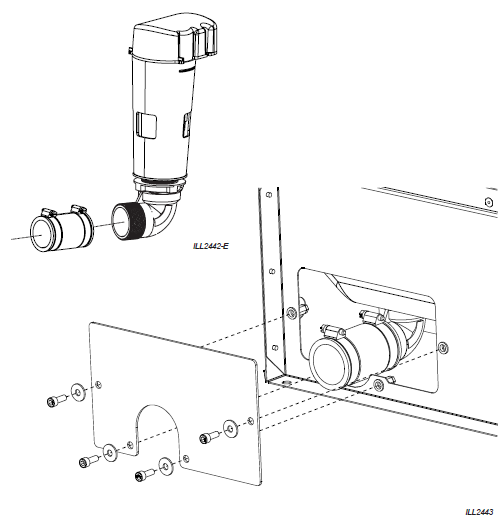
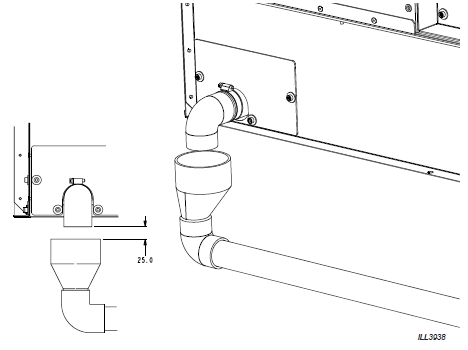
Fault Description
FC4 occurs when water is still detected at the low probe 20 minutes after a drain cycle begins.
This indicates the tank is not draining correctly.
Manual Reference: p.29
Common Causes
- Blocked or undersized drain pipework
- Back‑pressure from downstream plumbing
- Drain valve failure
- Poor drain installation
- Fouled probe giving false “wet” signal
Troubleshooting Procedure
- Confirm drain valve opens when commanded
- Verify strong, continuous drain discharge
- Inspect drain line for restrictions or traps
- Confirm drain installation meets requirements
- Clean probe
- Perform full manual drain and observe empty tank
Fault Code 5 – Water Detected at High Probe but Not Low Probe
Fault Description
FC5 occurs when water is detected at the high probe, but not at the low probe.
This is physically impossible in normal operation and indicates invalid probe readings.
Manual Reference: p.29
Root Cause
- Probe pins contaminated or scaled
- Moisture bridging between probe pins
- Probe not clipped correctly into bracket
Troubleshooting Procedure
- Remove and clean probe thoroughly
- Inspect pins for build‑up or corrosion
- Confirm correct seating and alignment
- Reinstall and reset fault
Field Procedure – Testing the Water Management Probe
This section applies to all FC2–FC5, especially FC5.
⚠️ Probe testing must only be done after confirming correct water supply and physical tank movement.
Step 1 – Safe Access
- Isolate electrical power
- Isolate water supply
- Open pump access panel
- Locate the water management probe
- Unclip probe from its bracket
(Do not pull on the cable)
Step 2 – Visual Inspection (Most Faults Found Here)
Inspect probe pins for:
- mineral scale
- biofilm
- residue
- corrosion
- moisture contamination
✅ Any visible contamination can cause incorrect level detection.
Step 3 – Cleaning the Probe (Mandatory)
- Remove plastic shrouds from Pins 1 and 3
- Clean pins using:
- soft cloth
- nylon brush
- If heavy scale is present:
- soak in warm water
- gently remove deposits
- Do not use abrasives or metal tools
Step 4 – Electrical Testing (Multimeter)
⚠️ Perform this test only after cleaning the probe and confirming correct water supply and tank operation.
Disconnect the water management probe from the PCBA before testing.
Resistance Test (Individual Probe Pins)
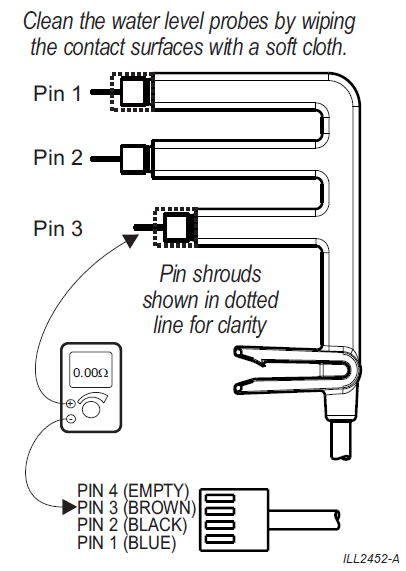
Using a multimeter set to ohms (Ω), test each probe pin to the common reference pin (as per probe design):
Pin 1 (Blue)
Expected resistance: 0–5 Ω
❌ Reading greater than 5 Ω = faulty probePin 2 (Black)
Expected resistance: 0–5 Ω
❌ Reading greater than 5 Ω = faulty probePin 3 (Brown)
Expected resistance: 0–5 Ω
❌ Reading greater than 5 Ω = faulty probe
✅ All three pins must read within 0–5 Ω for the probe to be considered electrically sound.
Invalid Readings (Automatic Fail)
- Any pin reading open circuit (∞ Ω)
- Any pin reading greater than 5 Ω
- Inconsistent readings between pins
➡️ Indicates an internally damaged or contaminated probe.
Important Notes
- A probe can look clean and still fail electrically
- High resistance often indicates:
- internal contamination
- hairline corrosion
- moisture ingress into probe body
- Do not reconnect a probe that fails resistance testing
Remember
If all three pins test 0–5 Ω and water movement is confirmed, the probe is not the fault. Continue diagnosing supply, solenoid, or drain issues.
Step 5 – Correct Reinstallation
- Refit plastic shrouds to Pins 1 & 3
- Clip probe firmly into bracket (audible “click”)
- Route cable correctly and refit cable tie
- Restore water and power
Step 6 – Functional Confirmation
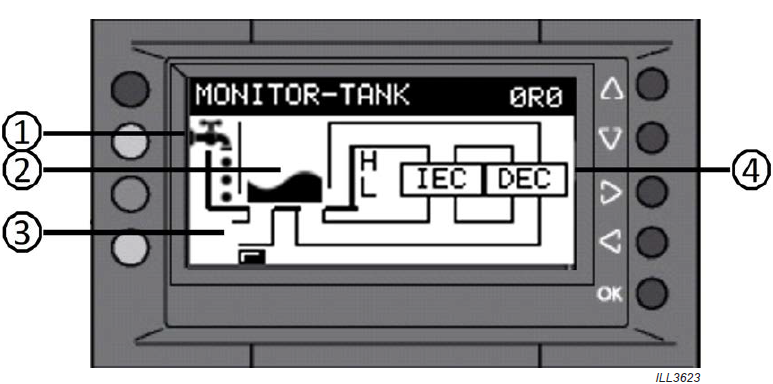
From the MONITOR → Tank screen, confirm:
- Low probe wets before high probe
- Both probes clear during drain
- Readings transition logically
When Probe Replacement Is Justified
Replace the probe only if:
✅ Probe fully cleaned
✅ Electrical test fails
✅ Shorts detected
✅ Water supply confirmed compliant
✅ Repeated faults persist
Resetting Fault Codes 2–5
After correcting the root cause:
- Navigate to ACTIVE FAULTS
- Press RESET
- Cycle power if required
- Confirm normal fill/drain operation resumes
Manual Reference: p.28
Key Takeaway for the Field
FC2–FC5 faults are rarely electronic failures.
In the majority of cases, they are direct indicators of non‑compliant water supply or drainage conditions.
Ensuring full compliance with Page 15 water requirements will prevent repeated faults and unnecessary part replacement.