⚠️ Safety Notice – Commercial Evaporative Cooling Products
This equipment must only be installed, commissioned, serviced and repaired by suitably qualified and licensed personnel.
Before commencing work, complete a task-specific risk assessment and ensure safe roof access, fall protection requirements, electrical isolation procedures, service clearances and appropriate PPE have been considered. All work must comply with applicable regulations, standards and manufacturer requirements.
Particular care must be taken when working at heights, in roof spaces, ceiling spaces and other restricted access areas. Additional consideration must be given to confined working conditions, electrical hazards, moving parts, water systems, wet surfaces, manual handling risks and weather conditions.
Do not proceed if safe access, weather conditions, required clearances, confined space risks or appropriate safety controls cannot be achieved and maintained.
Safety takes priority over diagnosis, repairs, installation schedules and customer expectations. If the task cannot be completed safely, it must not proceed until the risks have been adequately controlled.
Overview
Purpose of the Kit
- Provides water level input during low salinity conditions (<100 µS/cm)
- Mounted at the high probe position
- Disables pump interlocks and related fault codes when configured correctly
- CW‑H models only
When to Recommend This Kit
- Sites consistently operating in low salinity conditions (<100 µS/cm) where probe‑based water sensing becomes unreliable
- Repeated false “Reservoir Empty” indications despite adequate water level
- Intermittent pump shutdowns or pump interlock events caused by unstable probe readings
- Applications where incoming water quality or treatment chemistry affects probe accuracy
- Customer complaints of inconsistent unit operation that temporarily resolves after a drain/refill cycle
- As a reliability retrofit for CW‑H units after software is brought up to current production release
Related Symptoms & Operational Issues
- Reservoir Empty / Water Level Indication
- Pump Interlock / Pump Protection Events
- Low Salinity Related Lockouts
- Intermittent Unit Operation After Drain / Refill
Compatibility Requirements
Hardware
- CW‑H commercial cooler
- Multi‑Magic Water Manager control board P/N 671438
Software (Mandatory)
- Water Manager software: 103R0425 or later
- PLC software: 89R0525 or later
Kit Contents (Pt#121901)
Item | Part Number | Description | Qty |
1 | 637694 | Bracket – Float Switch CW‑H | 1 |
2 | 865885 | Sensor – Level Tank CW | 1 |
3 | 804118 | Cable Tie 292 × 4.8 mm Black | 1 |
4 | 864584 | CW‑H Float Switch Installation Instructions | 1 |
Installation Summary
- Open the right‑hand access panel.
- Locate the 3‑pin water management probe.
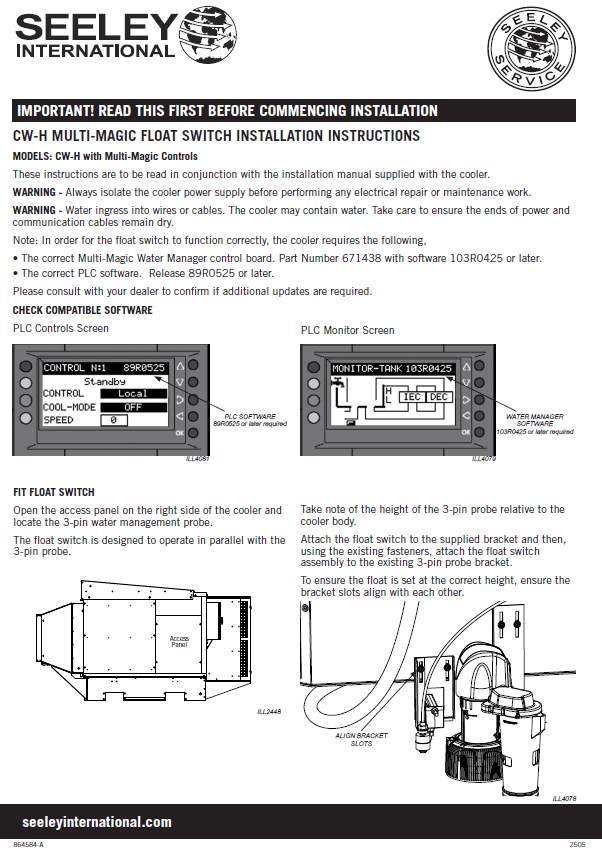
- Assemble the float switch onto the supplied bracket.
- Mount the float switch bracket onto the existing probe bracket using the same fasteners.
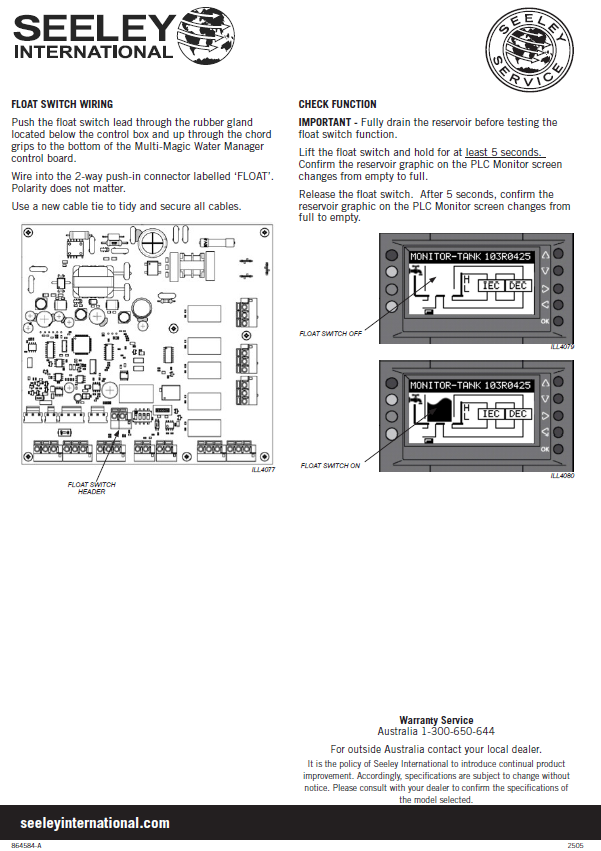
- Ensure bracket slots align so the float height matches the probe height.
- Secure the cable and route toward the control box.
Wiring Information
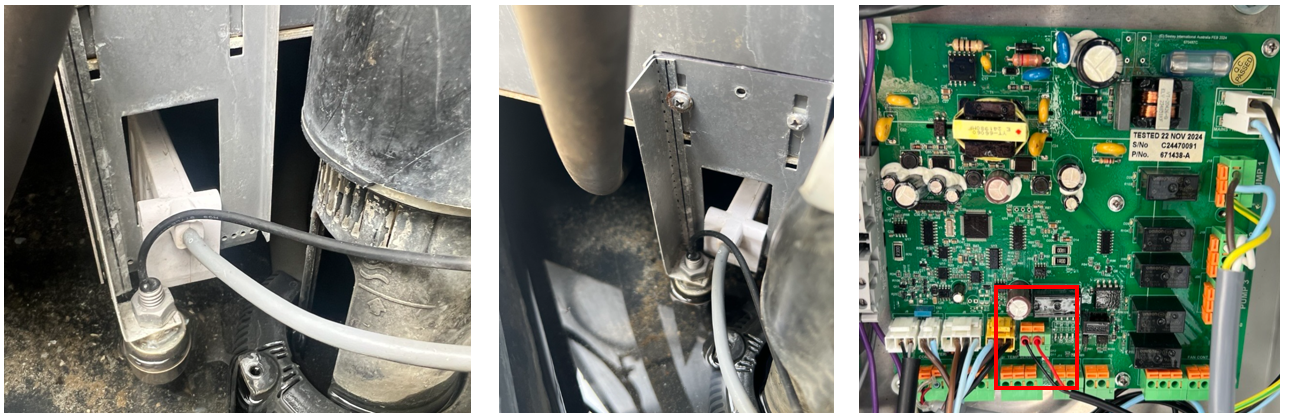
- Feed the float switch cable through the rubber gland below the control box.
- Route up through the cord grips to the Multi‑Magic Water Manager PCBA.
- Terminate into the 2‑way push‑in connector labelled “FLOAT”.
- Polarity does not matter.
- Secure all wiring with a cable tie.
Functional Test Procedure
- Lift the float switch and hold for ≥ 5 seconds.
- Release the float switch.
- After 5 seconds, confirm graphic changes Full → Empty.
Common Installation Issues
- Incorrect software version → Float input ignored
- Bracket misalignment → Incorrect trigger water level
- Wiring not connected to FLOAT header
- Water not fully drained during test