
L3 Error Code Braemar WCHV – Outdoor Fan Motor Fault | Service Guide WSHV‑03‑A
⚠️ Safety Notice – Reverse Cycle Air Conditioners
This equipment must only be installed, commissioned, serviced and repaired by suitably qualified and licensed personnel.
Before commencing work, complete a task-specific risk assessment and ensure electrical isolation procedures, safe access, adequate service clearances and appropriate PPE have been considered. All work must comply with applicable regulations, standards and manufacturer requirements.
Particular care must be taken when working around electrical systems, refrigerant circuits, moving parts, roof spaces, ceiling spaces, confined spaces and working-at-heights hazards where applicable.
Do not proceed if safe access, required clearances, confined space risks or appropriate safety controls cannot be achieved and maintained.
Safety takes priority over diagnosis, repairs, installation schedules and customer expectations. If the task cannot be completed safely, it must not proceed until the risks have been adequately controlled.
Affected Models
- Braemar WCHV Series: WCHV25 / WCHV35 / WCHV50 / WCHV70
- Applies to WSHV indoor units paired with WCHV outdoor units
Error Code
Fault Description
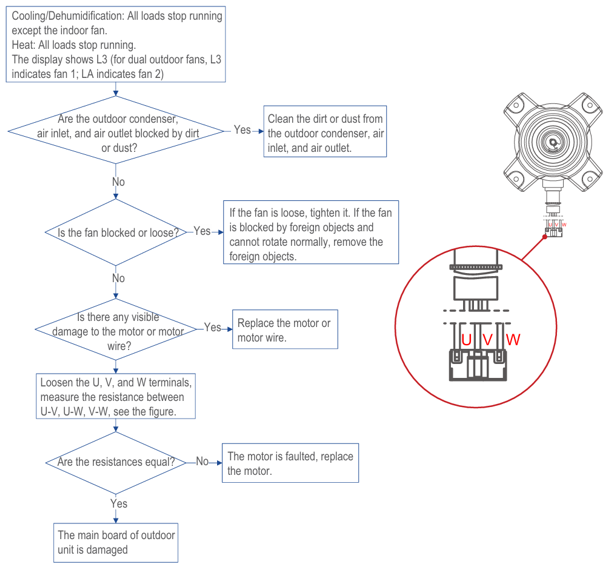
- Cooling / Dehumidification: Compressor and outdoor fan stop; indoor fan may continue to run.
- Heating: All loads stop running.
- L3 = Fan 1 error
- LA = Fan 2 error
Operating Principle (How L3 Is Triggered)
- Every 6 minor fan errors are accumulated as 1 major error
- After 6 major errors, the unit locks out and displays L3
Possible Causes
- Outdoor fan motor wiring issue
- Loose, poorly seated, or unreliable terminal connections
- Damaged fan motor wiring
- Open circuit, pinched cable, insulation damage
- Outdoor PCB (main board) fault
- Outdoor fan motor failure
- Internal motor fault or loss of feedback signal
- Mechanical obstruction or fan blade issue
- Fan blocked by debris
- Fan blade loose on shaft
- Fan unable to rotate freely due to external factors
Diagnostic Procedure (Recommended Order)
Step 1 – Visual & Mechanical Checks
- Isolate power to the unit
- Inspect outdoor fan for:
- Dirt or debris blocking the fan
- Ice, leaves, or foreign objects
- Loose or damaged fan blades
- Manually rotate the fan:
- Fan should rotate freely without resistance
- Tighten blade if loose
Step 2 – Wiring & Connection Checks
- Check fan motor plug at the outdoor PCB
- Ensure all terminals are fully seated and secure
- Inspect wiring harness for:
- Cuts, chafing, heat damage
- Signs of corrosion or moisture ingress
Step 3 – Fan Motor Electrical Checks
- Disconnect fan motor connector from PCB
- Measure resistance between the U–V, U–W, V–Wmotor terminals
- Resistance values should be equal or very similar
- If resistance is open circuit or significantly uneven:
- Replace outdoor fan motor
Step 4 – PCB Diagnosis
- If fan motor and wiring test OK
- Fan rotates freely
- Resistance values are correct
Reset & Verification
- Restore power and clear fault
- Run unit in cooling mode
- Confirm:
- Outdoor fan starts smoothly
- No abnormal noise or vibration
- L3 error does not reoccur
Notes
- L3 is often caused by intermittent fan binding or poor electrical connections, not immediate motor failure
- Always check mechanical causes first before replacing parts
- Repeated L3 faults after rain events may indicate moisture ingress at the fan motor connector or PCB
References
- Braemar WSHV / WCHV Service Manual – Section 7: Diagnostic Codes (L3 – Outdoor DC Fan Motor Malfunction)