
XE7C-24/HC Wired Controller – Daily Timer Setup (Schedule On/Off, Mode, Temperature & Fan)
⚠️ Customer Safety Notice
This article contains general information intended for homeowners and occupants.
Installation, servicing, repairs, electrical work, gas work and refrigerant-related work must only be carried out by appropriately qualified and licensed personnel.
Before performing any checks or maintenance, ensure the equipment is switched off and safe to access. Do not remove covers, enter roof or ceiling spaces, work at heights or attempt repairs unless you are qualified to do so.
If in doubt, contact an authorised service agent or licensed tradesperson. Safety must always take priority.
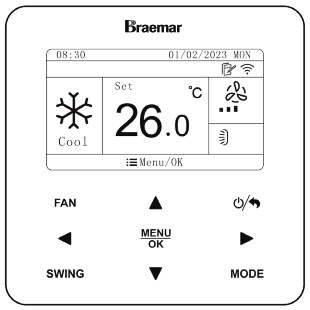
Overview
The Daily Timer allows automatic control of system operation throughout the day.
- Supports up to 4 timer events per day
- Each event can control:
- ON / OFF
- Mode (Cool / Heat / Dry / Fan / Auto)
- Temperature setpoint
- Fan speed
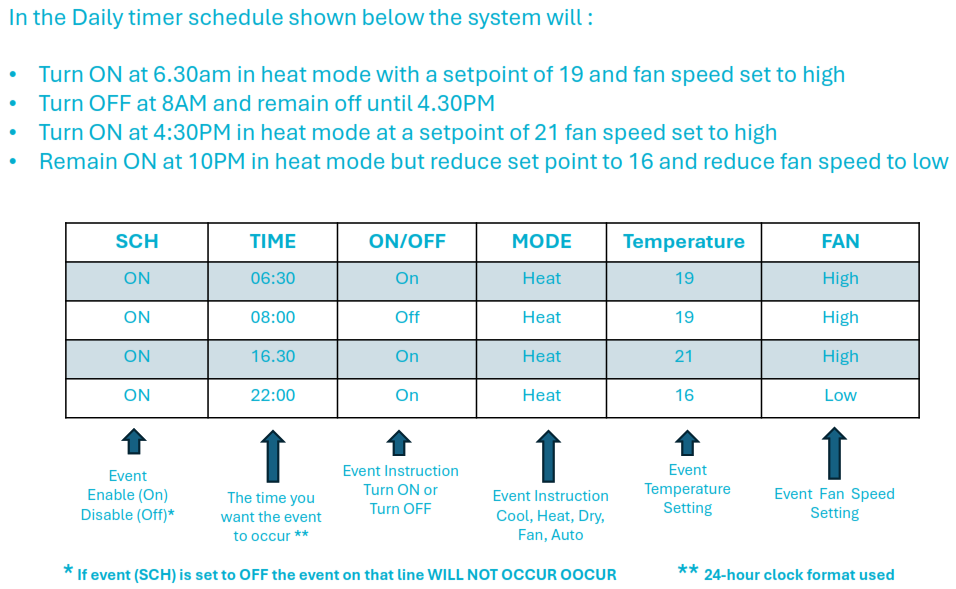
Timer Event Fields (What Each Setting Does)
| Field | Description |
|---|---|
| SCH | Enables (ON) or disables (OFF) the event |
| Time | Event trigger time (24-hour format) |
| ON/OFF | Turns system ON or OFF |
| Mode | Operating mode (Heat, Cool, etc.) |
| Temperature | Set temperature for the event |
| Fan | Fan speed setting |
⚠️ Important: If SCH = OFF, the event will not run
How to Set a Daily Timer Schedule
1. Enter Timer Menu
- Press Menu/OK
- Select Timer
- Select Daily Timer
- Press Menu/OK to enter the schedule
2. Select Event (1–4)
- Use navigation buttons to select:
- Event 1
- Event 2
- Event 3
- Event 4
3. Configure Event Settings
For each event:
- Move cursor to required field (SCH / Time / ON/OFF / Mode / Temp / Fan)
- Use ▲ / ▼ to adjust values
- Press Menu/OK to confirm
- Repeat for remaining events
Example Daily Heating Schedule
| Event | Time | Action | Mode | Temp | Fan |
|---|---|---|---|---|---|
| 1 | 06:30 | ON | Heat | 19°C | High |
| 2 | 08:00 | OFF | – | – | – |
| 3 | 16:30 | ON | Heat | 21°C | High |
| 4 | 22:00 | ON (adjust) | Heat | 16°C | Low |
▶ Result
- System starts heating at 6:30am
- Turns OFF at 8:00am
- Restarts at 4:30pm
- Reduces temperature and fan speed at 10:00pm
Technician Tips
Confirm before leaving site:
- Timer events are enabled (SCH = ON)
- Controller clock is set correctly
- Correct time format (24hr) is used
Best practice:
- Use OFF events to avoid unnecessary runtime
- Use lower night setpoints for energy savings
- Leave fan on Auto unless specific airflow is needed
Common Issues & Fixes
| Issue | Cause | Fix |
|---|---|---|
| Timer not operating | SCH set to OFF | Enable event |
| Incorrect timing | Controller time incorrect | Reset clock |
| System runs continuously | No OFF event set | Add OFF timer |
| Incorrect operation mode | Mode not set correctly | Recheck event settings |
Key Notes
- Maximum 4 daily events
- Timer operates daily on repeat
- All changes must be confirmed with Menu/OK
- If event (SCH) is set to OFF the event on that line WILL NOT OCCUR
Additional references:
Click link to view - Wired Controller XE7C-24/HC Owner's Manual - KDHA-01-A - R32 LNS ODU - Owner's Manual: Seeley International Pty Ltd