
⚠️ Customer Safety Notice
This article contains general information intended for homeowners and occupants.
Installation, servicing, repairs, electrical work, gas work and refrigerant-related work must only be carried out by appropriately qualified and licensed personnel.
Before performing any checks or maintenance, ensure the equipment is switched off and safe to access. Do not remove covers, enter roof or ceiling spaces, work at heights or attempt repairs unless you are qualified to do so.
If in doubt, contact an authorised service agent or licensed tradesperson. Safety must always take priority.
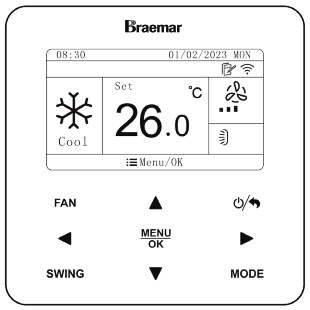
Overview
The XE7C-24/HC wired controller includes several timer functions that allow your air conditioner to operate automatically based on your schedule:
- Daily Timer – Repeats the same schedule every day.
- Weekly Timer – Allows a different schedule for each day of the week.
- OFF Timer – Automatically turns the system OFF after a selected number of hours.
- Two-Week Timer – Supports alternating Week 1 and Week 2 schedules for changing occupancy patterns.
Before configuring any timer, ensure the controller clock and date are set correctly.
Daily Timer
The Daily Timer allows up to 4 timer events per day. Each event can turn the system ON or OFF and optionally change the operating mode, temperature and fan speed.
Timer Event Fields (What Each Setting Does)
| Field | Description |
|---|---|
| SCH | Enables (ON) or disables (OFF) the event |
| Time | Event trigger time (24-hour format) |
| ON/OFF | Turns system ON or OFF |
| Mode | Operating mode (Heat, Cool, Dry, Fan, Auto) |
| Temperature | Set temperature for the event |
| Fan | Fan speed setting |
⚠️ Important: If SCH = OFF, the event will not run.
How to Set a Daily Timer Schedule
- Press Menu/OK
- Select Timer
- Select Daily Timer
- Press Menu/OK to enter the schedule menu.
YouTube Video Tutorial
Daily Timer Setup
Select Event (1-4)
Use the navigation buttons to select:
- Event 1
- Event 2
- Event 3
- Event 4
Configure Event Settings
For each event:
- Move the cursor to the required field (SCH / Time / ON/OFF / Mode / Temp / Fan)
- Use ▲ / ▼ to adjust values
- Press Menu/OK to save
- Repeat for remaining events
Example Daily Heating Schedule
| SCH | TIME | ON/OFF | MODE | TEMP | FAN |
|---|---|---|---|---|---|
| ON | 06:30 | ON | Heat | 19°C | High |
| ON | 08:00 | OFF | Heat | 19°C | High |
| ON | 16:30 | ON | Heat | 21°C | High |
| ON | 22:00 | ON | Heat | 16°C | Low |
What Will Happen?
In the Daily Timer schedule shown above the system will:
- Turn ON at 6:30am in Heat mode with a setpoint of 19°C and fan speed set to High
- Turn OFF at 8:00am and remain OFF until 4:30pm
- Turn ON at 4:30pm in Heat mode with a setpoint of 21°C and fan speed set to High
- Remain ON at 10:00pm but reduce the setpoint to 16°C and fan speed to Low
Tips
Confirm before leaving site:
- Timer events are enabled (SCH = ON)
- Controller clock is set correctly
- Correct 24-hour time format is being used
- Changes have been saved using Menu/OK
Best Practice
- Use OFF events to avoid unnecessary runtime
- Use lower overnight temperatures for energy savings
- Leave fan speed on Auto unless a specific airflow requirement exists
Common Issues & Fixes
| Issue | Cause | Fix |
|---|---|---|
| Timer not operating | SCH set to OFF | Enable event |
| Incorrect timing | Controller clock incorrect | Correct the clock |
| System runs continuously | No OFF event programmed | Add an OFF event |
| Unexpected operation | Incorrect mode selected | Recheck event settings |
Key Notes
- Maximum of 4 Daily Timer events
- Timer repeats every day
- All changes must be confirmed using Menu/OK
- If SCH = OFF, that event will not occur
Weekly Timer
The Weekly Timer allows a different schedule to be programmed for each day of the week. Each day can contain up to 4 timer events.
Timer Event Fields
| Field | Description |
|---|---|
| SCH | Enables (ON) or disables (OFF) the event |
| Time | Event trigger time |
| ON/OFF | Turns system ON or OFF |
| Mode | Operating mode |
| Temperature | Set temperature |
| Fan | Fan speed |
⚠️ Important: If SCH = OFF, the event will not run.
How to Set a Weekly Timer Schedule
- Press Menu/OK
- Select Timer
- Select Weekly Timer
- Press Menu/OK
- Select the day to configure
- Set up to 4 timer events
- Press Menu/OK to save
- Repeat for additional days as required.
YouTube Video Tutorial
Weekly Timer Setup
Example Weekly Schedule (Monday)
| SCH | TIME | ON/OFF | MODE | TEMP | FAN |
|---|---|---|---|---|---|
| ON | 06:30 | ON | Heat | 19°C | High |
| ON | 08:00 | OFF | Heat | 19°C | High |
| ON | 16:30 | ON | Heat | 21°C | High |
| ON | 22:00 | ON | Heat | 16°C | Low |
What Will Happen?
For Monday the system will:
- Turn ON at 6:30am
- Turn OFF at 8:00am
- Turn ON again at 4:30pm
- Reduce temperature and fan speed at 10:00pm
The same process can be repeated with different settings for each day of the week.
Technician Tips
Confirm before leaving site:
- Each required day has been configured
- The controller clock is correct
- Events are enabled (SCH = ON)
- Settings have been saved correctly
Best Practice
- Program weekdays and weekends separately
- Review all seven days before finishing
- Use OFF events to reduce running costs
Common Issues & Fixes
| Issue | Cause | Fix |
|---|---|---|
| Timer does not run | SCH set to OFF | Enable event |
| Wrong operating time | Controller clock incorrect | Correct clock |
| Weekend schedule missing | Weekend not programmed | Configure Saturday and Sunday |
| Unit remains running | No OFF event configured | Add an OFF event |
Key Notes
- Maximum of 4 events per day
- Each day must be programmed individually
- Weekly schedule repeats automatically
- If SCH = OFF, that event will not occur
OFF Timer
The OFF Timer automatically turns the system OFF after a selected operating period.
OFF Timer Field
| Field | Description |
|---|---|
| OFF Timer | Countdown time until the system turns OFF |
How to Set an OFF Timer
- Press Menu/OK
- Select Timer
- Select Timer OFF
- Use ▲ / ▼ to adjust the required time
- Press Menu/OK to save.
YouTube Video Tutorial
OFF Timer Setup
Example OFF Timer
| Setting | Value |
|---|---|
| OFF Timer | 2.5 Hours |
What Will Happen?
In the example shown:
- The system continues operating normally
- After 2 hours and 30 minutes, the air conditioner automatically turns OFF
- No further action is required
Technician Tips
Confirm before leaving site:
- Countdown time is correct
- Customer understands this is not a recurring timer
- Settings have been saved
Best Practice
- Ideal for bedrooms overnight
- Useful when temporarily cooling or heating a room
- Can be combined with Daily or Weekly schedules
Common Issues & Fixes
| Issue | Cause | Fix |
|---|---|---|
| Unit does not switch OFF | Timer not saved | Reconfigure and save |
| Wrong shutdown time | Incorrect timer setting | Adjust timer value |
| Customer expected repeating schedule | Using OFF Timer instead of Daily Timer | Configure Daily or Weekly Timer |
Key Notes
- Adjustable in 0.5-hour increments
- Turns the system OFF after the selected period
- Does not repeat automatically
- Settings must be saved using Menu/OK
Two-Week Timer
The Two-Week Timer supports separate schedules for Week 1 and Week 2, allowing the controller to automatically alternate between the two schedules.
When Should I Use a Two-Week Timer?
The Two-Week Timer is useful when occupancy patterns change every fortnight, such as:
- Shift workers
- Rotating rosters
- Holiday homes
- Fortnightly office occupancy
Key Notes
- Week 1 and Week 2 are programmed separately
- Up to 4 events per day
- Automatically alternates between weeks
- Requires the correct current week to be selected
- All changes must be confirmed using Menu/OK
Which Timer Should I Use?
| Timer Type | Best for | Repeats Automatically |
|---|---|---|
| Daily Timer | Same schedule every day | Yes |
| Weekly Timer | Different schedule for each day | Yes |
| OFF Timer | Turning the system off after a set period | No |
| Two-Week Timer | Alternating fortnightly schedules | Yes |
Quick Recommendation
✅ Daily Timer – Most common residential setup.
✅ Weekly Timer – Homes with different weekday and weekend routines.
✅ OFF Timer – Bedrooms and temporary operation.
✅ Two-Week Timer – Shift workers and rotating occupancy schedules.
Related YouTube Videos
Additional references:
Click link to view - Wired Controller XE7C-24/HC Owner's Manual - KDHA-01-A - R32 LNS ODU - Owner's Manual: Seeley International Pty Ltd