
⚠️ Safety Notice – Gas Heating Products
This appliance must only be installed, commissioned, serviced and repaired by suitably qualified and licensed personnel.
Before commencing work, complete a task-specific risk assessment and ensure gas and electrical safety requirements, ventilation provisions, safe access, adequate service clearances and appropriate PPE have been considered. All work must comply with applicable regulations, standards and manufacturer requirements.
Particular care must be taken when working around gas systems, electrical components, combustion products, hot surfaces, moving parts, roof spaces, ceiling spaces and confined spaces.
Do not proceed if safe access, required clearances, ventilation requirements, confined space risks or appropriate safety controls cannot be achieved and maintained.
Safety takes priority over diagnosis, repairs, installation schedules and customer expectations. If the task cannot be completed safely, it must not proceed until the risks have been adequately controlled.
Spectrolink SCC Controller – Video Library, User Guides & Frequently Used Functions
Overview
This article provides a central reference for operating and servicing the Spectrolink SCC (Comfort Control) used with selected Braemar commercial and ducted gas heating systems.
The video library covers the most commonly requested functions including:
- Controller setup
- Time and day settings
- Auto programming
- Manual and automatic operation
- Thermistor and temperature checks
- Fault history access
- Replacement controller commissioning
This article replaces multiple individual video articles, making it easier to find the information you need in one location.
Before You Start
Many controller settings rely on the time and day being correctly configured.
If automatic programs are not operating as expected, confirm:
✅ Time is correct
✅ Day is correct
✅ Controller is set to AUTO mode
✅ Program periods have been configured
Quick Navigation
| I Want To... | Go To |
|---|---|
| Set the time and day | Time & Day Settings |
| Program heater schedules | Auto Programming |
| Change from Manual to Auto | Operating Modes |
| Commission a replacement controller | System Setup |
| Check duct air temperature readings | Temperature & Thermistor Checks |
| View fault history | Fault Code History |
1. Time & Day Settings
The controller clock must be correctly configured before automatic schedules can operate.
Video
Click link to view YouTube Video - Spectrolink SCC - Setting the Time & Day
Typical Reasons to Use This Function
- Daylight savings adjustment
- Power interruption
- Incorrect operating schedules
- New controller installation
2. Auto Programming
Auto mode allows the heater to operate according to scheduled periods throughout the day.
Typical programmed periods include:
- Wake
- Away
- Home
- Sleep
Video
Click link to view YouTube Video - Spectrolink SCC - Setting the Auto Program (Single SCC)
Common Symptoms
- Heater starts at incorrect times
- Program periods missing
- Unit not following schedule
3. Manual and Automatic Operation
The Spectrolink SCC can operate in either:
Manual Mode
The heater maintains the selected temperature until manually changed or switched off.
Auto Mode
The controller follows programmed schedules automatically.
Video
Click link to view YouTube Video - Spectrolink SCC (2009 Onwards) - Changing from Manual to Auto
Common Support Questions
- Why is the heater not following the schedule?
- Why does AUTO appear on the screen?
- How do I disable automatic operation?
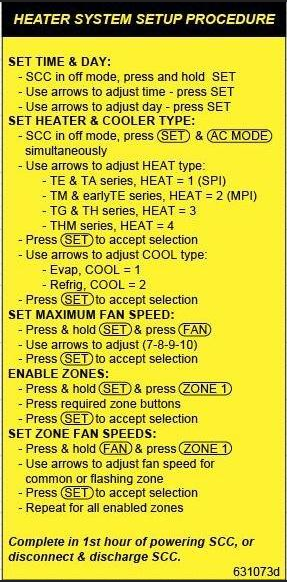
4. Replacement Controller Setup (Part No. 077390)
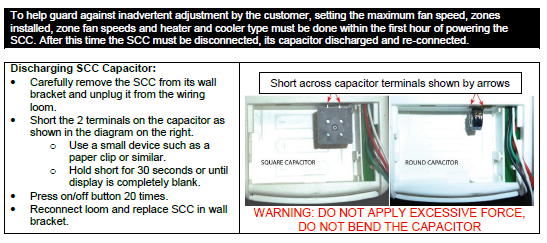
When replacing a Spectrolink SCC controller, the controller must be configured correctly for the installed system.
Video
Click link to view YouTube Video - Spectrolink SCC Spare Part 077390 - System Setup Procedure
Typical Applications
- Replacement controller installation
- Controller commissioning
- Configuration after component replacement
Service Technician Tip
Incorrect setup parameters may result in:
- Heating not operating correctly
- Fault codes
- Incorrect temperature control
- Scheduling issues
5. Temperature & Thermistor Checks
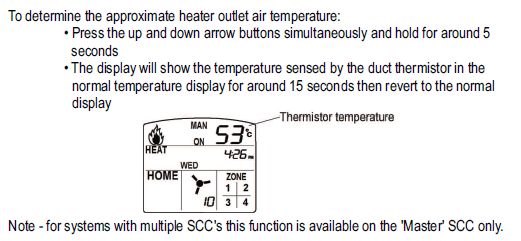
The SCC controller allows the duct air temperature / thermistor reading to be viewed for diagnostic purposes.
Video
Click link to view YouTube Video - Checking the Duct Air / Thermistor Temperature Using a Spectrolink SCC Controller
This Check Can Assist With
- Temperature complaints
- Suspected faulty thermistors
- Airflow-related issues
- Heater performance diagnosis
Typical Symptoms
- Heater cycling unexpectedly
- Supply air temperature concerns
- Thermistor-related fault codes
- Inaccurate room temperature control
6. Viewing and Clearing Fault Code History
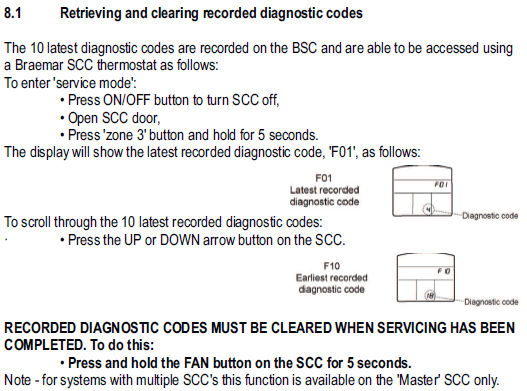
The SCC controller stores fault history which can assist with diagnosing intermittent issues.
Video
Click link to view YouTube Video - Viewing, Accessing and Clearing Fault Code History
Fault History Can Help Identify
- Ignition issues
- Airflow-related shutdowns
- Temperature sensor faults
- Previous lockouts
- Intermittent operating problems
Important
Clearing fault history removes valuable diagnostic information. Record fault codes before deleting them.
Frequently Asked Questions
Why is my heater not following the programmed schedule?
Check:
- Time is correct.
- Day is correct.
- Controller is set to AUTO.
- Program periods have been entered correctly.
Refer to:
- Time & Day Settings Video
- Auto Programming Video
- Manual to Auto Video
Can I operate the heater without AUTO mode?
Yes.
Manual mode allows the heater to maintain a selected temperature continuously until changed or turned off.
How do I know if a thermistor is faulty?
Compare the displayed duct air temperature with the actual supply air temperature and investigate any significant differences.
Refer to:
- Thermistor Temperature Check Video
Can I clear a fault code?
Fault history can be cleared through the controller menu; however, the original fault should be investigated first to avoid repeat failures.