
Dominator V2 Wall Controller Goes Blank After Shutdown
Applies To: Braemar Dominator V2 Systems (KCHV Series)
⚠️ Safety Notice – Reverse Cycle Air Conditioners
This equipment must only be installed, commissioned, serviced and repaired by suitably qualified and licensed personnel.
Before commencing work, complete a task-specific risk assessment and ensure electrical isolation procedures, safe access, adequate service clearances and appropriate PPE have been considered. All work must comply with applicable regulations, standards and manufacturer requirements.
Particular care must be taken when working around electrical systems, refrigerant circuits, moving parts, roof spaces, ceiling spaces, confined spaces and working-at-heights hazards where applicable.
Do not proceed if safe access, required clearances, confined space risks or appropriate safety controls cannot be achieved and maintained.
Safety takes priority over diagnosis, repairs, installation schedules and customer expectations. If the task cannot be completed safely, it must not proceed until the risks have been adequately controlled.
Overview
A small number of Dominator V2 installations have been reported where the wall controller operates normally during system operation but becomes blank and unresponsive approximately 15 minutes after the system is switched OFF.
Investigation has identified a wiring discrepancy between some indoor unit terminal labels and the published installation documentation. Where communication wiring has been connected according to the terminal labels fitted to the indoor unit, the wall controller and outdoor unit communication connections may be reversed.
This has been found to cause the controller to become unresponsive after shutdown despite the unit otherwise operating normally.
Installers and service agents encountering this symptom should verify all communication wiring against the published wiring diagrams rather than relying solely on the terminal labels fitted to the indoor unit.
Symptoms
The following symptoms may be observed:
✅ Unit operates normally during heating and cooling.
✅ Wall controller operates normally while the unit is running.
✅ No fault codes displayed.
❌ Approximately 15 minutes after the unit is switched OFF, the controller display goes blank.
❌ Controller becomes unresponsive.
❌ Cycling power restores controller operation temporarily.
❌ Fault reoccurs after the next shutdown period.
Wiring Identification Issue
Field investigations have identified examples where the terminal labels fitted to the indoor unit do not align with the published wiring documentation.
The labels fitted to the indoor unit may indicate:
| Terminal Block | Label |
|---|---|
| Left Terminal Block | Wall Controller |
| Right Terminal Block | Outdoor Unit |
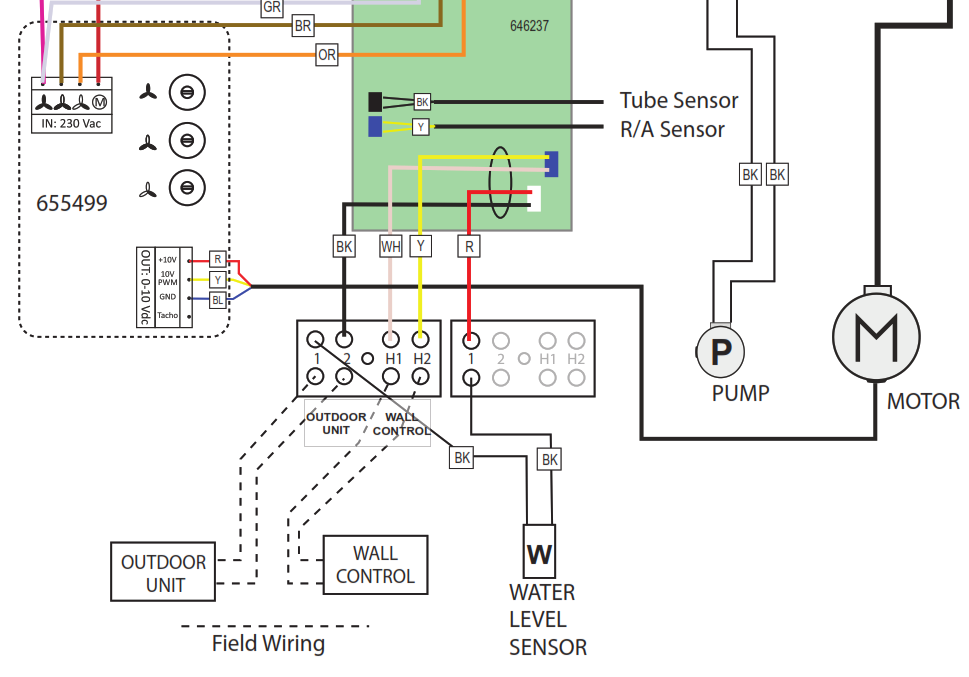
However, the Dominator V2 wiring diagrams and installation documentation show:
| Terminal Block | Correct Connection |
|---|---|
| 1 & 2 | Outdoor Unit |
| H1 & H2 | Wall Controller |
As a result, installers following the terminal labels on the indoor unit may inadvertently reverse the communication wiring.
⚠ The wiring diagrams contained within the installation documentation are the correct reference and should take precedence over the terminal stickers fitted to the indoor unit.
Correct Wiring Configuration
Indoor Unit Terminals
| Connection | Terminals |
|---|---|
| Outdoor Unit | 1 & 2 |
| Wall Controller | H1 & H2 |
Verify all communication wiring against the published wiring diagram below before further diagnosis.
Additional Installation Check
Communication Cable Type
The Dominator V2 Installer Guide Insert specifies:
0.75mm² Twin Shielded Communication Cable
During investigation of this issue, it was also noted that some installations had been completed using non-shielded communication cable.
Although the primary issue was found to be incorrect termination resulting from conflicting terminal identification, installers should also verify that shielded communication cable has been used in accordance with the installer guide.
Confirm:
✅ 0.75mm² communication cable
✅ Shielded cable construction
✅ Shield continuity maintained
Service Procedure
Step 1 - Verify Terminal Connections
Inspect the indoor unit terminal strip and confirm:
- Outdoor unit connected to terminals 1 & 2.
- Wall controller connected to terminals H1 & H2.
- Connections match the wiring diagram.
Do not rely solely on terminal identification labels fitted to the unit.
Insert Terminal Identification Photo Here
Step 2 - Verify Communication Cable
Confirm communication wiring is installed using 0.75mm² twin shielded communication cable.
Step 3 - Functional Test
- Restore power.
- Operate the system.
- Turn the system OFF.
- Wait at least 20 minutes.
- Confirm the controller remains powered and responsive.
Expected result:
✅ Controller remains operational.
✅ Display remains active.
✅ No blank-screen condition occurs.
Resolution
If a Dominator V2 controller becomes blank approximately 15 minutes after shutdown:
- Verify communication wiring against the installation documentation.
- Correct any wiring connected according to the indoor unit terminal labels rather than the wiring diagram.
- Confirm shielded communication cable has been installed.
- Re-test system operation.
Field investigations have shown that correcting the communication terminal connections resolves the controller blank-screen condition.