
KDHA - R32 ducted single phase split - 3rd party control (AirTouch) installation
⚠️ Safety Notice – Reverse Cycle Air Conditioners
This equipment must only be installed, commissioned, serviced and repaired by suitably qualified and licensed personnel.
Before commencing work, complete a task-specific risk assessment and ensure electrical isolation procedures, safe access, adequate service clearances and appropriate PPE have been considered. All work must comply with applicable regulations, standards and manufacturer requirements.
Particular care must be taken when working around electrical systems, refrigerant circuits, moving parts, roof spaces, ceiling spaces, confined spaces and working-at-heights hazards where applicable.
Do not proceed if safe access, required clearances, confined space risks or appropriate safety controls cannot be achieved and maintained.
Safety takes priority over diagnosis, repairs, installation schedules and customer expectations. If the task cannot be completed safely, it must not proceed until the risks have been adequately controlled.
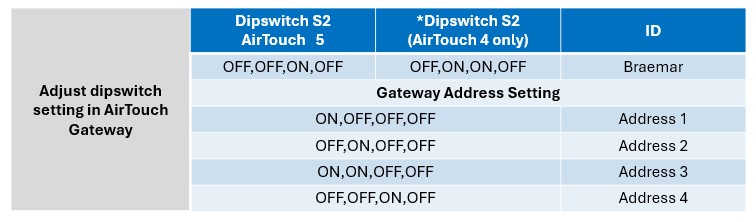
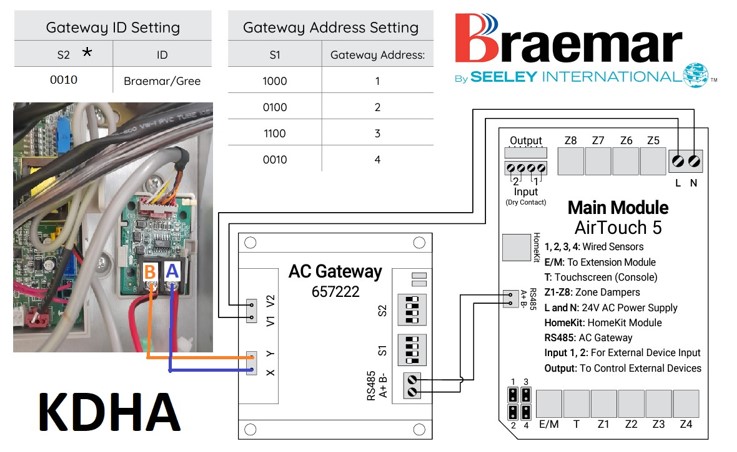 *For airtouch 4, S2 settings are 0110
The XE7C/HC wall control stays connected to H1 and H2 terminals and left inside the indoor unit.
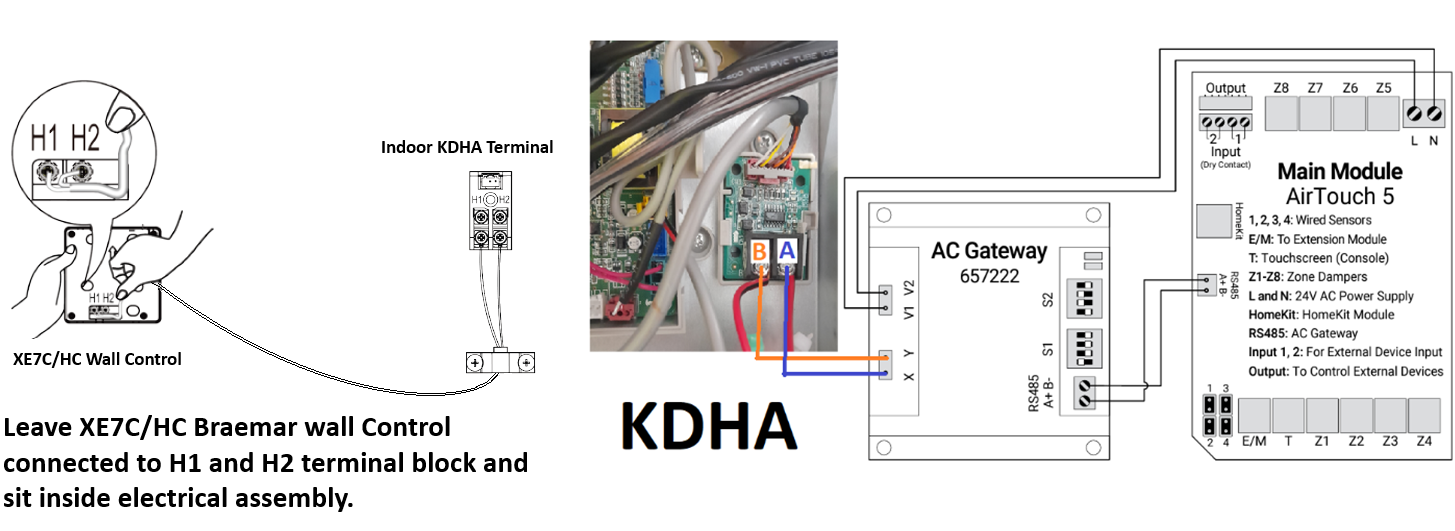
KDHA (ducted indoor) / KCHA (outdoor) comes with the XE7C controller, this has built in Wi-Fi
No configuration settings are needed to work with 3rd party controls
XE7C-24/HC Wi-Fi wired controller
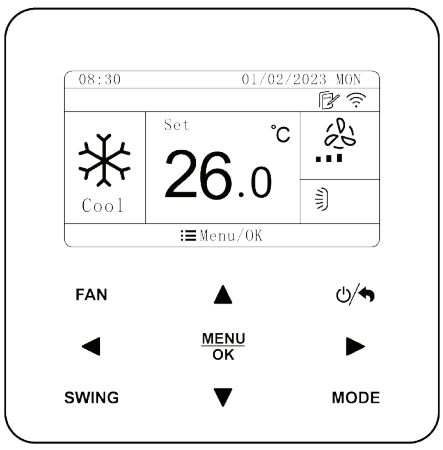
Only adjustable parameter that may need to be changed using the Braemar XE7C/24HC wall control, is the indoor fan static setting: (Factory preset value 5)
YouTube Video - adjust fan static on XE7C-24/HC controller
Changing the fan static setting on a KDHA single-phase split system can be important for several reasons:
- Optimizing Airflow: Adjusting the fan static setting helps ensure that the airflow is optimal for the specific installation, which can improve the efficiency and comfort of the system.
- Reducing Noise: Proper fan settings can minimize noise levels, making the environment more comfortable.
- Energy Efficiency: Correct fan settings can lead to better energy efficiency, reducing operational costs.
- System Longevity: Proper airflow settings can help prevent strain on the system, potentially extending its lifespan.
To adjust the fan static setting using the XE7C/24HC wall controller, follow these steps:
- MENU
- SET
- Parameter Settings:
- User Parameter:
- Indoor fan pressure: Settable range 1-9 / Default 5

IMPORTANT: If the XE7C wall controller remains in the system, the default setting for the ambient sensor is "AUTO," which means it may select the keypad as a sensor point.
Therefore, it is crucial to set the parameters to "mainboard/return air" only.
- Turn Off the Unit: Ensure the air conditioning unit is turned off.
- Access Parameter Settings:
- Press "MENU/OK" button
- Navigate to "PARAMETER SETTINGS".
- Select "PROJECT PARAMETER"
- Enter the password "000000" (use the up arrow for 0 and the right arrow to move to the next digit).
- Adjust Ambient Temp Sensor Location:
- Select "RETURN AIR" using the arrow buttons.
- Save and Exit:
- Press the "MENU/OK" button to save your changes and exit the settings menu.