
CE52‑24F Central Controller Installation & Wiring Guide – SDHV / KDHV (KDHA Uses Different Method)
⚠️ Safety Notice – Reverse Cycle Air Conditioners
This equipment must only be installed, commissioned, serviced and repaired by suitably qualified and licensed personnel.
Before commencing work, complete a task-specific risk assessment and ensure electrical isolation procedures, safe access, adequate service clearances and appropriate PPE have been considered. All work must comply with applicable regulations, standards and manufacturer requirements.
Particular care must be taken when working around electrical systems, refrigerant circuits, moving parts, roof spaces, ceiling spaces, confined spaces and working-at-heights hazards where applicable.
Do not proceed if safe access, required clearances, confined space risks or appropriate safety controls cannot be achieved and maintained.
Safety takes priority over diagnosis, repairs, installation schedules and customer expectations. If the task cannot be completed safely, it must not proceed until the risks have been adequately controlled.
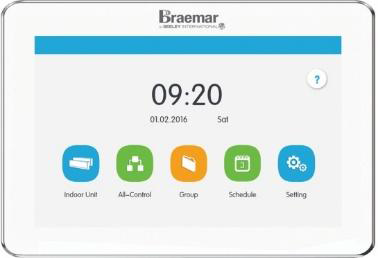 CE52-24/F9(C)
Overview
Pdf Owner's Manual CE52-24F(C)-B AU1906 attached for reference
What You Can Connect (Using This Method)
- ✅ SDHV indoor units
- ✅ KDHV indoor units
- ✅ Up to 36 indoor units (IDUs) per CE52 controller
What You Will Need
1. Power Supply
- The CE52 requires 240 V AC power
- Minimum power cable size: 1.5 mm²
2. Communication Cable (Very Important)
- Twisted‑core communication cable
- Shielded cable is strongly recommended
- Total network length under 1000 m → 2 × 1.0 mm² (18 AWG)
- Total network length over 1000 m → 2 × 1.5 mm² (16 AWG)
- Maximum total length: 1500 m (do not exceed)
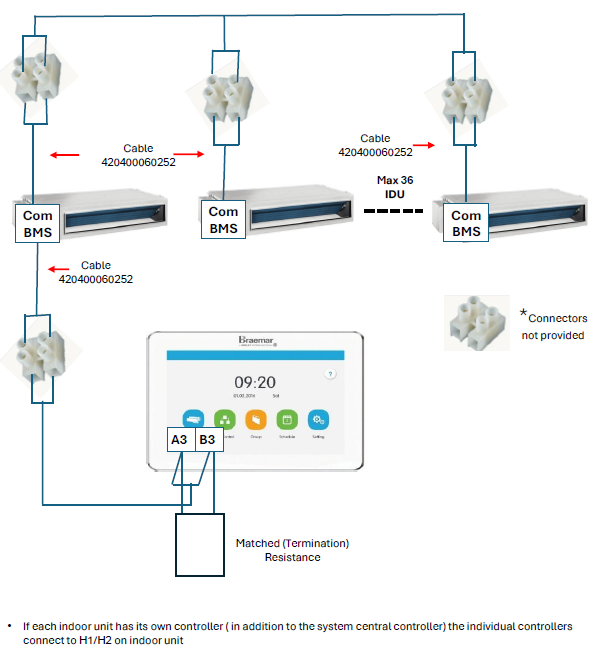
3. Adapter Cables (Mandatory)
- Number of indoor units plus one (IDUs + 1)

Adapter Cable Pt# 420400060252
- 5 indoor units → 6 adapter cables required
How to Wire the System (Simple Explanation)
- Connect a suitable 100–240 V AC power supply to the CE52 controller
- Use the adapter cables to connect:
- CE52 controller → Indoor units
- All indoor units are connected along the COM BMS communication line
- The system supports a maximum of 36 indoor units
- Fit a matched termination resistance at the end of the communication network
Using Individual Room Controllers (If installed)
- If an indoor unit also has its own wall or room controller, connect it to:
- H1 / H2 terminals on the indoor unit
- The room controller does not replace the CE52 connection — both operate together
Models and Compatibility – Quick Clarification
- ✅ SDHV – Supported using this wiring method
- ✅ KDHV – Supported using this wiring method
- ⚠️ KDHA – CE52 compatible but requires a different wiring method
Common Mistakes to Avoid
- ❌ Wiring KDHA units using the SDHV / KDHV method
- ❌ Connecting more than 36 indoor units
- ❌ Exceeding 1500 m total communication cable length
- ❌ Using incorrect cable sizes
- ❌ Forgetting to install termination resistance
Quick Checklist Before Power‑Up
Summary
- One CE52 controller
- Up to 36 indoor units
- Correct communication cable and adapters
- Correct termination
- Correct wiring method for the indoor unit model