TQ / DGH – FC48 Micro Flame Mismatch (ICS)
⚠️ Safety Notice – Gas Heating Products
This appliance must only be installed, commissioned, serviced and repaired by suitably qualified and licensed personnel.
Before commencing work, complete a task-specific risk assessment and ensure gas and electrical safety requirements, ventilation provisions, safe access, adequate service clearances and appropriate PPE have been considered. All work must comply with applicable regulations, standards and manufacturer requirements.
Particular care must be taken when working around gas systems, electrical components, combustion products, hot surfaces, moving parts, roof spaces, ceiling spaces and confined spaces.
Do not proceed if safe access, required clearances, ventilation requirements, confined space risks or appropriate safety controls cannot be achieved and maintained.
Safety takes priority over diagnosis, repairs, installation schedules and customer expectations. If the task cannot be completed safely, it must not proceed until the risks have been adequately controlled.
Description
The ICS has detected a mismatch between flame signal readings (microprocessors).
Reset Procedure
- Reset via MagIQtouch → Retry, or
- Press RESET button (1–2 sec) on ICS
Initial Checks (Do first)
- Power OFF unit for 5 minutes, then restart
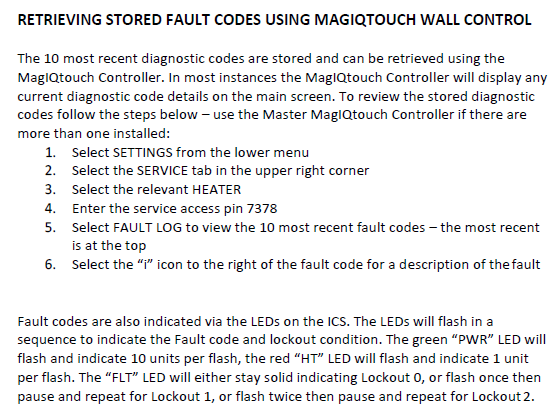
- Check fault history for repeat events
Click link to view - YouTube Video MagIQtouch heater accessing heater fault log: Seeley International Pty Ltd
If FLAME IS PRESENT
Flame quality
- Flame must contact flame sensor
- Flame must carry cleanly across all burners
- Check/clean crosslighting slots
Flame sense circuit
- Check flame sense lead:
- Connected at ICS
- Not damaged / shorted
- Check flame sense gap:
- 4–6 mm to burner face
Flame sensor condition
- Ensure sensor is clean and free of deposits
- Light cleaning with Scotchbrite is acceptable if required
- Do NOT use sandpaper, file, or aggressive abrasives (can damage sensor surface and affect flame signal)
Flame signal
- Check in MagIQtouch Service Mode
- Target: > 2 mV DC
Click link to view - YouTube video MagIQtouch service operating screen ducted gas heater: Seeley International Pty Ltd
Component condition
- If flame signal is low, unstable, or inconsistent:
- Inspect spark electrode + flame sensor assembly
- If condition is questionable or fault persists:
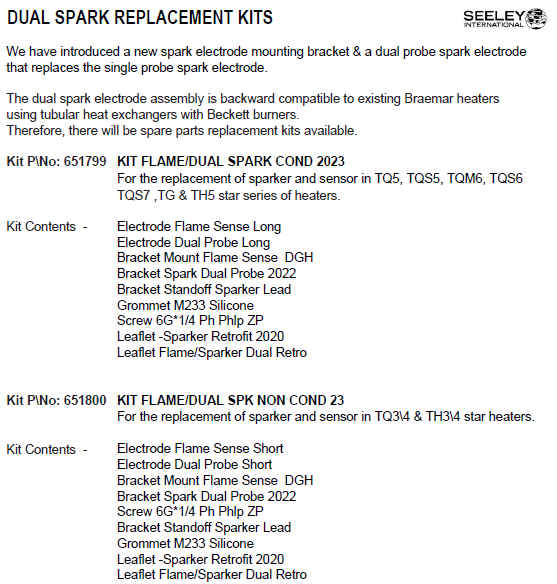
Replace with dual spark / flame sensor kit:
Non-condensing models: P/N 651800
Condensing models: P/N 651799
Dual probe setup improves:
- Ignition reliability
- Flame carry-over
- Signal stability
Click link to view - Dual spark electrode replacing single probe spark electrode - Flame Sensor & Dual Probe Sparker Replacement - suits TQ, TG and TH ducted gas heaters: Seeley International Pty Ltd
Gas supply
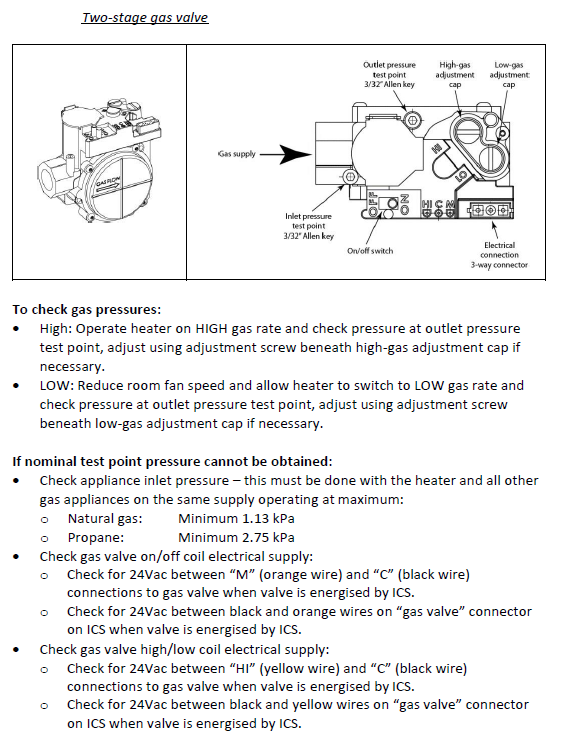
- Check inlet pressure (all appliances running):
- NG: ≥ 1.13 kPa
- LPG: ≥ 2.75 kPa
- Check outlet pressure matches data plate
If NO FLAME
Safety circuit
- Check OT3 manual reset switch (Overtemperature switch above burners with red reset button)
- Reset if tripped (will click when pressed)
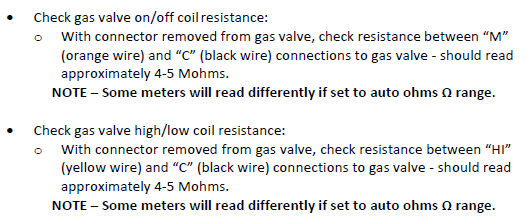
Gas valve
- Check:
- Resistance (~4–5 MΩ)
- 24VAC supply at valve (orange/black wires)
Click link to view 6.1 Gas Valve testing - Braemar TQ Gas Heater Component Testing & Fault Diagnosis TQ Service Guide 2023 (644066M): Seeley International Pty Ltd
Ignition system
- Check:
- Spark present
- Spark lead connected
- Spark gap 3–4 mm
Gas delivery
- Check:
- Gas valve opening during ignition
- Outlet pressure while sparking
- If no outlet pressure:
- Check inlet pressure during spark
If still not resolved
- Replace as required:
- Flame sensor / spark lead
- Gas valve
- ICS (latest version)
If fault persists after checks → replace ICS with latest version
Technician Notes
- FC48 is typically related to flame signal quality, not a single component
- Focus on:
- Flame contact
- Sensor condition
- Wiring / grounding integrity
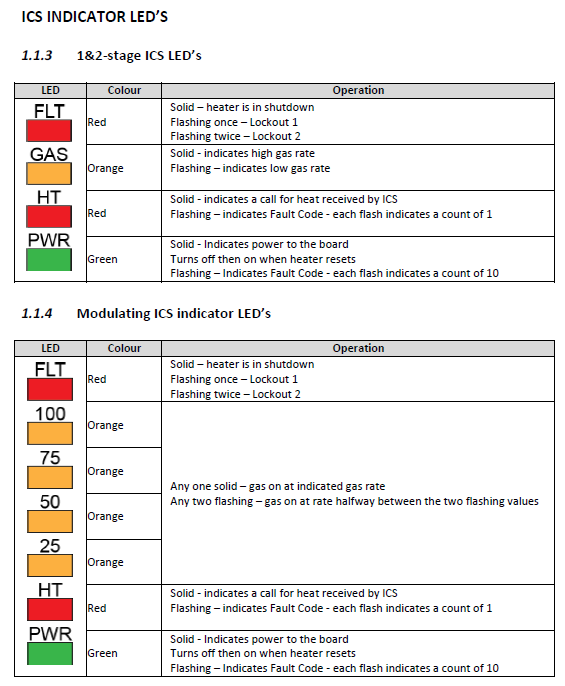
Click link to view comprehensive fault codes and diagnostics - TQ / TQM Fault Codes (FC Errors) + ICS LED Flash Guide – Diagnostics & Quick Checks: Seeley International Pty Ltd
TQ DGH - FC48 ICS micro flame mismatch
Fault code history can be accessed:
SETTINGS/SERVICE/GAS HEATER 01/7378 CONT/FAULT LOG
YouTube Video - MagIQtouch Heater Fault Log