
⚠️ Customer Safety Notice
This article contains general information intended for homeowners and occupants.
Installation, servicing, repairs, electrical work, gas work and refrigerant-related work must only be carried out by appropriately qualified and licensed personnel.
Before performing any checks or maintenance, ensure the equipment is switched off and safe to access. Do not remove covers, enter roof or ceiling spaces, work at heights or attempt repairs unless you are qualified to do so.
If in doubt, contact an authorised service agent or licensed tradesperson. Safety must always take priority.
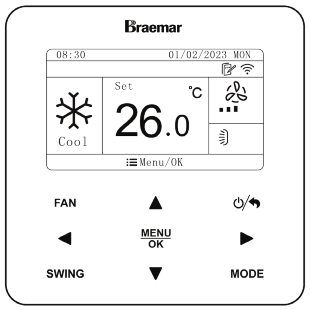
Overview
The Child Lock (Key Lock) function prevents users from changing the current operating settings or operating mode of the air conditioner.
When enabled, the keypad is locked to prevent accidental or unauthorised changes to the controller settings.
This feature is useful in:
- Homes with children
- Rental properties
- Offices and commercial buildings
- Public areas
- Situations where the current settings should remain unchanged
The Child Lock status is identified by a padlock icon displayed on the controller screen. The XE7C-24/HC controller also includes an unlock prompt when the keypad is locked.
How to Enable Child Lock (Key Lock)
- Press Menu/OK.
- Press the Right Arrow (►) to navigate to the Set menu.
- Press Menu/OK to enter the Set menu.
- Press the Page Down (▼) button until Lock is highlighted.
- Press the Left Arrow (◄) button to enable the lock.
- Press the Back button to return to the home screen.
Once enabled, the keypad will be locked, and users will be unable to change settings using the controller.
How to Identify When the Controller is Locked
When Child Lock is active:
- A padlock symbol is displayed in the upper right corner of the screen.
- An unlock symbol is displayed along the bottom of the screen.
- Pressing normal operating buttons will not change settings or operate the controller.
How to Unlock the Controller
When the controller is locked:
- Press Menu/OK.
- Press the Left Arrow (◄) and then
- Press the Right Arrow (►).
The keypad will unlock and normal controller operation will be restored.
What Happens When Child Lock is Enabled?
When Child Lock is active:
✅ Prevents accidental changes to settings
✅ Prevents users from changing the operating mode
✅ Current operating settings continue to operate normally
✅ Existing timer schedules continue to operate
❌ Temperature settings cannot be adjusted
❌ Fan speed settings cannot be changed
❌ Operating mode cannot be changed
❌ Timer settings cannot be modified until the keypad is unlocked
Re-Enabling Child Lock
After unlocking the controller, Child Lock must be enabled again through the Set → Lock menu.
Repeat the steps in How to Enable Child Lock (Key Lock) above to re-activate the keypad lock.
Troubleshooting
The controller buttons do not respond
If pressing buttons has no effect:
- Check if a padlock symbol is displayed on the screen.
- Follow the unlock procedure:
- Press Menu/OK
- Press Left Arrow (◄)
- Press Right Arrow (►)
If the controller does not unlock, cycle power to the air conditioning system and try again.
The air conditioner is still running while the keypad is locked
This is normal.
Child Lock only prevents changes being made through the controller. The air conditioner will continue operating using its existing settings.
Will Child Lock stop timer functions from operating?
No.
Any timer settings that have already been configured will continue to operate normally while Child Lock is enabled.
Video Demonstration
For a step-by-step demonstration, view the video below:
? XE7C-24/HC Child Lock (Key Lock) Operation
The video demonstrates:
- How to enable Child Lock
- How to identify that the controller is locked
- How to unlock the keypad
- How to re-enable the lock when required
Related Articles
- XE7C-24/HC Timer Setup Guide | Daily Timer, Weekly Timer, OFF Timer & Two-Week Timer
- Wired Controller XE7C-24/HC Owner's Manual - KDHA-01-A - R32 LNS ODU - Owner's Manual
- KDHA Static Pressure Adjustment using XE7C-24HC wired wall controller
- KDHA Wi-Fi Setup – EWPE App Connection (XE7C‑24/HC & LE60 Zone Control)